This TV size calculator turns one measurement, the distance from your eyes to the screen, into the range of TV sizes that will look right in your room. It uses the same viewing-angle guidelines that cinema designers work with, so the answer depends on how much of your view the picture fills, not on guesswork. Already own a TV? Switch to “My TV size” to find the best spot for your couch.
| TV size | Immersive (40°) | Comfortable (30°) | Closest for full 4K detail |
|---|---|---|---|
| 32″ | 3 ft 2 in (1.0 m) | 4 ft 4 in (1.3 m) | 2 ft 1 in (0.6 m) |
| 43″ | 4 ft 3 in (1.3 m) | 5 ft 10 in (1.8 m) | 2 ft 10 in (0.9 m) |
| 50″ | 5 ft 0 in (1.5 m) | 6 ft 9 in (2.1 m) | 3 ft 3 in (1.0 m) |
| 55″ | 5 ft 6 in (1.7 m) | 7 ft 5 in (2.3 m) | 3 ft 7 in (1.1 m) |
| 65″ | 6 ft 6 in (2.0 m) | 8 ft 10 in (2.7 m) | 4 ft 3 in (1.3 m) |
| 75″ | 7 ft 6 in (2.3 m) | 10 ft 2 in (3.1 m) | 4 ft 11 in (1.5 m) |
| 77″ | 7 ft 8 in (2.3 m) | 10 ft 5 in (3.2 m) | 5 ft 0 in (1.5 m) |
| 83″ | 8 ft 3 in (2.5 m) | 11 ft 3 in (3.4 m) | 5 ft 5 in (1.6 m) |
| 85″ | 8 ft 6 in (2.6 m) | 11 ft 6 in (3.5 m) | 5 ft 6 in (1.7 m) |
| 98″ | 9 ft 9 in (3.0 m) | 13 ft 3 in (4.0 m) | 6 ft 4 in (1.9 m) |
| 100″ | 10 ft 0 in (3.0 m) | 13 ft 7 in (4.1 m) | 6 ft 6 in (2.0 m) |
| 115″ | 11 ft 6 in (3.5 m) | 15 ft 7 in (4.8 m) | 7 ft 6 in (2.3 m) |
Below the TV size calculator you will find how the math works, a full size-by-distance chart, worked examples for real rooms, the sizing mistakes people make most often and answers to common questions. Everything here is for 16:9 screens, which covers nearly every TV sold today. For room layout tips, read how far should a couch be from the TV.
How to measure your seating distance
- Sit where you normally watch, leaning back the way you really do.
- Measure from the spot between your eyes straight to where the screen will be. For a wall-mounted TV, measure to the wall; for a TV on a stand, measure to the front of the stand.
- Round to the nearest half foot (or 10 cm). The calculator is not so precise that inches matter.
Tip: if several people watch, measure from the seat you use most. Everyone else will be close enough. While the tape is out, also measure the width of the wall or stand and the height from the floor to your eyes when seated. Those two numbers decide whether the size you pick will physically fit and where it should hang.
How the TV size calculator works
A TV looks “right” when it fills a comfortable slice of your field of view. Too small and you lose detail and impact; too large and you end up turning your head to follow the action. The TV size calculator uses three reference points:
- Immersive (40°): the screen fills about 40 degrees of your view. This is the THX recommendation for a cinema-like feel and the upper end of what most people enjoy for movies and games.
- Comfortable (30°): about 30 degrees, the figure widely quoted as the SMPTE guideline. Relaxed everyday viewing for news, sports and shows, where you don’t want to move your eyes around the screen.
- Full 4K detail: the distance where one 4K pixel is one arcminute wide, the resolving limit of 20/20 vision. Sit closer than this and you can see every bit of 4K detail; sit farther and 4K still looks clean, but the extra sharpness over 1080p starts to fade.
Behind the scenes, the calculator runs simple trigonometry. For a screen width W and a viewing angle A, the distance is (W ÷ 2) ÷ tan(A ÷ 2). A 16:9 screen is 0.872 times its diagonal wide, so a 40° view works out to about 1.2 × the screen size and a 30° view to about 1.6 × the screen size. A 65-inch TV is 56.7 inches wide, which puts the immersive seat at about 6.5 feet and the relaxed seat at about 8.8 feet.
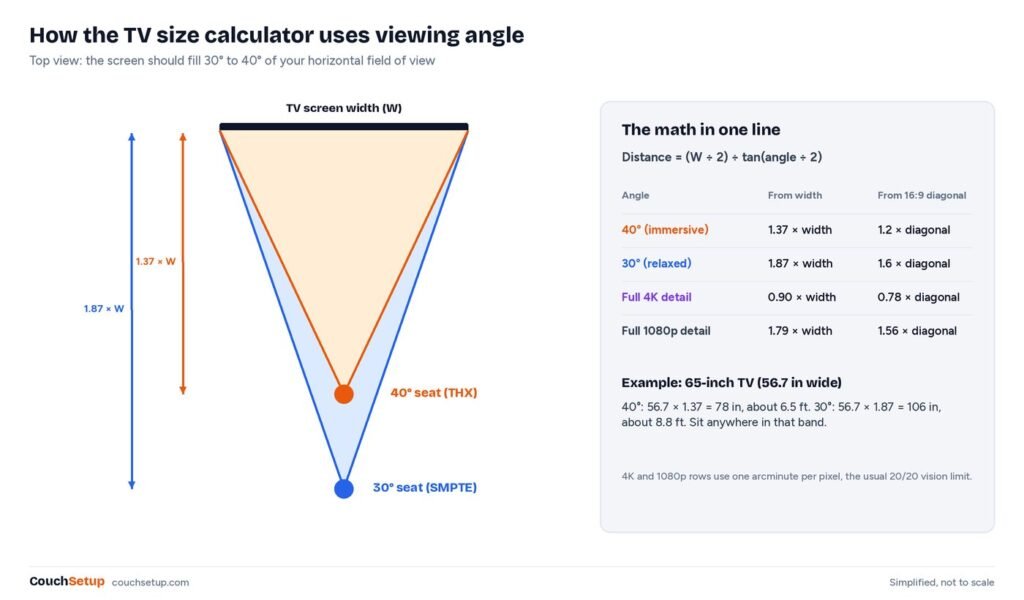
Where do the angles come from? Wikipedia’s summary of optimum HDTV viewing distance covers both the THX 40° figure and the 30° figure usually credited to SMPTE, and it notes that SMPTE has no single published rule for home TVs; 30° is a long-standing industry convention. Sound & Vision’s screen size and distance explainer works through the same geometry for projection screens.
Calculator chart: distance for every common size
If you just want the numbers, this chart shows the seating range for each popular TV size. The dark part of each bar is the immersive end and the light part runs out to the relaxed limit. Sitting anywhere inside the bar is a good result; sitting outside it is not wrong, but the picture will feel either overwhelming or a little small.
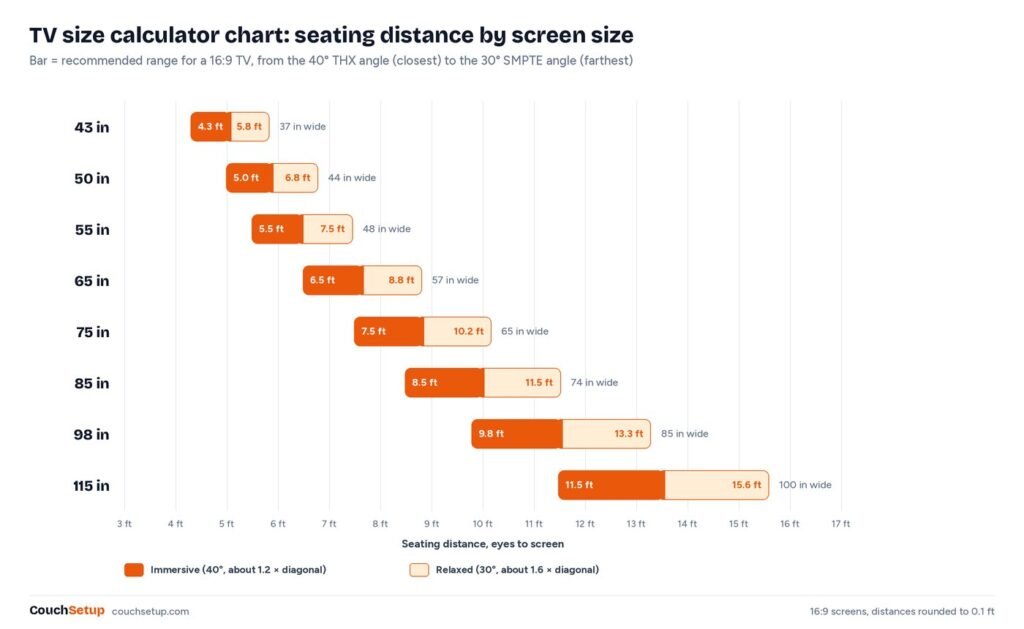
| TV size | Screen width | Immersive (40°) | Relaxed (30°) | Full 4K detail closer than |
|---|---|---|---|---|
| 43 in | 37.5 in | 4 ft 3 in | 5 ft 10 in | 2 ft 10 in |
| 50 in | 43.6 in | 5 ft 0 in | 6 ft 9 in | 3 ft 3 in |
| 55 in | 47.9 in | 5 ft 6 in | 7 ft 5 in | 3 ft 7 in |
| 65 in | 56.7 in | 6 ft 6 in | 8 ft 10 in | 4 ft 3 in |
| 75 in | 65.4 in | 7 ft 6 in | 10 ft 2 in | 4 ft 11 in |
| 85 in | 74.1 in | 8 ft 6 in | 11 ft 6 in | 5 ft 6 in |
| 98 in | 85.4 in | 9 ft 9 in | 13 ft 3 in | 6 ft 4 in |
| 115 in | 100.2 in | 11 ft 6 in | 15 ft 7 in | 7 ft 6 in |
Reverse it: what size TV for your distance?
Most people already know where the couch goes, so the more useful question is the reverse one. Divide your distance in inches by 1.2 for the immersive size and by 1.6 for the relaxed size, then pick a real TV size inside that window. That is exactly what the calculator does in its default mode, and the table below shows the results for common distances.
| Seating distance | Relaxed size (30°) | Immersive size (40°) | Common sizes that fit |
|---|---|---|---|
| 5 ft | 37 in | 50 in | 43 or 50 in |
| 6 ft | 44 in | 60 in | 50 or 55 in |
| 7 ft | 52 in | 70 in | 55 or 65 in |
| 8 ft | 59 in | 80 in | 65 or 75 in |
| 9 ft | 66 in | 90 in | 75 or 85 in |
| 10 ft | 74 in | 100 in | 75, 85 or 98 in |
| 11 ft | 81 in | 110 in | 85, 98 or 100 in |
| 12 ft | 89 in | 120 in | 98, 100 or 115 in |
| 13 ft or more | 96 in and up | 130 in and up | 98 to 115 in, or a projector |
Worked examples from real rooms
Apartment living room, 8 feet from the couch
At 8 feet the calculator gives a window of roughly 59 to 80 inches. A 65-inch TV lands in the middle and a 75-inch sits near the immersive end. If the wall between the windows is only 6 feet wide, the 75-inch (about 66 inches wide) still fits with a little room for speakers. Our 65 vs 75-inch TV guide goes deeper on that exact choice.
Bedroom TV across from the bed, 7 feet
For seven feet the calculator suggests about 52 to 70 inches. In a bedroom you often watch lying down at an angle, so the relaxed end usually feels better: a 55-inch is the sensible pick, and a 65-inch works if the wall allows. See the best TVs for small rooms for models that suit tight spaces and side viewing.
Large family room, 11 feet
At 11 feet the window runs from about 81 to 110 inches. An 85-inch TV hits the comfortable middle, while a 98- or 100-inch set gets you close to a cinema feel. A 75-inch would still look fine, but it falls just below the relaxed limit, so it will feel smaller than you expect once it is on the wall.
Basement theater, 13 feet
Thirteen feet calls for 96 inches or more, which is the point where a projector starts to make sense. A 100- to 120-inch screen fills the 40° angle from the back row, and a short-throw or standard projector usually costs less than a 98-inch TV. Read projector vs TV before you decide, then use the projector throw calculator to place it.
Does 4K matter at my distance?
The calculator also tells you the TV size above which 4K is clearly sharper than 1080p at your distance. From a typical 9-foot couch, that point is around 69 inches. Below that size, 4K still helps (better HDR, better processing and more streaming content), but resolution alone is not the reason to upgrade.
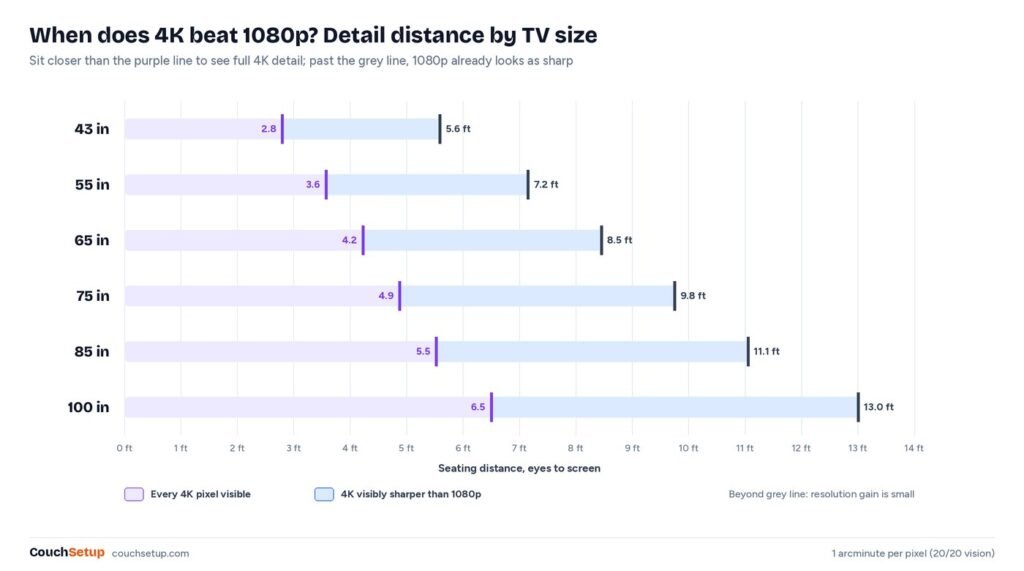
The detail numbers come from the one-arcminute limit of 20/20 vision. A 4K pixel on a 65-inch TV is about 0.015 inches wide, small enough that you need to sit within about 4 feet to resolve every one. That is why 8K TVs make little visible difference at living-room distances. RTINGS’ size-to-distance article reaches the same conclusion from its own testing of viewing angle and resolution.
Which size should you actually buy?
- Between two sizes? Go bigger. Almost nobody regrets a bigger TV after the first week, and the calculator’s “comfortable” size is on the conservative side.
- Mostly movies and gaming? Aim for the immersive end of the range.
- Mostly news, sports and background TV? The comfortable end is fine.
- Check the wall too. A 75-inch TV is about 66 inches (168 cm) wide. Measure the wall or stand before you order.
- Stuck between 65 and 75? Read our 65 vs 75-inch TV guide.
Reading your calculator results
You get a range, not a single answer, because comfort is partly personal. Here is how to turn that range into a decision:
- Your size is inside the range: buy it. Anything between the relaxed and immersive sizes will look right from your seat.
- Your size is just below the relaxed size: it will work, but expect it to feel a little small after a few weeks. If the budget allows, go up one size.
- Your size is above the immersive size: fine for movies and games in a dedicated room, but tiring for long news or sports sessions. Consider moving the couch back a foot.
- No TV fits the range: above about 100 inches, a projector and screen is usually the more practical way to fill your view. Our projector vs TV guide covers that choice.
Run the calculator for every seat that gets regular use, not just your favorite one. If the closest seat is inside the immersive distance, people sitting there will turn their heads to follow the action; if the farthest seat is well beyond the relaxed distance, the picture will feel small from there. A 75-inch TV, for example, suits seats from about 7 ft 6 in to 10 ft 2 in.
Beyond distance: what else limits screen size
- Wall and stand width. The stand should be wider than the TV’s feet, and a wall-mounted set needs a few inches of clearance on each side for cables and a hand to reach the ports.
- Mounting height. A bigger screen raises the top edge, so it is easier to end up looking up. Keep the center near seated eye level; our guide on how high to mount a TV has the numbers.
- Side seats. Viewers far off to the side see a narrower screen. If your sofa wraps around, favor a panel with wide viewing angles over a slightly bigger one.
- Windows and glare. A large glossy screen across from a window acts like a mirror. Plan the size and the curtains together.
- Getting it inside. An 85-inch box is over 6 feet long. Check stairwells, elevators and tight hallway turns before delivery day.
Common TV sizing mistakes
- Measuring from the couch arm, not your eyes. Leaning back on a deep sofa can add a foot or more to the real distance.
- Shopping in a big store. TVs look small under a high ceiling. Trust the numbers from the calculator instead of how the set looked on the shelf.
- Using the old 2× or 3× rules. Those rules were made for blurry standard-definition sets and push you toward screens that are too small for 4K.
- Ignoring the room’s other job. In a shared living room a huge black rectangle dominates the space. The relaxed end of the range is a fair compromise.
- Forgetting sound. Bigger pictures make thin TV speakers more obvious. Budget for a soundbar along with the screen.
Using the calculator for gaming and sports
Fast games and live sports are where the two ends of the range matter most. Competitive players often prefer the relaxed end, because a screen that fills 30° lets you see the minimap and the edges without moving your eyes. Story games and racing titles feel better at 40°, where the picture wraps your vision. For sports, the relaxed distance keeps the whole field in view and reduces the eye strain of tracking a ball across a huge panel.
If several people watch from different seats, run the calculator for the farthest seat you use regularly and check that the closest seat still sits outside the 40° line. Pair that with good seating; our home theater seating guide covers row spacing and riser heights.
Next steps
- Best TVs for small rooms (43 to 55 inches)
- Small living room home theater setups
- The complete home theater setup guide
- How high to mount your TV
- Thinking about a projector instead? Use the projector calculator
FAQ
How far should I sit from a 65-inch TV?
Between about 6 ft 6 in (2 m) for an immersive, cinema-like picture and 8 ft 10 in (2.7 m) for relaxed everyday viewing. To see every pixel of 4K detail you would need to sit about 4 ft 3 in (1.3 m) away.
What size TV should I get for a 10-foot viewing distance?
Roughly 75 to 100 inches. A 75- to 85-inch TV is the sweet spot for most living rooms at 10 feet; 98- and 100-inch TVs are the immersive option.
What size TV for an 8-foot distance?
About 59 to 80 inches. A 65-inch TV is the safe middle choice and a 75-inch gives a more cinematic feel without being overwhelming.
Is a TV too big if I can see the pixels?
With a 4K TV you would have to sit unusually close to see pixels. A TV is more likely to feel too big if you have to turn your head to follow the action, which happens beyond about a 40-degree viewing angle.
Is the calculator accurate for curved or ultrawide screens?
The calculator and chart are for 16:9 screens, which covers almost every TV sold today. For projector screens in other shapes, use the projector throw calculator, which supports 16:9, 2.35:1 and 4:3.
Can I use the calculator for a projector screen?
Yes. The viewing-angle math is the same for any 16:9 screen. Use the result as your screen size, then find the lens position with the projector throw calculator.
Should I measure to the wall or to the TV?
Measure to where the screen surface will be. For a wall mount that is the wall plus an inch or two; for a TV on a stand, measure to the front edge of the stand.
How high should I mount the TV?
Put the center of the screen close to your eye level when seated, usually about 40 to 42 inches (100 to 107 cm) from the floor. Mounting high above a fireplace forces you to look up and is a common cause of neck strain.
Sources: Wikipedia: Optimum HDTV viewing distance (THX and SMPTE angles, visual acuity) · Sound & Vision: What size screen, how far away? · RTINGS: TV size to distance calculator and the science behind it