
Projector vs TV is really a question about your room. A projector gives you a cinema-sized picture no TV at the same price can match. A TV gives you a brighter, punchier picture that works in any light and needs no setup. Which is better comes down to how dark your room gets and when you watch.
Our verdict
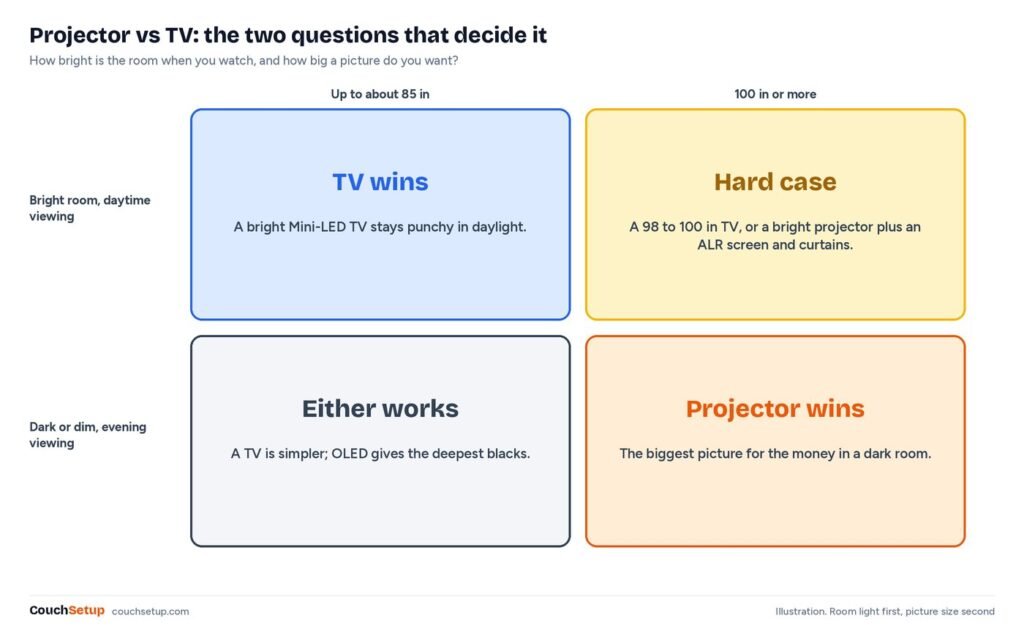
Short answer: get a TV if you watch a lot in daylight, can’t darken the room, want zero setup or mostly watch news, sports and shows. Get a projector if you mostly watch movies and games in the evening, can control light, and want 100 inches or more for the money. Plenty of people end up with both.
Side by side
| Feature | TV | Projector |
|---|---|---|
| Picture size for the money | Good up to 75 to 85 in | 100 to 120 in for less |
| Daylight | Excellent, especially Mini-LED | Washes out unless the room is dark |
| Contrast and blacks | Excellent (OLED best) | Good in a dark room, weak with lights on |
| Setup | Plug in | Placement, screen or wall, separate sound |
| Gaming lag | Very low on most TVs | Low on gaming models, higher on many others |
| Upkeep | None | Lamps dim and need replacing; laser and LED last far longer |
| Noise | Silent | Fan noise, audible in quiet scenes |
Brightness in real numbers
Reviews tell you projectors look washed out in daylight. They rarely show you by how much, because TVs are rated in nits and projectors in lumens. So we worked it through with two published formulas.
Projector brightness on the screen is measured in foot-lamberts (ftL): lumens divided by the screen area in square feet, times the screen’s gain. SMPTE recommends 16 ftL in a dark cinema. ProjectorScreen.com suggests 16 to 30 ftL for a dedicated home theater, about 40 with moderate room light and 60 with a lot of it. Here’s what that means in lumens actually reaching the screen:
| Target (1.0-gain screen) | 100-inch (29.7 sq ft) | 120-inch (42.7 sq ft) |
|---|---|---|
| Dark room, 16 ftL | about 475 lumens | about 685 lumens |
| Bright dark-room picture, 30 ftL | about 890 lumens | about 1,280 lumens |
| Moderate room light, 40 ftL | about 1,190 lumens | about 1,710 lumens |
| Lots of room light, 60 ftL | about 1,780 lumens | about 2,560 lumens |
Those are real lumens, not the box number. ProjectorCentral measured the BenQ TK700STi, rated at 3,000 lumens, at 2,584 in its brightest mode and 1,625 in its more accurate Cinema mode. On a 100-inch screen that’s about 55 ftL, plenty for a dark room.
Now compare it with a TV. Kaleidescape gives the conversion: nits = lumens ÷ (screen area in square meters × pi). Those 1,625 lumens on 100 inches come to roughly 190 nits. TCL rates its QM7L Mini-LED at up to 3,000 peak nits. That gap, more than ten times, is why a TV still looks punchy at noon and a projector doesn’t.
Cost per inch, and the costs nobody lists
Size is where the math tips toward projectors. A 100-inch picture from a good projector plus a screen usually costs less than a 98-inch TV like the TCL QM7L, which sits in a much higher price bracket than a 1080p short-throw such as the BenQ TH671ST. Under about 85 inches, TVs are cheaper and better. Past 100 inches, projectors are nearly the only option.
But the projector is only the start. A working setup usually needs a screen or a prepared wall, a soundbar (projector speakers are small), a streaming stick if it has no apps, blackout curtains, a mount and a long HDMI run. Then there’s the light source:
| Light source (BenQ example) | Rated life | At 4 hours a day |
|---|---|---|
| Lamp, normal mode (TK700STi) | 4,000 hours | about 2.7 years |
| Lamp, eco mode (TK700STi) | 10,000 hours | about 6.8 years |
| Lamp, LampSave mode (TK700STi) | 15,000 hours | about 10 years |
| Laser (TK710STi) | 20,000 hours | about 13.7 years |
A TV needs none of that beyond an optional soundbar. If you’re pricing a whole room, our home theater under $1,000 guide shows how the pieces add up.
Picture quality beyond brightness
HDR. Kaleidescape notes projectors generally can’t get anywhere near the peak brightness of modern HDR TVs. They accept HDR and tone-map it, but highlights won’t pop.
Contrast. ProjectorCentral called the TK700STi’s black levels mediocre and typical of DLP, and found a good ambient-light-rejecting screen made a big difference. On a projector, the screen and the room are part of the picture.
4K. Some budget 4K projectors use pixel-shifting from a lower native resolution. A 4K TV has every pixel physically there.
Rainbows. Single-chip DLP projectors use a spinning color wheel, and some viewers see brief red, green and blue flashes on bright moving objects. Many never notice. LED and laser designs reduce it, and TVs don’t have it at all.
Gaming and fan noise
ProjectorCentral measured the TK700STi at about 16.8 ms of input lag at 4K 60Hz in game mode, but 33.5 ms with game mode off. That’s fine for a gaming projector, but lots of lifestyle and budget models are much slower, so check the spec and always turn game mode on. Most current TVs have low lag, 120Hz and VRR; our best TVs for PS5 and Xbox compares them.
Projectors also make noise. ProjectorCentral measured the TK700STi at 39.2 dBA from 3 feet in normal mode and 36.5 in eco, higher than BenQ’s own 34 and 28 dB. You won’t hear it in an action scene, but you may in quiet dialogue if it sits beside the couch. Eco mode or a ceiling mount helps.
Space and seating distance
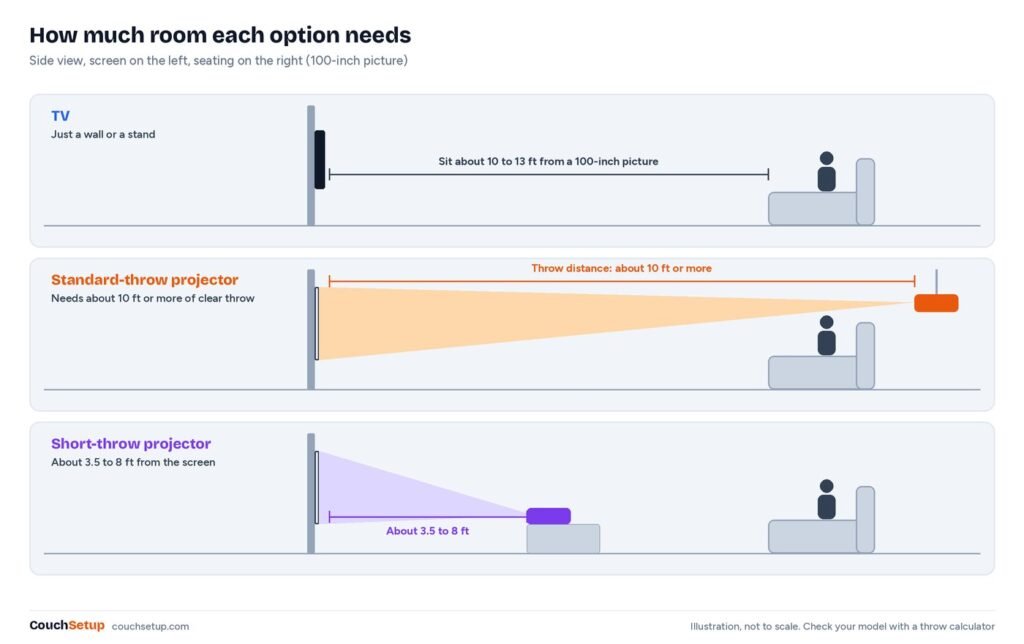
A 100-inch screen feels right from about 10 to 13 feet (check yours with our TV size calculator). A standard projector also needs 10 feet or more of throw, while short-throw models need about 3.5 to 8. Our projector throw calculator gives the exact figure for your model.
Room by room
| Room | Usually better | Why |
|---|---|---|
| Bright living room, daytime TV | TV (bright Mini-LED) | It makes its own light |
| Basement or media room | Projector | Little daylight, so even a mid-brightness model looks great at 100 to 120 in |
| Bedroom | Either | Easy to darken, but a projector’s fan is close to your head |
| Small apartment with a bare wall | Short-throw projector or TV | Space for throw is tight, and you sit close |
| Competitive gaming | TV | Lower lag on nearly every model |
| Backyard movie nights | Projector | Packs away and fills a big screen after sunset |
Going the projector route? See the best short-throw projectors and projector screens. Sticking with a TV? Start with the best TVs for small rooms. For the backyard, try the best outdoor projectors.
Why lots of homes end up with both
A mid-size TV handles news, daytime sports and quick episodes. The projector comes out for movie nights and big games, and because it’s not the only screen it never has to win in daylight. Plan one sound system for both: a soundbar on the TV’s eARC port with the projector’s source routed through the TV or a receiver. Our home theater setup guide covers the wiring.
Test a projector in your room first
- Measure the wall. A 100-inch 16:9 picture is about 87 inches wide; 120 inches is about 105.
- Measure where the projector can sit and run it through the throw calculator.
- Look at the room at your normal viewing times, not just at night.
- Assume real output in an accurate mode will be well below the rated lumens.
- Buy somewhere with an easy return window and test a dark movie scene and a daytime game before it closes.
How we picked
We gathered the measurements and expert reviews for every pick, put them side by side, and worked out the room-fit numbers the individual reviews leave out. The foot-lambert, nits and lamp-life figures are our own calculations from the published numbers. Every source is listed at the end.
FAQ
Is a projector cheaper than a TV?
Per inch, yes, once you go past about 85 inches. Below that a TV is usually cheaper and better. Add the screen, sound and light control before comparing.
Can you use a projector in a bright room?
Only with compromises: a bright projector, an ambient-light-rejecting screen and curtains. Even then a bright TV looks punchier in daylight.
Can a projector replace a TV?
Yes, if you mostly watch in a dark or dim room. In a bright room it’s better as a second screen for movie nights.
How many lumens does a projector need to replace a TV?
In a dim room, about 1,200 real lumens gives a 100-inch screen around 40 ftL. Since rated lumens run higher than measured, start with a projector rated around 2,000 to 3,000.
Do projectors need a screen?
Not strictly. A smooth matte white or light-gray wall works. A screen improves brightness and contrast, and ALR screens help a lot in rooms that aren’t fully dark.
Is a projector easier on the eyes?
Reflected light can feel softer in a dark room, but comfort mostly depends on size, distance and room light. With either, keep some soft light near the screen and take breaks.
Related guides
- Best short-throw projectors
- Best TVs for small rooms
- Projector throw calculator
- Home theater setup guide
Sources: BenQ TK700STi review (ProjectorCentral) · BenQ TK700STi specifications · BenQ TK710STi specifications · TV or Projector? (Kaleidescape) · What Are Foot-Lamberts? (ProjectorScreen.com) · Tom’s Guide TCL QM7L review · TCL QM7L specifications · Digital light processing (Wikipedia)