
CouchSetup is reader-supported. When you buy through links on our site, we may earn an affiliate commission at no extra cost to you. Learn more
A PS5 or Xbox Series X can do far more than most TVs let it: 4K at 120 frames per second, variable refresh rate to stop tearing, and an automatic game mode that cuts lag the moment you pick up the controller. Every TV here does all of that. What separates them is the room they suit, and how many consoles you can plug in at full speed once the soundbar takes its port.
Our verdict
Quick picks: the LG C6 OLED is the best TV for PS5 and Xbox for most players: four HDMI 2.1 ports, tiny lag and perfect blacks. In a bright room, the TCL QM7L. For big screens and sports, the Hisense U7SG. On a budget, the Hisense U6SF Pro, and for OLED for less, the LG B6.
Top picks at a glance
Best overall
LG C6 OLED (65 inch)
Serious gamers with a PS5, Xbox and PC
$$$ PremiumBest for bright rooms
TCL QM7L (65 or 75 inch)
Daytime gaming in a sunny living room
$$ Mid-rangeBest big screen
Hisense U7SG (65 or 75 inch)
Large living rooms, sports and gaming
$$ Mid-rangeThe picks side by side
| TV | Panel | HDMI 2.1 | Max refresh | Measured lag | Best for | Price |
|---|---|---|---|---|---|---|
| LG C6 | OLED | 4 | 165Hz | about 4 ms at 120Hz (TechRadar) | Dim and mixed rooms | $$$Check price |
| TCL QM7L | Mini LED | 4 (two at 144Hz) | 144Hz | 9.4 ms (Tom’s Guide) | Bright rooms | $$Check price |
| Hisense U7SG | Mini LED | 4 | 165Hz | 9.8 ms (Tom’s Guide) | Big screens, sports | $$Check price |
| Hisense U6SF Pro | Mini LED | 2 | 144Hz | 9.3 ms (Tom’s Guide) | Budget | $Check price |
| LG B6 | OLED | 4 | 120Hz | 8.9 ms (Tom’s Guide) | OLED on a budget | $$Check price |
What the reviews don’t tell you
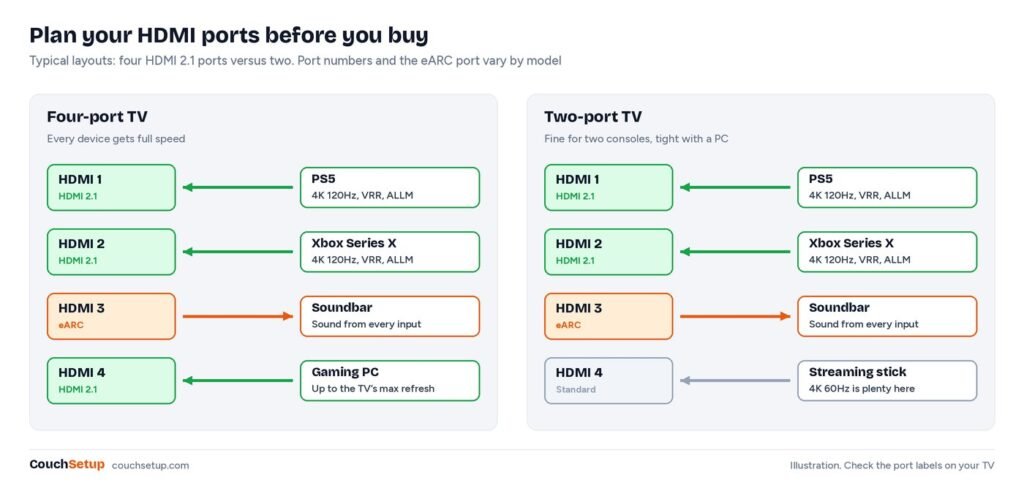
Reviews say “four HDMI 2.1 ports” or “two.” What matters is how many full-speed ports are left once your soundbar is on the eARC port. We checked which port has eARC on each TV’s spec sheet or in its review.
Full-speed ports left after the soundbar
| TV | Full-speed ports | eARC port | Left for consoles and PC | Price |
|---|---|---|---|---|
| LG C6 | 4 × HDMI 2.1 | One of the four | 3 | $$$Check price |
| Hisense U7SG | 4 × HDMI 2.1 | HDMI 3 | 3 | $$Check price |
| TCL QM7L | HDMI 1 and 2 at 144Hz | HDMI 4 (a 60Hz port) | 2 | $$Check price |
| Hisense U6SF Pro | 2 × HDMI 2.1 | HDMI 1 | 1 or 2, check the labels | $Check price |
The surprise is the TCL. Its eARC sits on one of the slower ports, so a soundbar doesn’t steal either 144Hz input; a PS5 and an Xbox both still run at full speed. On the U6SF Pro, Hisense’s sheet puts eARC on HDMI 1 but doesn’t say which two ports are HDMI 2.1. If HDMI 1 is one of them, you’re left with one full-speed port for consoles. Check the labels on the back before you plan two consoles and a soundbar on it.
144Hz and 165Hz don’t help a console
PS5 and Xbox Series X output up to 120Hz. A 144Hz or 165Hz panel only matters for a gaming PC. For console players, brightness, lag and port count matter more than the top refresh number.
The cheap OLED is hard to find in small sizes
Tom’s Guide found the LG B6 mostly in stock at 65, 77 and 83 inches, with the 48 hard to find. If you want a small gaming OLED for a desk or bedroom, the C6 at 42 or 48 inches is the realistic option.
The picks
1. LG C6 OLED: best overall
LG C6 OLED (65 inch)
Best for Serious gamers with a PS5, Xbox and PC
- Four HDMI 2.1 ports up to 165Hz
- About 4 ms input lag at 120Hz
- OLED: perfect blacks and instant response
- VRR, ALLM and HGiG HDR gaming
Prices change often, so check today’s price on Amazon.
All four ports are full HDMI 2.1, so a PS5, an Xbox and a PC all run at full speed. TechRadar measured about 4 ms of lag at 120Hz and lists HDMI VRR, FreeSync, G-Sync, ALLM and Dolby Vision gaming. OLED pixels switch almost instantly, so fast motion stays clear and dark game worlds have true black with no glow around the HUD. HGiG support means the console’s HDR calibration works as intended. Full details in our LG C6 review.
The catch: a reflective screen in sunny rooms, no HDR10+, and static HUDs for hours a day carry a burn-in risk, so vary your games.
2. TCL QM7L: best for bright rooms
TCL QM7L (65 or 75 inch)
Best for Daytime gaming in a sunny living room
- Very bright Mini-LED: about 2,270 nits measured
- Two 144Hz HDMI 2.1 ports
- VRR and ALLM
- Google TV built in
Prices change often, so check today’s price on Amazon.
If the TV faces windows, brightness beats perfect blacks. Tom’s Guide measured about 2,270 nits in HDR and 9.4 ms of lag, with FreeSync Premium Pro and HGiG on board. As above, its eARC port doesn’t cost you a 144Hz input. More in our TCL QM7L review.
The catch: some blooming around bright objects on black, and colors fade from far off to the side, which matters for split-screen on a wide sofa.
3. Hisense U7SG: best for big screens and sports
Hisense U7SG (65 or 75 inch)
Best for Large living rooms, sports and gaming
- Native 165Hz panel
- Four HDMI 2.1 ports
- Bright Mini-LED with anti-glare layer
- Dolby Vision IQ, HDR10+ and IMAX Enhanced
Prices change often, so check today’s price on Amazon.
Tom’s Guide measured about 2,867 nits and 9.8 ms of lag, and called it fully equipped for gamers, with four HDMI 2.1 ports and powerful 2.1.2 speakers. Android Headlines praised its anti-glare layer for bright rooms. It supports HDR10+, which the LG doesn’t.
The catch: Tom’s Guide found weak black levels, and the VA panel’s viewing angles are limited for wide sofas.
4. Hisense U6SF Pro: best budget
Hisense U6SF Pro Mini-LED (65 inch)
Best for Gamers on a tight budget
- Native 144Hz panel
- Two HDMI 2.1 ports
- 9.3 ms input lag in Tom’s Guide’s test
- Dolby Vision IQ and HDR10+
Prices change often, so check today’s price on Amazon.
The cheapest TV we’d happily connect a console to. Tom’s Guide measured 9.3 ms of lag and 1,265 nits HDR, and Hisense lists VRR, ALLM and FreeSync Premium. Buy the Pro, not the plain U6SF, which Tom’s Guide says lacks the 144Hz panel. See our Hisense U6 review.
The catch: only two HDMI 2.1 ports (see the port table), blooming in dark scenes, and an ad-heavy Fire TV home screen.
5. LG B6 OLED: OLED for less
LG B6 OLED (65 inch)
Best for Dim-room gaming on a budget
- OLED blacks and fast response
- 4K 120Hz with VRR
- Four HDMI 2.1 ports
- 8.9 ms lag with Game Optimizer
Prices change often, so check today’s price on Amazon.
A Tom’s Guide Editor’s Choice: 8.9 ms of lag with Game Optimizer, and Spider-Man 2 held a steady 120 fps with VRR and no visible tearing. You get OLED’s instant response and perfect blacks for less than the C6.
The catch: much dimmer HDR. Tom’s Guide measured 695 nits in its review and 780 in its C6 vs B6 test, against 1,355 for the C6 in the same test. Keep it for evening play.
Which one for your setup
| Your situation | Pick |
|---|---|
| Dim room, two consoles plus a PC | LG C6 |
| Bright living room, one or two consoles | TCL QM7L |
| Big screen for sports and gaming | Hisense U7SG |
| Tight budget, one console | Hisense U6SF Pro |
| Evening play, OLED on a budget | LG B6 |

Size: gamers usually like it a bit bigger. From 6 to 7 feet, 55 to 65 inches; from 8 to 9 feet, 65 to 75. Our size calculator and 65 vs 75-inch guide give exact numbers. Bright or dark room? OLED vs Mini LED goes deeper.
The gaming features, in plain English
| Feature | What it does | Need it? |
|---|---|---|
| HDMI 2.1 | Enough bandwidth for 4K at 120Hz | Yes, for 120Hz |
| VRR | TV follows the console’s frame rate, removing tearing | Yes, very noticeable |
| ALLM | Console switches the TV to Game mode automatically | Very handy |
| Input lag | Delay from button press to screen | Aim for about 10 ms or less |
| HGiG | TV follows the console’s HDR calibration | Nice for accurate HDR |
Use the console’s own cable or a certified Ultra High Speed HDMI cable; older cables are a common reason 120Hz is grayed out. Outside Game mode, the same TV can be several times slower because of picture processing.
Settings that matter
- PS5: Settings, Screen and Video, Video Output. Set VRR and 120Hz Output to Automatic, then run Adjust HDR.
- Xbox Series X|S: Settings, General, TV & display options. Set 120Hz, allow VRR and auto low-latency mode, then run the HDR Game Calibration app.
- On the TV: use a full-speed port and turn on its enhanced or full-bandwidth HDMI setting. Some TVs ship with it off, which hides 120Hz.
- Sound: plug consoles into the TV, not the soundbar (many bars can’t pass 4K 120Hz or VRR), and send audio out over eARC. See HDMI ARC vs eARC.
For the rest of the menus, see our picture settings guide, and for seating and cables, our couch gaming setup. A projector? Most under a few thousand dollars can’t do 4K 120Hz or VRR; see projector vs TV.
How we picked
We gathered the measurements and expert reviews for every pick, put them side by side, and worked out the room-fit numbers the individual reviews leave out. For gaming that meant measured lag and brightness, plus which HDMI port carries eARC on each TV, checked against the makers’ spec sheets. Every source is listed at the end.
FAQ
Do I need an HDMI 2.1 TV for PS5?
Only for 4K at 120Hz and VRR. A PS5 works on any HDMI TV at 4K 60Hz.
Is OLED or Mini LED better for gaming?
OLED in dim rooms for its instant response and blacks. Mini LED in bright rooms. Both can have very low lag.
Is a 144Hz or 165Hz TV better for PS5?
Not for the console, which outputs up to 120Hz. It only helps a gaming PC.
Can OLED TVs burn in from games?
It’s possible with the same static HUD for very long periods. Varying what you play keeps the risk low.
Why can’t I select 120Hz on my PS5?
Usually the console is on a slower port, the TV’s enhanced HDMI setting is off, the cable isn’t rated for it, or the game has no 120Hz mode.
Related guides
Sources: TechRadar LG C6 review · TFTCentral: LG C6 full specs · Tom’s Guide TCL QM7L review · TCL QM7L specifications · Tom’s Guide Hisense U7SG review · Android Headlines Hisense U7SG review · Tom’s Guide Hisense U6SF Pro review · Hisense U6SF Pro spec sheet (PDF) · Tom’s Guide LG B6 review · Tom’s Guide: LG C6 vs B6