This projector throw calculator tells you exactly where to mount a projector for the screen size you want, or how big the picture will be from the spot you already have. Every projector has a fixed relationship between how far the lens sits from the screen and how wide the image is, so one number from the spec sheet, the throw ratio, is all you need. Enter it with your screen size and get the lens distance in feet and meters.
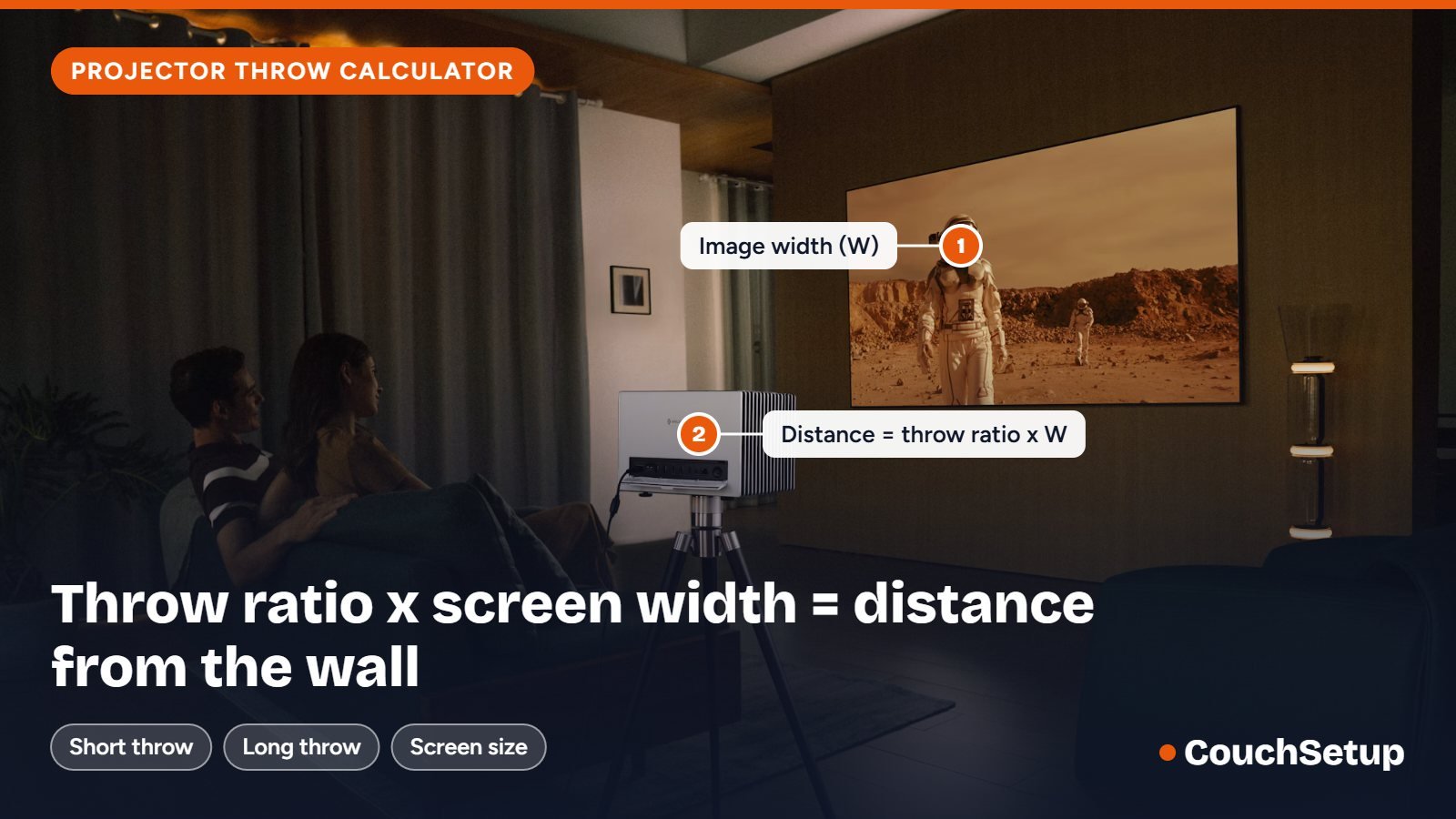
Formula: throw distance = throw ratio × image width. Find the throw ratio in the projector’s spec sheet. Ultra-short-throw makers often measure from the back of the unit, so check their chart too.
Below the projector throw calculator you will find the formula, distance charts for 80- to 150-inch screens, worked examples for real rooms, how zoom and lens shift change the answer, mounting-height advice, the mistakes that cost people a second hole in the ceiling, and answers to common questions.
How the projector throw calculator works
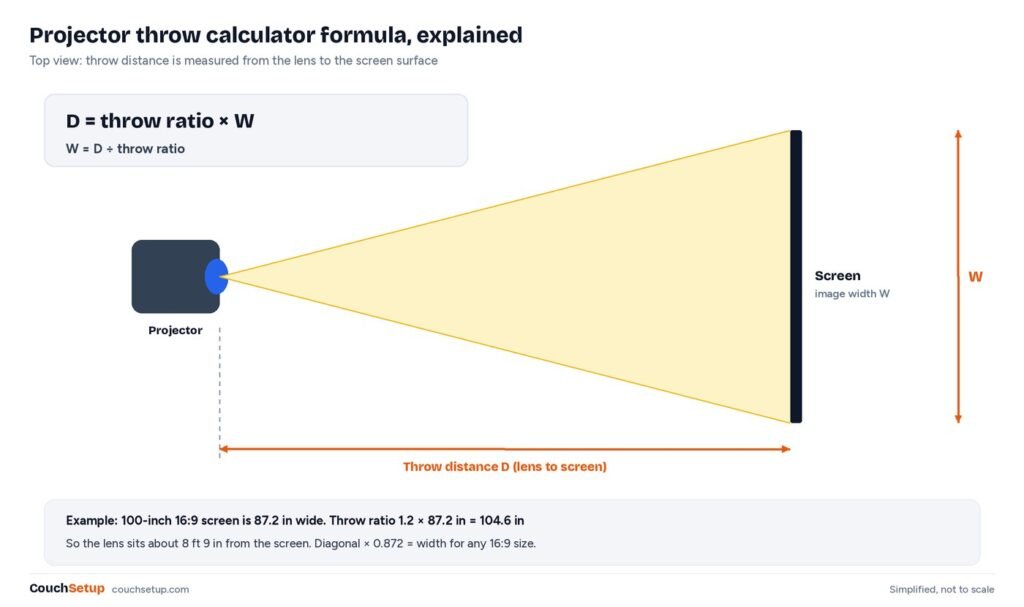
Throw ratio is the lens-to-screen distance divided by the picture width. A projector with a 1.2 throw ratio needs to sit 1.2 feet back for every foot of picture width. That gives one simple formula, which the tool runs in both directions:
Throw distance = throw ratio × picture width, and picture width = throw distance ÷ throw ratio.
Screens are sold by their diagonal, so the first job is converting the diagonal to a width. A 16:9 screen is 0.872 times its diagonal wide, a 2.35:1 cinemascope screen is 0.920 times, and a 4:3 screen is 0.8 times. A 100-inch 16:9 screen is therefore 87.2 inches wide, and a projector with a 1.2 throw ratio needs its lens 104.6 inches, or about 8 ft 9 in, from the screen surface.
Where does the throw ratio come from? It is printed on every projector’s spec sheet, usually written like “1.13–1.47:1”. BenQ’s guide to throw ratio lists real distances for its own models, such as roughly 8 feet for a 100-inch picture from a standard-throw unit and about 5 feet from a short-throw one. The same math works for any brand, which is why the tool only asks for the ratio.
Fixed lens or zoom lens?
One number means a fixed lens: there is exactly one distance for each screen size. Two numbers mean a zoom lens. Enter the first (smaller) number as the throw ratio and the second as the max throw ratio, and the calculator returns a range instead of a single spot. Anywhere inside that range gives the same picture size; you just turn the zoom ring to match.
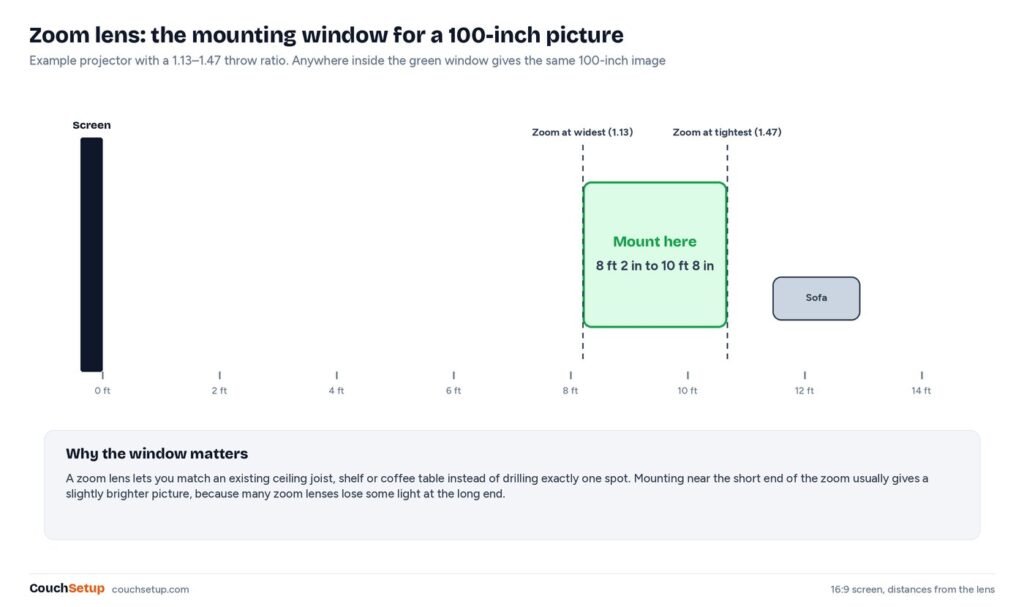
That window is the most useful thing a zoom lens gives you, and the main reason to enter both numbers into the calculator. It lets you match an existing ceiling joist, a bookshelf or the back wall instead of drilling one exact spot. Many zoom lenses lose a little light at the long end, so if you have the choice, mount closer to the short end of the range.
Calculator chart by screen size
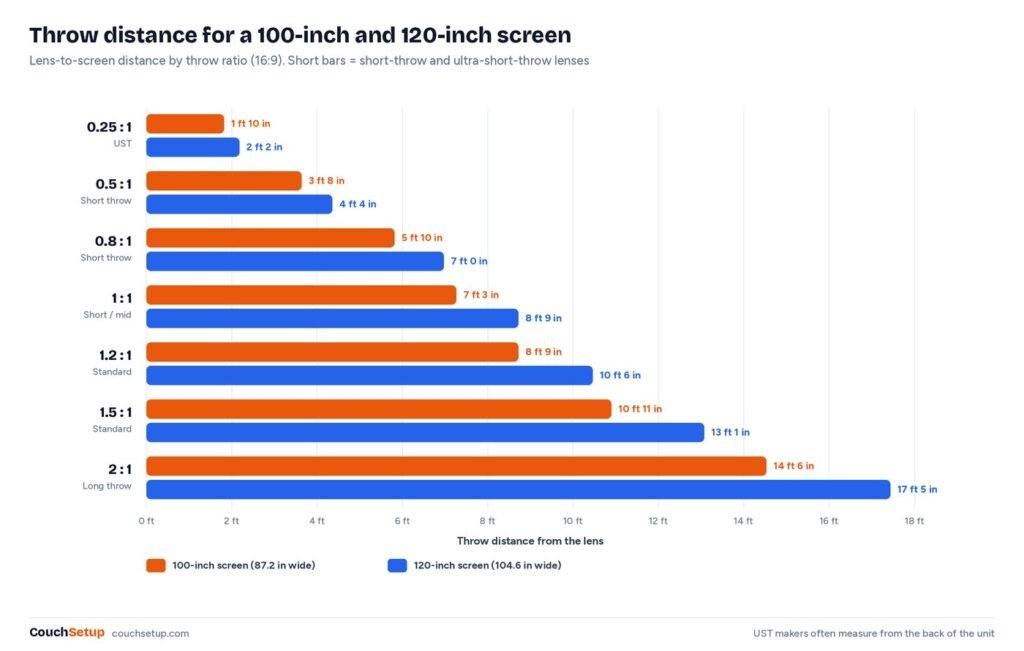
If you already know your projector’s throw ratio, read the distance straight off this chart. Each cell is the lens-to-screen distance for a 16:9 picture, with short-throw ratios on the left and standard and long-throw ratios on the right.
| Screen (16:9) | 0.5 : 1 | 0.8 : 1 | 1.0 : 1 | 1.2 : 1 | 1.5 : 1 | 2.0 : 1 |
|---|---|---|---|---|---|---|
| 80 in | 2 ft 11 in | 4 ft 8 in | 5 ft 10 in | 7 ft 0 in | 8 ft 9 in | 11 ft 7 in |
| 90 in | 3 ft 3 in | 5 ft 3 in | 6 ft 6 in | 7 ft 10 in | 9 ft 10 in | 13 ft 1 in |
| 100 in | 3 ft 8 in | 5 ft 10 in | 7 ft 3 in | 8 ft 9 in | 10 ft 11 in | 14 ft 6 in |
| 110 in | 4 ft 0 in | 6 ft 5 in | 8 ft 0 in | 9 ft 7 in | 12 ft 0 in | 16 ft 0 in |
| 120 in | 4 ft 4 in | 7 ft 0 in | 8 ft 9 in | 10 ft 6 in | 13 ft 1 in | 17 ft 5 in |
| 135 in | 4 ft 11 in | 7 ft 10 in | 9 ft 10 in | 11 ft 9 in | 14 ft 8 in | 19 ft 7 in |
| 150 in | 5 ft 5 in | 8 ft 9 in | 10 ft 11 in | 13 ft 1 in | 16 ft 4 in | 21 ft 9 in |
Reverse it: what screen size from your distance?
Often the mounting spot is fixed by a ceiling joist, a shelf or the back wall. Divide your distance by the throw ratio to get the picture width, then divide by 0.872 for the 16:9 diagonal. Switch the calculator to distance mode and it does both steps; this table shows the results for common distances.
| Lens to screen | 0.5 : 1 | 0.8 : 1 | 1.0 : 1 | 1.2 : 1 | 1.5 : 1 | 2.0 : 1 |
|---|---|---|---|---|---|---|
| 6 ft | 165 in | 103 in | 83 in | 69 in | 55 in | 41 in |
| 8 ft | 220 in | 138 in | 110 in | 92 in | 73 in | 55 in |
| 10 ft | 275 in | 172 in | 138 in | 115 in | 92 in | 69 in |
| 12 ft | 330 in | 207 in | 165 in | 138 in | 110 in | 83 in |
| 14 ft | 385 in | 241 in | 193 in | 161 in | 128 in | 96 in |
Projector types by throw ratio
| Type | Typical throw ratio | Distance for a 100-inch 16:9 picture | Best for |
|---|---|---|---|
| Long throw | 1.5 – 2.0+ | about 10 ft 11 in – 14 ft 6 in | Large dedicated rooms, rear-shelf mounting |
| Standard throw | 1.1 – 1.5 | about 8 ft – 10 ft 11 in | Most living rooms and basements, ceiling mounts |
| Short throw | 0.4 – 1.0 | about 2 ft 11 in – 7 ft 3 in | Small rooms, bedrooms, gaming, fewer shadows |
| Ultra-short throw (UST) | under 0.4 | inches from the wall, measured from the back of the unit | Living rooms where the projector sits on a TV console |
Standard-throw projectors are usually the cheapest way to a big picture, but the light path crosses the room, so anyone who stands up casts a shadow. Short-throw models fix that and fit rooms under about 12 feet deep. Ultra-short-throw projectors sit right under the screen like a TV and need a perfectly flat surface, because any ripple in the screen or wall shows up as a wavy line. If your room is tight, start with our best short-throw projectors.
Whichever type you choose, the calculator works the same way. Only the ratio changes, which is why it is worth comparing two or three shortlisted models side by side before you buy.
Worked examples with the calculator
Living room, ceiling joist 11 feet from the screen
You want a 120-inch screen and the nearest ceiling joist is 11 feet (132 inches) from the wall. A 120-inch 16:9 picture is 104.6 inches wide, so the ratio you need is 132 ÷ 104.6 = 1.26. A fixed-lens projector at 1.2 would land at 10 ft 6 in, six inches short of the joist. A zoom projector with a 1.13–1.47 range covers 9 ft 10 in to 12 ft 10 in, so it can hang right on the joist. This is the case where entering the zoom range into the calculator saves an extra mounting plate.
Small bedroom, 7 feet to the back wall
With the projector on a shelf behind the bed, 7 feet (84 inches) is the most you have. A standard 1.2 throw projector makes only an 80-inch picture from there (84 ÷ 1.2 = 70 inches wide, about 80 inches diagonal). A 0.8 short-throw model makes about 120 inches from the same spot, which is too big for most bedroom walls, so you would choose a 100-inch screen and move the projector forward to about 5 ft 10 in. Try both ratios in the calculator before you pick a model.
Backyard movie night with a 100-inch screen
Outdoors you can usually put the projector anywhere, so the throw ratio only decides how far back the table goes. A portable projector with a 1.2 ratio needs about 8 ft 9 in for a 100-inch screen. Put the projector table behind the seats, not in the walkway in front of them. Brightness and screen tips are in our best outdoor projector guide.
Basement theater with a 2.35:1 screen
A 120-inch cinemascope screen is 110.4 inches wide. With a 1.5 throw ratio the lens sits about 13 ft 10 in back. If you also watch 16:9 TV on that screen, the picture will be pillarboxed inside the same height, so run the 16:9 numbers too before you commit to one mount position.
How to use the calculator result
- Pick your screen size first. For most living rooms, 100 to 120 inches is the sweet spot; the viewing-distance rules from our TV size calculator apply to projectors too.
- Run the calculator and mark the lens position on the ceiling or shelf with painter’s tape.
- Keep the lens centered on the screen left to right. Lens shift (if your projector has it) moves the image up or down without distortion; avoid digital keystone if you can, because it softens the image.
- Check the lens height against the screen: most home projectors are designed to sit level with the top or bottom edge of the picture.
- Before drilling, test with the projector on a box or ladder at the marked spot and project a grid or menu screen.
After the calculator: height, lens shift and keystone
Distance is only half of placement; the other half is height. Most home projectors have a fixed offset: on a table the lens sits roughly level with the bottom edge of the picture, and mounted upside down on the ceiling it sits roughly level with the top edge. The exact offset is in the manual, usually as a percentage or a drawing.
- Vertical lens shift moves the image up or down optically, with no loss of sharpness. Use it to line up with the screen after mounting.
- Horizontal lens shift is rarer. Without it, the lens must be centered left to right on the screen.
- Digital keystone squares a tilted image by throwing away pixels. It works in a pinch but softens text and fine detail, so treat it as a last resort.
- Ceiling mounts add several inches of drop and can push the lens forward. Measure from the lens, not the ceiling plate, when you check the distance.
Planning the screen too? Our best projector screen guide covers sizes, gain and ambient-light-rejecting screens, which matter as much as the projector in a room with any daylight.
Room advice: pick the screen size before the projector
The calculator tells you where the lens goes, but it can’t tell you how big the screen should be. That depends on where you sit. The same viewing-angle rules used for TVs apply: sit between about 1.2 and 1.6 times the screen diagonal away. From a 10-foot couch that means roughly 75 to 100 inches; from 12 feet, about 90 to 120 inches. Run the TV size calculator with your seat distance, then bring that size back here.
- Light control matters more than size. A 120-inch picture in a bright room looks worse than a 100-inch one in a dark room, because a bigger screen spreads the same light over more area.
- Screen height. Put the bottom of the screen around 24 to 36 inches off the floor so heads in the front row don’t block it.
- Leave a border. Allow a few inches of wall around the screen frame for speakers and a center channel.
- Projector or TV? If the room can’t get dark, a big TV may be the better buy. Our projector vs TV comparison walks through the trade-offs.
Common projector placement mistakes
- Measuring from the wall behind the projector. Throw distance is lens to screen. On a ceiling mount the lens can sit a foot or more forward of the back of the case.
- Using only one end of a zoom range. Enter both numbers and pick a spot in the middle of the window, so small measuring errors don’t matter.
- Forgetting the image shape. A 120-inch 2.35:1 screen is wider but shorter than a 120-inch 16:9 one. Choose the aspect ratio in the calculator before you read the answer.
- Relying on keystone. Tilting the projector and correcting digitally costs sharpness. Get the height right and use lens shift instead.
- Ignoring fan noise. A projector right behind your head is distracting. If the lens lands directly above the couch, consider a longer-throw model that sits farther back, or a short-throw one at the front.
- Buying the screen last. Screen frames add a few inches on each side. Size the wall for the frame, not just the picture.
Ultra-short-throw projectors
UST projectors sit on a console right under the screen. Makers usually measure their distance from the back of the unit, not the lens, so use the manufacturer’s own chart for the final placement. The calculator is still useful for comparing models, and for checking whether a 100- or 120-inch picture suits your seat distance.
Because the light hits the screen at a steep angle, UST projectors pair best with screens designed for them. A plain wall works, but any bump or ripple becomes visible, and a slight tilt in the console turns the picture into a trapezoid that is hard to fix without keystone.
Next steps
- Best short-throw projectors for small rooms
- Projector vs TV: which is better for your living room?
- Best projector screens (and when a wall is enough)
- Best outdoor projectors for backyard movie nights
- Small living room home theater setups
- The complete home theater setup guide
FAQ
How far should a projector be from a 100-inch screen?
It depends on the throw ratio. For a 16:9 picture: about 8 ft 2 in with a 1.13 ratio, 8 ft 9 in with a 1.2 ratio, 10 ft 6 in with a 1.44 ratio, and about 3 ft 8 in with a 0.5 short-throw ratio.
How do I find my projector’s throw ratio?
Look in the spec sheet or manual under “throw ratio” or “projection ratio”. A single number means a fixed lens; a range like 1.13–1.47 means a zoom lens. If the maker only gives a distance chart, divide any distance by its image width to get the ratio.
Can I use a projector in a small room?
Yes. A short-throw projector (throw ratio under 1.0) can make a 100-inch picture from 3 to 7 feet away, which fits most small living rooms and bedrooms.
Does the projector have to be centered?
Left to right, yes, unless the projector has horizontal lens shift. Up and down, you can use vertical lens shift. Digital keystone correction works but reduces sharpness.
What screen shape should I pick?
16:9 for TV, streaming and games. 2.35:1 (cinemascope) only if you mostly watch widescreen movies and have a projector or lens setup built for it.
Is the calculator accurate for ultra-short-throw models?
The lens math is the same, but UST makers usually quote distance from the back of the unit or from the wall. Use their chart for the final position and our tool for comparing models.
Does a longer throw distance make the picture dimmer?
For the same screen size, the image area is the same, so brightness is about the same. A zoom lens set to its long end can lose some light, so mounting toward the short end of the zoom range often gives a slightly brighter picture.
Can I project onto a wall instead of a screen?
Yes. A smooth wall painted flat white or light grey is a fine start. A proper screen adds contrast and even brightness, especially in rooms that are not fully dark.
Sources: BenQ: What is a good throw ratio and why does it matter? · RTINGS: Projector throw distance calculator · ProjectorCentral: Projection Calculator Pro · Wikipedia: Throw (projector)