Every home theater calculator on this page is free and answers one of the three questions that decide almost every purchase: how big the screen should be, where the projector goes, and where the speakers go. Measure once, buy right. There is no sign-up, and every tool works on your phone.
TV Size & Viewing Distance Calculator
Enter how far you sit and get the TV sizes that fit your room, or enter a TV size and get the best seating distance.
- Cinema (THX) and relaxed (SMPTE) sizes
- 4K and 1080p detail distance
- Full size-vs-distance chart
Projector Throw Calculator
Enter your projector’s throw ratio and the screen size you want to find exactly where to mount it, or work backwards from the distance you have.
- Works with zoom lenses
- Feet and meters
- Screen width and height
Speaker Placement Calculator
Pick 5.1, 7.1 or a Dolby Atmos layout (5.1.2, 5.1.4, 7.1.4) and get positions for every speaker, plus a top-view diagram.
- Dolby-recommended angles
- Height speaker positions
- Top-view room diagram
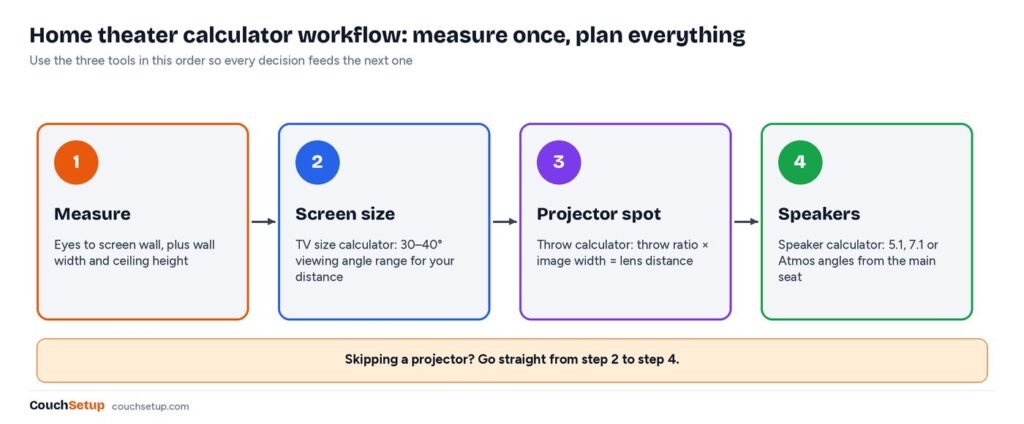
Use each home theater calculator in 3 steps
- Measure your seatTape from your eyes to the wall where the screen goes.
- Pick the screen sizeUse the TV or projector calculator with that distance.
- Place the soundMap your soundbar or speakers with the speaker calculator.
Why use a home theater calculator before you buy
Most home theater regrets come from buying in the wrong order: a TV that looks small from the couch, a projector that can’t be placed far enough back, or speakers that end up in the corners because nobody measured. A home theater calculator turns a few tape-measure readings into concrete numbers, so you can compare models on paper and avoid returns.
The three tools share the same starting point, the main seat, so the answers fit together. Size the screen from where you sit, place the projector for that screen, then place the speakers around that seat. Each step takes about a minute once you have your measurements.
Doing it in this order also protects your budget. The screen size you choose sets the wall width you need for front speakers, the projector type decides whether anything hangs above the couch, and the seat position sets every speaker angle. Change one and the others move, so it pays to settle them together on paper before anything ships to your door.
What to measure before you start
| Measurement | How to take it | Used by |
|---|---|---|
| Eyes to screen wall | Sit normally and measure from between your eyes to the wall or the front of the TV stand | TV size, projector and speaker tools |
| Wall width | Clear width where the screen and front speakers will go | TV size and speaker tools |
| Ceiling height | Floor to ceiling above the main seat | Speaker tool (Atmos) and projector mounting |
| Possible lens positions | Shelf, ceiling joist or table where a projector could sit | Projector tool |
| Ears to side and back walls | From your head in the main seat | Speaker tool |
| Seated eye height | Floor to eyes when seated, usually 36 to 42 inches | TV mounting height |
Write them on one sheet or in your phone’s notes, and measure twice. The most common error is measuring from the front of the sofa cushion instead of from your eyes, which can be a foot or more off when you lean back on a deep couch.
TV size and viewing distance
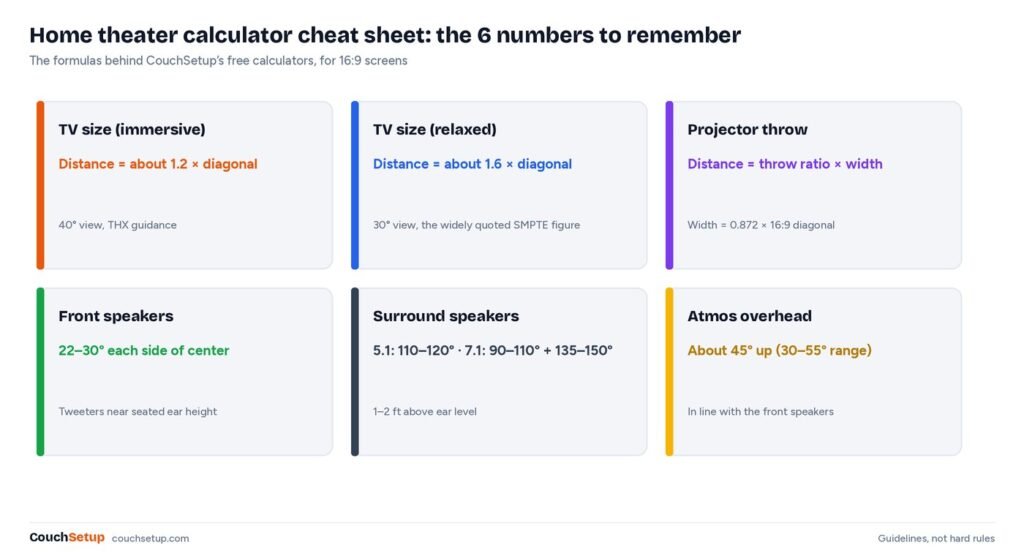
The TV size calculator uses viewing angle: the screen should fill about 30° to 40° of your view. For a 16:9 TV that works out to sitting between about 1.2 and 1.6 times the screen diagonal away. From 8 feet, that is roughly 60 to 80 inches; from 10 feet, 75 to 100 inches.
| Seating distance | Relaxed size (30°) | Immersive size (40°) | Common sizes that fit |
|---|---|---|---|
| 6 ft | 44 in | 60 in | 50 or 55 in |
| 7 ft | 52 in | 70 in | 55 or 65 in |
| 8 ft | 59 in | 80 in | 65 or 75 in |
| 9 ft | 66 in | 90 in | 75 or 85 in |
| 10 ft | 74 in | 100 in | 75, 85 or 98 in |
| 12 ft | 89 in | 120 in | 98 to 115 in, or a projector |
This calculator also shows the distance where full 4K detail becomes visible, plus a chart for 43- to 115-inch sets. If you are torn between two sizes, our 65 vs 75-inch TV comparison and best TVs for small rooms cover the most common choices, and how high to mount a TV has the height numbers once you know the size.
Projector throw distance
Every projector has a fixed relationship between lens distance and picture width, set by its throw ratio. The projector throw calculator multiplies the ratio by the picture width to get the lens-to-screen distance, or works backward from the spot you already have. For a 100-inch 16:9 picture (87.2 inches wide), a 1.2 throw ratio puts the lens about 8 ft 9 in back, and a 0.5 short-throw lens only about 3 ft 8 in.
That calculator handles zoom lenses, which give you a mounting window instead of one exact spot, along with 16:9, 2.35:1 and 4:3 screens. In a small room, start with our best short-throw projectors; for the screen itself, see the best projector screens; and for backyard nights, the best outdoor projectors.
Speaker placement for 5.1, 7.1 and Atmos
Surround sound depends on angles from the main seat. The speaker placement calculator puts the front speakers 22° to 30° either side of center, 5.1 surrounds at 110° to 120°, 7.1 side and rear surrounds at 90° to 110° and 135° to 150°, and Dolby Atmos overhead speakers about 45° above your ears. Enter your distance and ceiling height and it returns positions in feet and inches.
Not ready for separate speakers? The same angles tell you where wireless rear speakers should go with a soundbar. Our soundbar vs surround sound guide helps you choose between the two before you use this calculator for the final layout.
Calculator results by room size
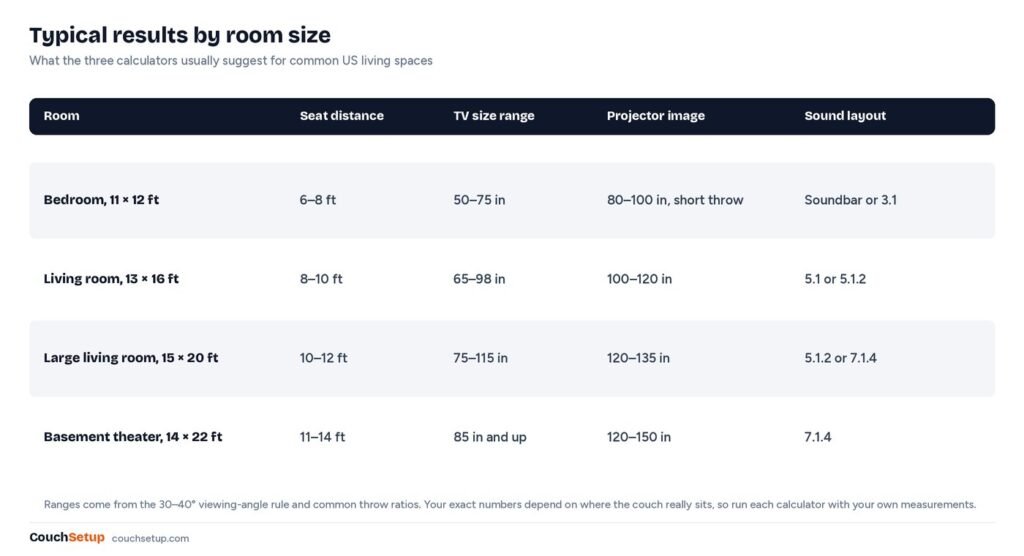
Every room is different, but most US homes fall into a few patterns. The image and table below show what the three tools usually suggest, so you can sanity-check your own results before you order anything.
| Room | Seat distance | TV size range | Projector image | Sound layout |
|---|---|---|---|---|
| Bedroom, 11 × 12 ft | 6–8 ft | 50–75 in | 80–100 in, short throw | Soundbar or 3.1 |
| Living room, 13 × 16 ft | 8–10 ft | 65–98 in | 100–120 in | 5.1 or 5.1.2 |
| Large living room, 15 × 20 ft | 10–12 ft | 75–115 in | 120–135 in | 5.1.2 or 7.1.4 |
| Basement theater, 14 × 22 ft | 11–14 ft | 85 in and up | 120–150 in | 7.1.4 |
Bedrooms usually land on a 55- to 65-inch TV and a soundbar. Living rooms around 13 by 16 feet suit a 65- to 85-inch TV or a 100- to 120-inch projector screen with 5.1 sound. Dedicated basements are where 7.1.4 and screens of 120 inches and up make sense. Full room-by-room plans are in our small living room home theater guide.
Worked example: plan a living room in 10 minutes
Say the couch is 9 feet from the TV wall, the wall is 11 feet wide, each side wall is 5 feet from your head, and the ceiling is 8 feet high. Here is what each calculator returns:
- Screen size. About 66 to 90 inches at 9 feet. A 75-inch TV sits in the middle of that range and is about 65 inches wide, leaving room for speakers on the 11-foot wall.
- Projector alternative. For a 100-inch screen, a projector with a 1.2 throw ratio needs about 8 ft 9 in, which puts it right above the couch. A 0.8 short-throw model needs about 5 ft 10 in and sits in front of the seats, so its fan isn’t behind your head.
- Front speakers. At 9 feet the fronts go about 7 ft 3 in to 10 ft 5 in apart. On an 11-foot wall, 8 feet apart leaves a foot and a half to each side wall.
- Surrounds. With 5 feet to each side wall, 5.1 surrounds go about 1 ft 10 in to 2 ft 11 in behind your ears.
- Atmos. An 8-foot ceiling puts top front and top rear pairs about 4.5 feet in front of and behind the seat.
- Mounting height. Hang the TV so the screen center is near seated eye level, around 40 to 42 inches from the floor.
That is the whole plan from six measurements. The budget then depends on the parts you pick; our home theater under $1,000 guide shows one way to split it between screen, sound and cables.
Planning mistakes a calculator catches
- Buying a TV by how it looks in the store. High ceilings make every screen look small. Trust your distance and the numbers instead.
- Assuming any projector fits. Throw ratios vary widely between models. A standard-throw projector can need twice the room depth of a short-throw one for the same picture.
- Putting speakers where they fit, not where they belong. A receiver can correct distance and level, but not a speaker at the wrong angle.
- Forgetting the seating. Every calculator starts from the main seat, so decide where the couch goes first. Our home theater seating guide covers rows and risers.
- Ignoring the ceiling. Ceiling height decides both projector mounting and Atmos speaker positions. Measure it once and use it everywhere.
- Skipping the wall-width check. A 75-inch TV is about 66 inches wide before you add speakers. Make sure the whole front stage fits.
How accurate is a calculator?
The math is exact; the inputs and the guidelines are where judgment comes in. The viewing angles come from THX and SMPTE-style guidance, which Wikipedia’s summary of optimum viewing distance explains, and Sound & Vision’s screen size and distance explainer works through the same geometry. Speaker angles follow Dolby’s Dolby Atmos home theater installation guidelines.
Throw distance is pure geometry, and projector makers such as BenQ publish throw ratio explainers that match it. Treat each result as a strong starting point rather than a rule. Some people like a screen bigger than the immersive limit, and some rooms simply can’t put speakers at textbook angles. Land inside the recommended range and the room will work.
Quick formulas if you want to check the math
- 16:9 screen width = diagonal × 0.872
- Immersive seat (40°) ≈ diagonal × 1.2; relaxed seat (30°) ≈ diagonal × 1.6
- Throw distance = throw ratio × screen width
- Front speaker spacing ≈ seat distance × 0.8 (22°) to × 1.15 (30°)
- Side-wall surround at 110° ≈ 0.36 × your distance to the side wall, behind your ears
- Atmos overhead offset at 45° = ceiling height minus seated ear height
Each calculator on CouchSetup runs these exact formulas, so you can double-check any result with the calculator app on your phone.
TV or projector? Let the numbers decide
If your seat is 11 feet or more from the screen wall, the TV size results start at about 85 inches. That is where a projector begins to make sense, because a 100- to 120-inch screen fills the view from the back of the room and is usually cheaper than a TV of the same size. Our projector vs TV guide compares the two in detail.
Run both paths with the calculator tools: size the screen first, then check whether the room can place a projector at the right distance for that screen. If you can’t make the room reasonably dark in the evening, a large TV is usually the safer choice.
What a calculator can’t tell you
The tools handle geometry. A few decisions are still up to you, and they matter just as much:
- Light. A room with big windows needs a bright TV or an ambient-light-rejecting screen. No distance formula fixes glare.
- Neighbors and volume. In an apartment, a soundbar with a night mode may beat a full 7.1 system you can never turn up.
- Budget balance. A huge screen with thin TV speakers is less satisfying than a slightly smaller screen with decent sound.
- Seating comfort. Recliners need extra depth when reclined. Measure from your head in the reclined position.
- What you watch. Mostly sports and news? Lean to the relaxed end of every range. Mostly movies and games? Lean immersive.
Our complete home theater setup guide walks through these decisions in order, from the room to the final calibration.
Next steps
- The complete home theater setup guide
- Small living room home theater setups
- Home theater under $1,000
- Projector vs TV: which suits your room?
- Soundbar vs surround sound
FAQ
Are these calculators free?
Yes. All three tools are free, need no account and work on phones, tablets and computers.
Which calculator should I use first?
Start with the TV size calculator, because the screen size drives everything else. If you want a projector, use the projector throw calculator next, then place the sound with the speaker placement calculator.
What is the best seating distance for a home theater?
Between about 1.2 and 1.6 times the screen diagonal for a 16:9 screen. From 10 feet, that means a 75- to 100-inch screen.
Can I use a calculator for a small apartment?
Yes. Small rooms benefit most, because there is less room for error. Short-throw projectors, 55- to 65-inch TVs and soundbars with wireless rears are common results for rooms under about 12 feet deep.
Do the tools work in meters?
The projector throw calculator works in feet or meters. For results shown in feet, multiply by 0.305 to get meters; a 9-foot seat, for example, is about 2.7 meters from the screen.
Do I need Dolby Atmos?
No. A well-placed 5.1 system or a good soundbar is a big upgrade over TV speakers. Atmos height speakers add overhead effects and are worth adding once the ear-level speakers are placed well.
How high should the TV be mounted?
Put the center of the screen near seated eye level, usually around 40 to 42 inches from the floor. Avoid mounting high above a fireplace if you can.
Do the results work for curved or ultrawide screens?
The TV and projector tools assume flat screens. The projector throw calculator supports 16:9, 2.35:1 and 4:3 shapes; for curved TVs, the 16:9 results are close enough for planning.
What if two people disagree on the size?
Use the range. The relaxed end suits people who mostly watch news and sports, the immersive end suits movie and game fans, and a size in the middle of the range is a fair compromise for a shared living room.
Sources: Wikipedia: Optimum HDTV viewing distance · Sound & Vision: What size screen, how far away? · Dolby: Dolby Atmos home theater installation guidelines (PDF) · BenQ: What is a good throw ratio? · RTINGS: Projector throw distance calculator