

CouchSetup is reader-supported. When you buy through links on our site, we may earn an affiliate commission at no extra cost to you. Learn more
Soundbar vs surround sound comes down to one trade-off: convenience against real speakers around you. A soundbar is one box and one HDMI cable. A surround system is an AV receiver plus five or more speakers and a subwoofer: more space, wire and money, and bigger sound in return. In between sits a third option that barely existed ten years ago, a soundbar with a wireless sub and real rear speakers.
Our verdict
Short answer: get a soundbar if your room is small, you rent, or you mainly want clearer dialogue. Get a soundbar system with real rears if you want true surround but hate wires and receivers. Get a receiver-based system if you have the space, love movies or music, and want the best sound per dollar and the freedom to upgrade.
Top picks at a glance
Best soundbar with real rears
Samsung HW-Q990H
Living rooms that want true surround and Atmos without a receiver or speaker wire
$$$ PremiumBest modular soundbar
Sonos Arc Ultra
Music lovers and anyone who wants to start with a bar and add a sub and rears later
$$$ PremiumBest budget receiver
Denon AVR-S770H
First receiver-based 5.1 or 5.1.2 system in a living room
$$ Mid-rangeThe three options side by side
| Feature | Soundbar alone | Bar + sub + wireless rears | Receiver + 5.1/7.1 speakers |
|---|---|---|---|
| Surround effects | Virtual (reflected or processed) | Real speakers behind you | Real, freely positioned |
| Atmos height | Virtual or up-firing | Up-firing in bar and often rears | Height or up-firing speakers |
| Deep bass | Limited without a sub | Good to very good | Best; easy to add a second sub |
| Setup | 15 minutes | 30 to 60 minutes | An afternoon or more |
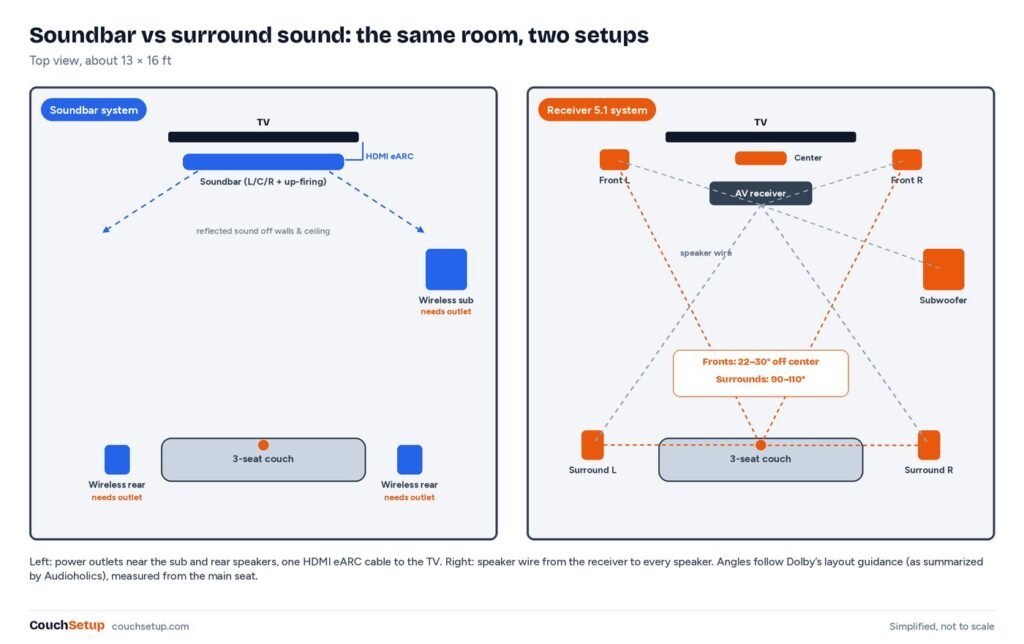
| Wiring | HDMI and power | HDMI and 3 to 4 power outlets | Speaker wire to every speaker |
| Upgrades | Limited | Same brand only | Any piece, any brand |
What the comparisons don’t tell you
Virtual surround depends on your walls
Bars without rears fake surround by bouncing sound off side walls and the ceiling. That works in a closed, box-shaped room. In an open-plan space or under a high ceiling, the bounced sound has nothing to reflect off and the effect collapses toward the front. So the same bar can sound very different in two homes, and reviews from a closed test room can flatter it. Real rear speakers don’t depend on the room.
The price lines cross around $1,000
| Setup | Typical budget | What you get |
|---|---|---|
| Entry soundbar | Under $300 | Clearer dialogue, simple setup |
| Mid-range Atmos bar (+ sub) | About $400 to $900 | Wider sound, better bass |
| Flagship bar + sub + rears | About $1,000 to $2,500 | Real rear surround, one remote |
| Entry receiver + 5.1 speakers | About $1,000 to $1,800 | True 5.1, room calibration, any-brand upgrades |
| Mid-range receiver + 5.1.2 or 7.1.4 | $2,000 and up | Overhead Atmos, bigger speakers |
A flagship soundbar system and an entry receiver package often cost about the same. At that point the receiver path usually buys bigger speakers and better bass; the soundbar path buys simplicity and a cleaner look. Below that price, a soundbar is the clear value.
“Wireless” rears still need outlets
Every wireless rear speaker and sub needs its own power socket. If there’s no outlet near the couch, a wireless system is harder to place than it sounds.
How they compare where it matters
| Feature | Better choice | Why |
|---|---|---|
| Surround imaging | Surround sound (bars with real rears close most of the gap) | Real speakers at the right angles |
| Dialogue | Tie | Bars are clear out of the box; a calibrated center matches it |
| Bass | Surround sound | Receivers often have two sub outputs |
| Atmos | Surround sound for true overhead; flagship bars get most of it | Ceiling or height speakers place sound better |
| Space and renting | Soundbar | One box, no wire runs, less rumble through walls |
| Setup | Soundbar, by a mile | One cable and HDMI-CEC |
| Music | Surround sound | Separate left and right speakers give a wider stereo image |
| Gaming | Surround or a bar with real rears | Footsteps behind you are easier to place |
If dialogue is your main complaint, start with our dialogue fixes. Both paths need HDMI eARC for lossless Atmos from a player plugged into the TV; see HDMI ARC vs eARC.
Which path fits you
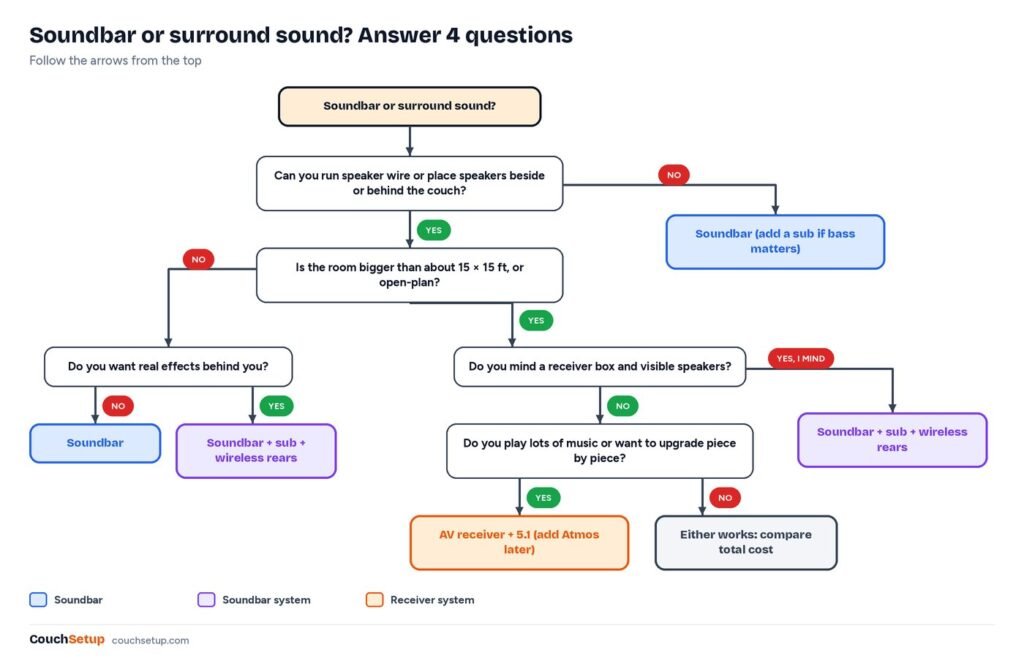
- Soundbar: small to mid-size room or bedroom, renting or shared walls, dialogue is the goal, budget under about $500. Start with best soundbars for small rooms or under $300.
- Soundbar system with real rears: you want sound behind you but no speaker wire, there are outlets near the couch, and you’re happy staying with one brand.
- Receiver surround: a dedicated media room or large living room, lots of music, best sound per dollar, and you don’t mind an afternoon of wiring.
Picks for each path
Soundbar with real rears: Samsung HW-Q990H
Samsung HW-Q990H
Best for Living rooms that want true surround and Atmos without a receiver or speaker wire
- 11.1.4 channels with up-firing drivers in bar and rears
- Wireless sub with two 8-inch drivers
- 2 HDMI 2.1 inputs plus eARC, 4K 120Hz passthrough
- Dolby Atmos, DTS:X, Active Voice Amplifier Pro
- SpaceFit Sound Pro room calibration
Prices change often, so check today’s price on Amazon.
Samsung lists it as true 11.1.4-channel with wireless Atmos, Q-Symphony for Samsung TVs and SpaceFit Sound Pro room tuning. RTINGS notes the hardware is unchanged from last year’s HW-Q990F, which What Hi-Fi lists with 23 drivers, a sub with two 8-inch drivers and two HDMI 2.1 inputs with 4K 120Hz passthrough. The catch: premium price, three extra outlets, and it shines brightest with a Samsung TV.
Modular: Sonos Arc Ultra, then Sub 4 and Era 100 rears
Sonos Arc Ultra
Best for Music lovers and anyone who wants to start with a bar and add a sub and rears later
- 9.1.4 spatial audio from the bar alone
- 14 drivers, 15 Class-D amps, up-firing height
- HDMI eARC, Wi-Fi 6, Bluetooth 5.3, AirPlay 2
- Trueplay on iOS and Android
- AI speech enhancement
Prices change often, so check today’s price on Amazon.
Sonos says the bar alone delivers 9.1.4 spatial audio from 14 drivers, including up-firing height and a new Sound Motion woofer. Add a Sub 4 and two Era 100s later. Trueplay now works from Android too. The catch: no DTS:X, no HDMI inputs, and the full set is a premium buy. For smaller rooms, the Sonos Beam (Gen 2) follows the same add-on path for less.
Budget receiver: Denon AVR-S770H
Denon AVR-S770H
Best for First receiver-based 5.1 or 5.1.2 system in a living room
- 7.2 channels, 75 W per channel (8 ohms, 2ch driven)
- Dolby Atmos and DTS:X, up to 5.2.2
- 6 HDMI inputs (3 x 8K), eARC, 4K 120Hz
- Audyssey MultEQ room calibration
- HEOS, AirPlay 2, Bluetooth, two sub outputs
Prices change often, so check today’s price on Amazon.
7.2 channels at 75 watts each (8 ohms, two channels driven), Atmos and DTS:X up to 5.2.2, six HDMI inputs, eARC, Audyssey calibration, two sub outputs and HEOS, AirPlay 2 and Bluetooth for music. The catch: menus take patience, and seven channels can’t run a 7.1.4 system.
Speakers for it: Polk Monitor XT
Polk Monitor XT speakers
Best for Building a matched 5.1 or 5.1.2 system on a budget
- Towers, bookshelves, centers, sub and Atmos modules
- Timbre-matched across the range
- Hi-Res Audio and Dolby Atmos certified
- XT12 12-inch powered subwoofer
- XT90 height modules for Atmos later
Prices change often, so check today’s price on Amazon.
An affordable matched range: XT60 towers, XT30 center, XT15 bookshelves as surrounds and the XT12 sub make a sensible first 5.1, with XT90 height modules later. TechRadar notes the range is timbre-matched so sound pans smoothly. The catch: entry-level detail at high volume. Plan positions with our speaker placement calculator.
Setup basics
Soundbar: use the TV’s ARC/eARC port, turn on HDMI-CEC, set the TV’s digital output to Auto or Passthrough (not PCM, which blocks Atmos), keep the bar at the front edge clear of the IR sensor, run room calibration, and put wireless rears beside or slightly behind the couch.
Receiver: fronts about 22 to 30 degrees either side of the main seat, center under or over the screen aimed at ear level, surrounds about 90 to 110 degrees to the sides and a little above ear height. Connect the TV to the receiver’s eARC output, run Audyssey or YPAO from the main seat, and start small speakers at an 80 Hz crossover. Our home theater setup guide covers the rest.
- Don’t hide a soundbar inside a cabinet; side and up-firing drivers get muffled.
- Don’t put surrounds in front of the couch.
- Move the sub before you turn it up.
How we picked
We gathered the specs and expert reviews for every product, put them side by side, and worked out the trade-offs the individual reviews leave out. Specs come from Samsung, Sonos and Denon, with reviews from RTINGS, What Hi-Fi, TechRadar and Audioholics; the price bands are rough US street ranges. Every source is listed at the end.
FAQ
Is a soundbar as good as surround sound?
Not quite. It’s far clearer than TV speakers, but can’t match real speakers beside and behind you. A bar with wireless rears and a sub gets much closer.
Can a soundbar give real surround?
Only with real rear speakers. Bars alone use reflected or virtual surround, which fades in open-plan rooms.
Do I need an AV receiver?
For passive speakers, yes. Soundbar systems have the decoding and amps built in.
5.1 soundbar or 5.1 speaker system?
A receiver with real speakers usually sounds bigger. Check whether a 5.1 soundbar’s rears are real speakers or virtual.
Can I mix a soundbar and surround speakers?
Not freely. You can add the same brand’s rears and sub to many bars, but not passive speakers or a receiver.
Related guides
- Sonos Beam (Gen 2) review
- Home theater under $1,000
- Best soundbars under $300
- Speaker placement calculator
Sources: Samsung HW-Q990H (US) · RTINGS: Samsung HW-Q990F vs HW-Q990H · TechRadar: Sonos Arc Ultra official · What Hi-Fi: Sonos Arc Ultra vs Arc · Parts Express: Denon AVR-S770H