

CouchSetup is reader-supported. When you buy through links on our site, we may earn an affiliate commission at no extra cost to you. Learn more
ARC and eARC are why one HDMI cable can carry sound from your TV to a soundbar and let the TV remote control its volume. They’re also why so many people end up with no sound, a bar that won’t turn on with the TV, or an Atmos bar that never lights up “Atmos.” The HDMI ARC vs eARC difference is simpler than it sounds, and most of the problems come down to three settings.
Our verdict
Short answer: ARC sends compressed audio from the TV to a soundbar, including Dolby Atmos the way streaming apps send it (inside Dolby Digital Plus). eARC, which came with HDMI 2.1, has about 37 times the bandwidth and adds lossless formats like Dolby TrueHD, DTS-HD Master Audio, DTS:X and multichannel PCM. Plug the bar into the TV port labeled ARC or eARC, turn on HDMI-CEC, and set the TV’s audio output to the soundbar.
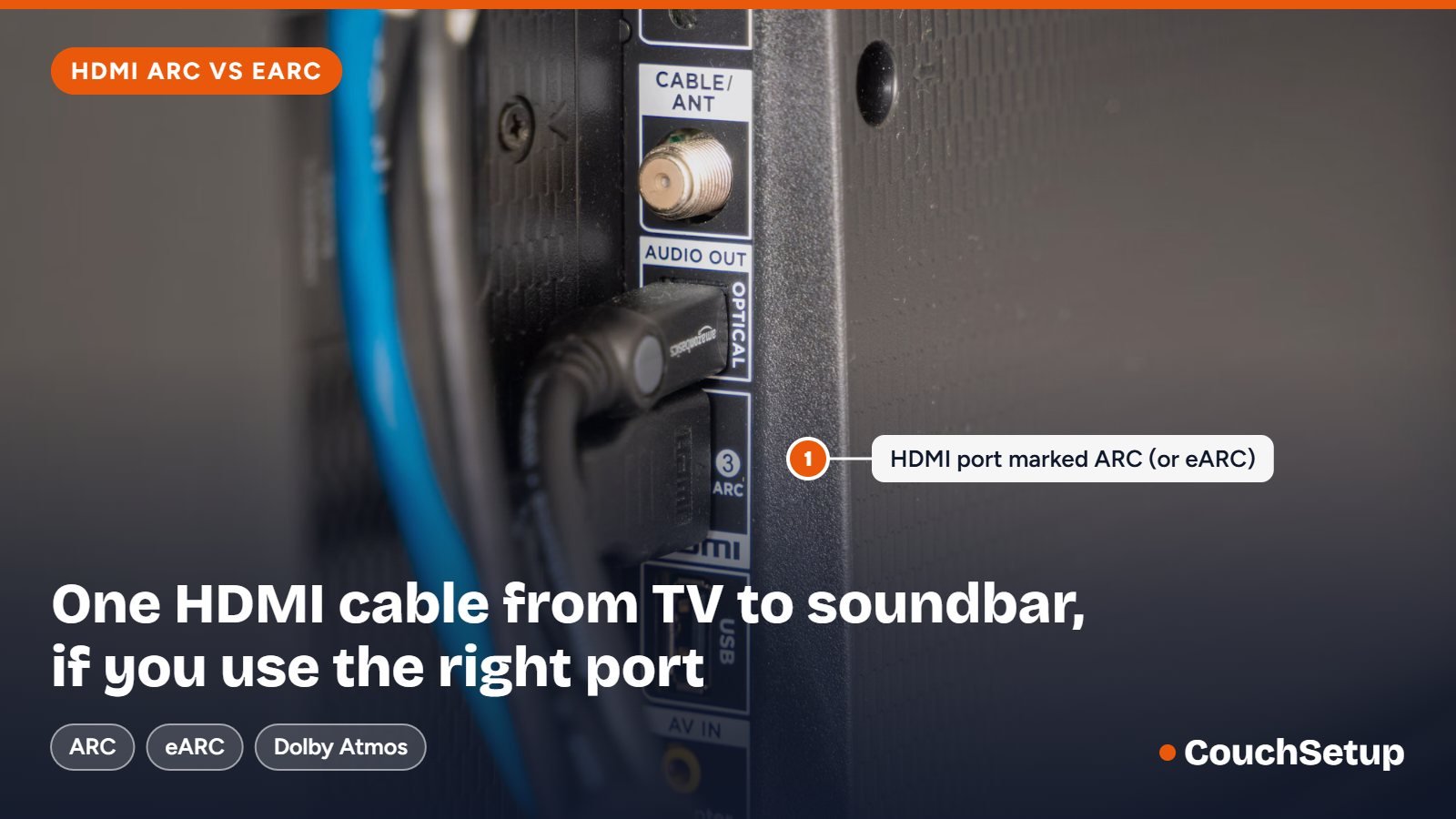
ARC vs eARC side by side
| Feature | ARC | eARC |
|---|---|---|
| Arrived with | HDMI 1.4 | HDMI 2.1 |
| Audio bandwidth | About 1 Mbps | About 37 Mbps |
| Stereo PCM, Dolby Digital, DTS 5.1 | Yes | Yes |
| Dolby Digital Plus, incl. streaming Atmos | Yes | Yes |
| Dolby TrueHD Atmos (4K Blu-ray) | No | Yes |
| DTS-HD Master Audio, DTS:X | No | Yes |
| 5.1 or 7.1 uncompressed PCM | No | Yes |
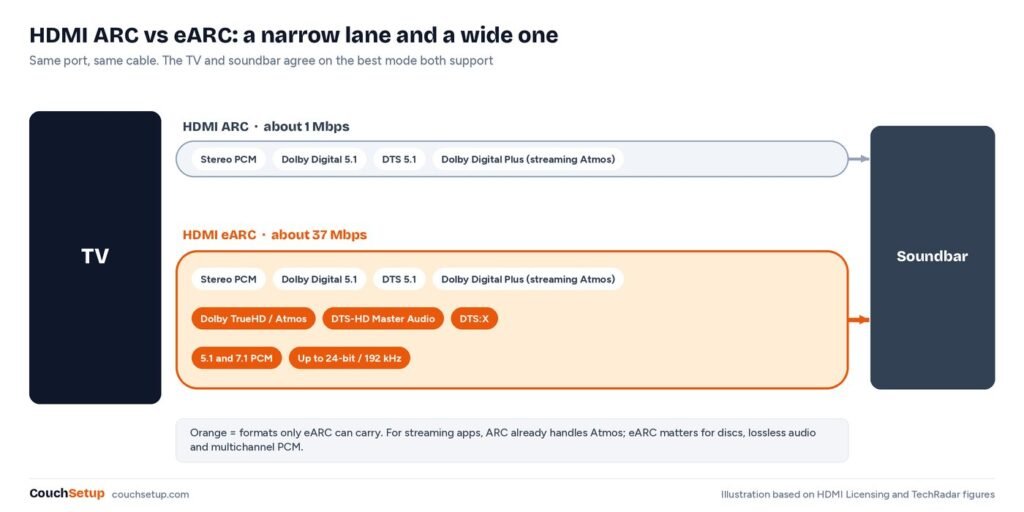
Both use the same port and cable. The TV and soundbar settle on the best mode they share, so an eARC bar on an ARC TV just runs as ARC.
What most explainers leave out
Spec tables make eARC look like a must. Lining the formats up against how people actually watch tells a different story.
If you only stream, eARC changes almost nothing
Netflix, Disney+ and Max send Atmos inside Dolby Digital Plus, which plain ARC carries. The lossless formats that need eARC come from 4K Blu-ray players, some media players and consoles sending multichannel PCM. If none of those is plugged into your TV, money spent on eARC is better spent on a better soundbar.
Where you plug the source matters more than the port
If a Blu-ray player or console plugs straight into the soundbar or receiver, the bar gets its audio directly and the TV’s ARC limits don’t apply. The catch is that many soundbars can’t pass 4K 120Hz or VRR through their own HDMI input, so gamers usually plug the console into the TV and need eARC to get full audio back out.
The fix for missing Atmos is usually one setting
Most “no Atmos” cases aren’t the port at all. If the TV’s digital audio output is set to PCM, it mixes everything down before sending it, and the bar never sees Atmos. Set it to Auto, Bitstream or Passthrough.
Do you need eARC?
| Your system | What you need |
|---|---|
| TV apps or a stick, basic 2.0 or 2.1 bar | ARC |
| Streaming Atmos on a mid-range Atmos bar | ARC works; eARC is nice to have |
| 4K Blu-ray player plugged into the TV, premium bar | eARC on both ends |
| Console sending multichannel PCM through the TV | eARC on both ends |
| AV receiver with every source plugged into it | ARC or eARC, for TV apps only |
| Older TV with no ARC port | Optical (no streaming Atmos) |
Buying new? eARC on both TV and soundbar keeps every option open, even if you only stream today. Many current Atmos bars have it:
| Soundbar | What eARC adds | Worth knowing |
|---|---|---|
| Sonos Arc Ultra | Sonos marks Dolby TrueHD as needing eARC | Optical adapter sold separately |
| Sony BRAVIA Theater Bar 8 | Dolby TrueHD, Atmos, DTS:X, LPCM up to 24-bit/192kHz | Also lists IMAX Enhanced |
| Sonos Beam (Gen 2) | eARC added for the newer Atmos formats (TechCrunch) | Optical adapter in the box |
All three still work on an ARC-only TV and simply fall back. Before paying for eARC, check your TV’s port actually says eARC. More picks in our best soundbars for small rooms.
How to connect a soundbar, step by step
- Find the HDMI port on the TV labeled ARC or eARC. Usually only one has it; check the label rather than assuming a number.
- Use a decent cable. Any standard HDMI cable works for ARC; for eARC, use High Speed HDMI with Ethernet or, better, Ultra High Speed.
- Connect the TV’s ARC/eARC port to the soundbar’s HDMI port marked ARC, eARC or TV.
- Turn on HDMI-CEC on the TV (names by brand below).
- Set the TV’s audio output to the soundbar (often HDMI ARC, eARC, Receiver or the bar’s name).
- If the TV has a separate eARC switch, turn it on.
- Set the digital audio format to Auto, Bitstream or Passthrough.
- Test the TV remote’s volume and check the bar shows the format you expect.
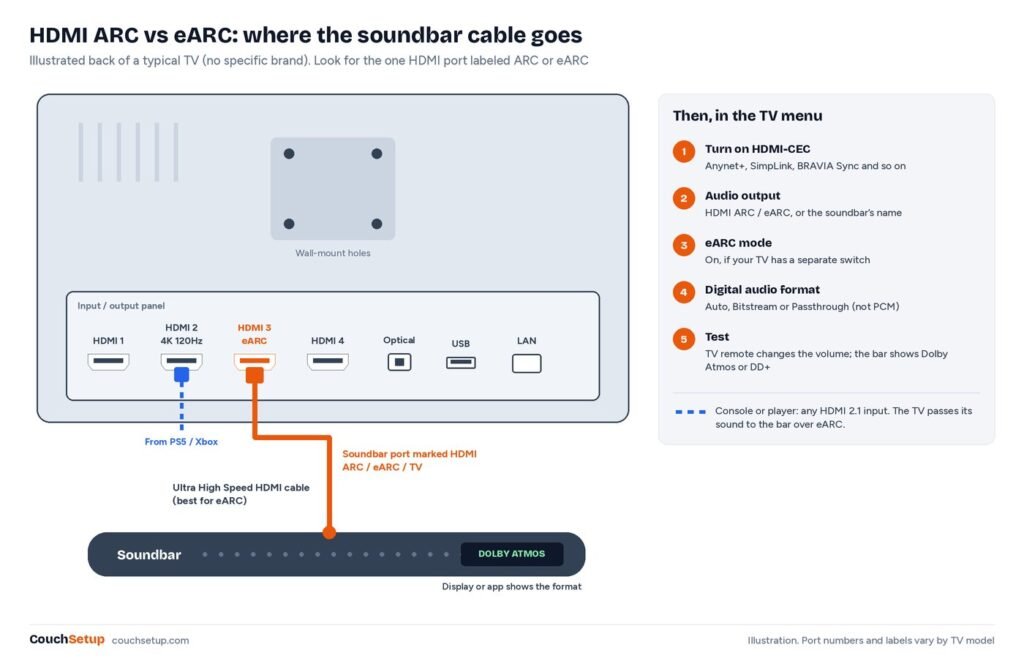
Not sure what your TV has? Read the port label, look for an eARC option in the sound menu, or search the full model number plus “eARC” on the maker’s spec page. Don’t assume HDMI 2.1 inputs mean eARC.
HDMI-CEC names by brand
CEC is what lets the TV switch the soundbar on and off and control its volume. Every brand renames it.
| TV brand | CEC is called |
|---|---|
| Samsung | Anynet+ (HDMI-CEC) |
| LG | SimpLink; also turn on Auto Power Sync |
| Sony | BRAVIA Sync (HDMI CEC on newer menus) |
| Panasonic | VIERA Link |
| Philips | EasyLink |
| TCL and Roku TVs | Control other devices (CEC) |
| Hisense | CEC Function or HDMI CEC |
| Vizio | CEC |
| Amazon Fire TV | HDMI CEC Device Control |
Troubleshooting
No sound at all
- Check the cable is in the ARC/eARC port, not another HDMI input.
- Check the TV’s audio output is the soundbar, not TV Speakers.
- Check the soundbar’s input is HDMI/TV, not Bluetooth or optical.
- Power everything off, unplug both for a minute, then turn on the soundbar first and the TV second.
- Turn CEC off and on again on the TV.
Bar shows Dolby Digital or PCM, not Atmos
- Make sure the show is actually in Atmos and your streaming plan includes it.
- Set the TV’s digital output to Auto, Bitstream or Passthrough, not PCM.
- On a streaming stick plugged into the TV, set its audio to Auto or Dolby Atmos too.
- Lossless TrueHD Atmos from a disc needs eARC on both ends; over ARC it drops to a lesser format.
- Some TVs don’t pass DTS at all. Check the spec sheet if you play DTS discs.
TV remote won’t control the bar
- Turn on CEC on the TV and, if it has a setting, on the soundbar.
- Some TVs split device control and auto power; turn on both.
- Try a different HDMI cable. Flaky CEC is a classic bad-cable sign.
- Too many CEC devices can confuse each other. Switch it off on ones that don’t need it.
Sound out of sync
Use the lip-sync or AV sync setting on the TV or bar. eARC includes automatic lip-sync correction, but some combinations still need a nudge. Cheap HDMI switches between TV and soundbar are a frequent cause of dropouts, so remove them while testing.
When to use optical instead
| Feature | Optical | ARC | eARC |
|---|---|---|---|
| Dolby Digital / DTS 5.1 | Yes | Yes | Yes |
| Streaming Atmos (DD+) | No | Yes | Yes |
| Lossless TrueHD, DTS-HD MA, DTS:X | No | No | Yes |
| TV remote controls volume | Sometimes, via IR learning | Yes, via CEC | Yes, via CEC |
Optical is the fallback when ARC won’t cooperate or the gear is older. Set the TV’s output to Dolby Digital or Auto, and teach the bar your TV remote if it can learn. Optical is also the usual way to connect wireless TV headphones.
Common myths
- “ARC can’t do Atmos.” It can, in the streaming form. Only lossless TrueHD Atmos needs eARC.
- “You need a special eARC cable.” There isn’t one. High Speed with Ethernet or Ultra High Speed works.
- “eARC improves the picture.” It only affects audio going back out of the TV.
- “Optical sounds better.” It can’t carry DD+ or Atmos and gives no CEC control.
Two soundbars that set up easily
Sonos Beam (Gen 2)
Best for Small to medium rooms with an eARC TV
- HDMI eARC with Dolby Atmos support
- TV remote volume control through CEC
- Speech Enhancement and Night Sound
- Optical adapter included for older TVs
Prices change often, so check today’s price on Amazon.
Samsung HW-B750D
Best for Samsung TV owners who want a sub in the box
- Wireless subwoofer included
- HDMI ARC and optical
- DTS Virtual:X
- Works with Anynet+ for one-remote control
Prices change often, so check today’s price on Amazon.
More in our best soundbars under $300. Routing a console through the TV? Our couch gaming setup covers port planning.
How we picked
We gathered the measurements and expert reviews for every pick, put them side by side, and worked out the room-fit numbers the individual reviews leave out. The format, setup and CEC tables combine the spec pages and brand guides listed at the end.
FAQ
Can HDMI ARC do Dolby Atmos?
Yes, in its Dolby Digital Plus form, which is what streaming apps use. Lossless TrueHD Atmos from 4K Blu-ray needs eARC.
Is eARC backward compatible with ARC?
Yes. An eARC device falls back to ARC when the other end only has ARC.
Does HDMI ARC vs eARC matter for Netflix?
Usually not. Netflix sends Atmos inside Dolby Digital Plus, which ARC carries.
Why is my soundbar not working with HDMI ARC?
Usually the cable is in the wrong port, CEC is off, or the TV’s output is still its own speakers. Check those, then power-cycle both.
Do I need a special cable for eARC?
No special cable. Use High Speed HDMI with Ethernet or Ultra High Speed.
Is optical better than HDMI ARC?
No. Optical can’t carry DD+ or Atmos and doesn’t give CEC control.
Related guides
- Can’t hear dialogue on your TV?
- Sonos Beam (Gen 2) review
- Home theater setup guide
- Best TV picture settings
Sources: TechRadar: HDMI ARC vs eARC · WyreStorm: HDMI ARC vs eARC · Klipsch: TV manufacturer CEC names · Sony Help Guide: HDMI CEC · Sonos Arc Ultra · Sony BRAVIA Theatre Bar 8 specs · TechCrunch: Sonos Beam (Gen 2) with eARC