

CouchSetup is reader-supported. When you buy through links on our site, we may earn an affiliate commission at no extra cost to you. Learn more
Gaming from the couch should beat gaming at a desk: a bigger screen, room for friends, nothing but a controller in your hands. In practice many living room setups feel laggy, sound thin, and leave dead controllers and cables everywhere. Each of those has a simple fix.
Our verdict
Short answer: a good couch gaming setup is a TV sized to your seat, the console on an HDMI 2.1 port with Game mode on, a soundbar on eARC plus a headset for late nights, a charging spot for every controller, one tidy cable path, and a soft light behind the screen.
Top picks at a glance
Best for TV and casual games
Avantree Ensemble
Late-night TV and relaxed gaming without waking anyone
$ BudgetBest cord cover
Legrand Wiremold CordMate II Kit
Wall-mounted TVs and tidy cable runs
$ BudgetBest budget sync light
Govee TV Backlight 3 Lite
Adding color and atmosphere to a gaming setup
$ BudgetWhat setup guides don’t tell you
Split-screen halves your screen, so size for it
In two-player split-screen, each player gets half the picture. On a 65-inch TV, each half has about the same screen area as a 46-inch TV. With four players, each quarter is like a 32-inch TV. If co-op nights are a big part of how you play, use the immersive column below, not the comfortable one.
| Seating distance | Immersive (40°) | Comfortable (30°) |
|---|---|---|
| 6 ft | about 60 in | about 44 in |
| 7 ft | about 70 in | about 52 in |
| 8 ft | about 80 in | about 59 in |
| 9 ft | about 90 in | about 66 in |
Your soundbar can steal a gaming port
On some TVs, the eARC port the soundbar needs is also one of only two HDMI 2.1 ports. We checked which port has eARC on popular gaming TVs in our best TVs for PS5 and Xbox guide. On the TCL QM7L, for example, eARC sits on a slower port, so both 144Hz inputs stay free for consoles.
Your console won’t do Bluetooth headphones
PS5 and Xbox Series X don’t support standard Bluetooth audio, so AirPods won’t pair to them. Use a wired headset in the controller’s 3.5mm jack, a console-specific wireless headset, or headphones connected to the TV.
Step 1: Screen size and height
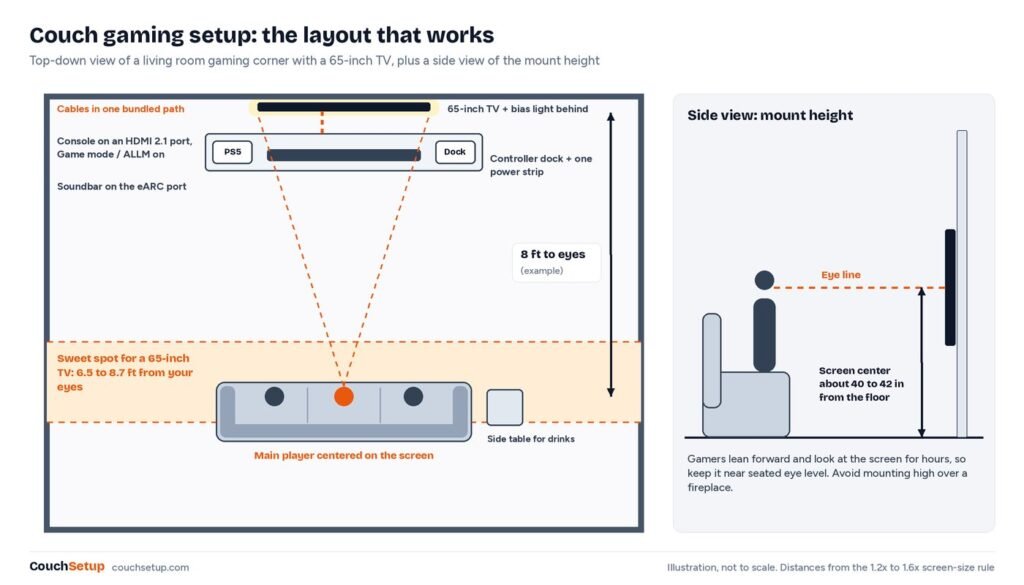
Use the table above, or our TV size calculator for your exact seat. Torn between sizes? See 65 vs 75 inches. Keep the screen center near seated eye level, around 40 to 42 inches from the floor; a TV over a fireplace is even worse for gaming than for movies because you sit forward for hours.
Step 2: A TV that keeps up
For a PS5 or Xbox Series X you want HDMI 2.1 for 4K 120Hz, VRR, ALLM and low input lag. An OLED like the LG C6 suits dim rooms and the fastest response; a bright Mini LED like the TCL QM7L suits sunny living rooms. Full picks in best TVs for PS5 and Xbox.
Step 3: Low-lag settings
- Plug the console into an HDMI 2.1 port, with its own cable or a certified Ultra High Speed one.
- Turn on the input’s enhanced HDMI setting (Input Signal Plus, HDMI Enhanced Format, HDMI 2.1 mode).
- Switch on Game mode, or let ALLM do it.
- PS5: Settings, Screen and Video, Video Output. Xbox: Settings, General, TV & display options. Enable 120Hz and VRR.
- Turn on HGiG if offered, then run the console’s HDR calibration.
- Check motion smoothing is off for that input. More in our picture settings guide.
Step 4: Sound
Plug consoles into the TV and the soundbar into the TV’s eARC port, so the 2.1 ports stay free and surround reaches the bar. Many soundbars can’t pass 4K 120Hz or VRR through their own input. See HDMI ARC vs eARC, and for bars, best soundbars for small rooms or under $300. Use night mode late, and keep the sub down with neighbors.
For family TV and story games, RF TV headphones connect to the TV, so they work with every input, but they have no mic, so stick to a console headset for online chat. More in best wireless headphones for TV.
Avantree Ensemble
Best for Late-night TV and relaxed gaming without waking anyone
- Charging dock doubles as the transmitter
- Optical and 3.5mm inputs, up to 2 headsets
- Up to 35 hours of playback
- aptX Adaptive, auto-pairing out of the box
Prices change often, so check today’s price on Amazon.
Step 5: Seating
Center the main seat on the screen; LED TVs lose contrast from the sides, which hurts split-screen. Couch gaming means leaning forward, so a firm cushion or lumbar pillow beats sinking into a soft sofa. A sectional or floor chairs keep players two to four in range. See couches for movie nights and home theater seating.
Step 6: Keep controllers charged
- A two-controller charging stand next to the console, so putting them away charges them.
- Rechargeable packs or AAs for Xbox controllers, which use AAs by default.
- A powered USB charger so the console doesn’t sit in rest mode to charge.
- Spare charged controllers for guests, kept in the same spot.
Step 7: One cable path
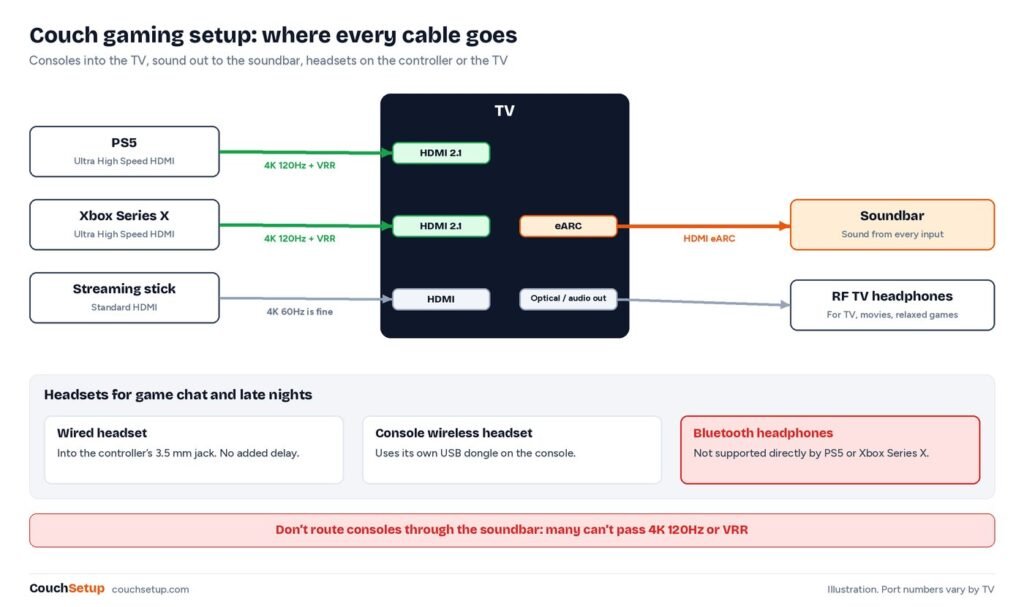
Put the console on an open shelf or ventilated cabinet, never a closed box. Run HDMI and power to the TV in one sleeve or cord cover, plug everything into one power strip behind the furniture, and label HDMI cables at both ends. Both consoles have Ethernet; a cable is steadier than Wi-Fi for online play, and a flat cable along the baseboard or powerline adapters solve a distant router.
Legrand Wiremold CordMate II Kit
Best for Wall-mounted TVs and tidy cable runs
- Paintable channel with fittings for corners
- Holds power and HDMI cables
- Adhesive backing, no tools needed
- Cut to length
Prices change often, so check today’s price on Amazon.
More in how to hide TV wires.
Step 8: Lighting
A pitch-dark room makes the screen harsh; a bright one adds glare. A neutral 6500K bias light behind the TV eases eye strain, and a sync light adds atmosphere. Compare both in the best TV backlights.
Govee TV Backlight 3 Lite
Best for Adding color and atmosphere to a gaming setup
- Camera-based sync
- Works with built-in TV apps
- Easy app setup
- Much cheaper than the 3 Pro
Prices change often, so check today’s price on Amazon.
Small rooms and troubleshooting
Sitting closer, a 50 or 55-inch TV can feel as big as 65 across a large room; see best TVs for small rooms. In a bedroom, a 42 or 48-inch OLED on a dresser works well. No mounting allowed? See no-drill TV setups. A projector gives a huge co-op picture but most can’t do 4K 120Hz or VRR; see projector vs TV.
| Problem | Fix |
|---|---|
| 120Hz option grayed out | HDMI 2.1 port, enhanced HDMI on, the console’s own cable |
| Controls feel laggy | Game mode or ALLM on, motion smoothing off |
| HDR washed out or clipped | HGiG on, then the console’s HDR calibration |
| Sound arrives late | Soundbar’s game or direct mode, then AV sync |
| Screen flickers at 4K 120Hz | Console’s own cable; on PS5, lower Video Transfer Rate |
How we picked
We gathered the console makers’ guidance and expert reviews, put them side by side, and worked out the room numbers the individual guides leave out. Console settings come from PlayStation and Xbox support pages, the size and split-screen figures are our own sums, and TV port details come from our checks of each maker’s spec sheet. Every source is listed at the end.
FAQ
How far should you sit from the TV for gaming?
For a 65-inch TV, roughly 6.5 to 8.7 feet; gamers usually prefer the closer end.
Can I use Bluetooth headphones with a PS5 or Xbox?
Not directly. Use a wired headset in the controller, a console wireless headset, or headphones on the TV.
Should the console go into the TV or the soundbar?
The TV, on an HDMI 2.1 port, with the soundbar on eARC.
Why does my TV feel laggy?
Usually it isn’t in Game mode, the console is on a slower port, or motion smoothing is on.
Is wired internet better for gaming?
Usually. Both consoles have Ethernet, and a cable gives fewer lag spikes.
Related guides
Sources: PlayStation Blog: VRR for PS5 · Xbox Wire: is your TV ready · PlayStation: PS5 video output guide · TCL QM7L specifications · BenQ TK710STi specifications