

CouchSetup is reader-supported. When you buy through links on our site, we may earn an affiliate commission at no extra cost to you. Learn more
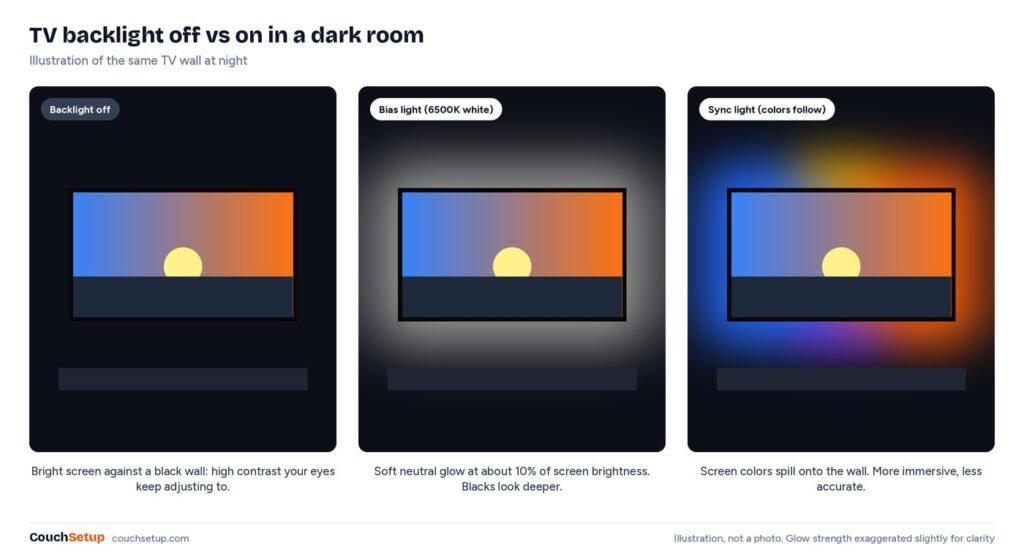
A strip of light behind the TV is one of the cheapest upgrades you can make, but it does two different jobs. Bias lighting is a soft, neutral white glow that makes dark scenes easier on the eyes and blacks look deeper. Sync lighting splashes the screen’s colors onto the wall so the picture feels bigger. Decide which you want first, and the best TV backlight for you picks itself.
Our verdict
Quick picks: the MediaLight Mk2 is the best true bias light, with calibration-grade 6500K white. The Govee TV Backlight 3 Pro is the best camera sync kit and works with the TV’s own apps. The Philips Hue Sync Box 8K with a Gradient Lightstrip gives the most accurate sync, and the Govee 3 Lite is the cheap way to try it.
Top picks at a glance
Best bias light
MediaLight Mk2 Flex
Movie fans who care about accurate picture
$ BudgetBest camera sync
Govee TV Backlight 3 Pro
Immersive color with any source, including TV apps
$$ Mid-rangeMost accurate
Philips Hue Play HDMI Sync Box 8K + Play Gradient Lightstrip
Hue homes and gamers who want exact color sync
$$$ PremiumBias light or sync light?
| Feature | Bias light (white) | Camera sync | HDMI sync box |
|---|---|---|---|
| What it does | Steady neutral white glow | Camera watches the screen | Reads the HDMI signal |
| Best for | Eye comfort, accurate picture | Fun with any source | Most accurate sync |
| Works with TV apps | Yes | Yes | No, HDMI devices only |
| Setup | Very easy | Easy | More involved, needs a hub |
What the reviews don’t tell you
Reviews tell you to dim the light to “about 10 percent” and buy “a strip that fits.” Neither is very useful without numbers, so we worked them out.
Strip length: the table nobody prints
Using standard 16:9 screen sizes and setting the strip about 2 inches in from each edge, here’s roughly how much you need. Your TV’s frame adds a little, so round up to the next kit size.
| TV size | Screen (W × H) | All 4 sides | Top and sides only |
|---|---|---|---|
| 43 in | 37.5 × 21.1 in | 8.4 ft (2.6 m) | 5.7 ft (1.7 m) |
| 55 in | 47.9 × 27.0 in | 11.2 ft (3.4 m) | 7.5 ft (2.3 m) |
| 65 in | 56.7 × 31.9 in | 13.4 ft (4.1 m) | 9.0 ft (2.8 m) |
| 75 in | 65.4 × 36.8 in | 15.7 ft (4.8 m) | 10.6 ft (3.2 m) |
| 85 in | 74.1 × 41.7 in | 18.0 ft (5.5 m) | 12.1 ft (3.7 m) |
Skip the bottom if the TV sits on a stand or soundbar that would block it anyway. On a wall-mounted TV, four sides give the most even halo.
“10 percent” means different things to different sources
| Guideline | What it says |
|---|---|
| ISF | About 10% of the display’s brightest white, some guidance up to 15% |
| SMPTE (HDR viewing) | Around 4.5 nits behind the screen |
| MediaLight | Never more than 10% of peak; about 5% suits most rooms |
| Color | 6500K (D65) white with a CRI of 90 or more |
So the experts don’t fully agree: MediaLight’s 5% is half the ISF figure. And MediaLight’s UK distributor points out the target is the light you see bouncing off the wall, not the strip’s raw output. A dark wall soaks up light, so the same strip needs a higher setting there than on a white one. That’s why setting it by eye, below, works better than a number.
Your wall can undo a good strip
For bias lighting, MediaLight suggests a neutral matte gray (Munsell N5 or N7) or off-white. Strong colors like deep red tint the glow and shift how screen colors look to you, and gloss creates hot spots. For sync kits the advice flips a bit: GameSpace’s Govee review found white walls gave the most vivid colors and darker walls made the effect dull.
The picks
1. MediaLight Mk2: best true bias light
MediaLight Mk2 Flex
Best for Movie fans who care about accurate picture
- 6500K (D65) white with CRI of 98 or more
- 150 flicker-free dimming levels with remote
- USB powered
- Lengths for every TV size, 5-year warranty
Prices change often, so check today’s price on Amazon.
If you want bias lighting the way calibrators describe it, this is the one. Many cheap strips run too blue or too green, which throws off how you see colors. The MediaLight is a simulated D65 white, the same white point TVs are calibrated to, with a CRI of 98 or more. It runs off the TV’s USB port and dims smoothly over 150 steps.
The catch: white only, no color effects, and it costs more than generic strips.
2. Govee TV Backlight 3 Pro: best camera sync kit
Govee TV Backlight 3 Pro
Best for Immersive color with any source, including TV apps
- Triple-lens camera reads the whole screen
- Versions for 55–65 in and 75–85 in TVs
- Works with built-in TV apps, no HDMI needed
- Matter support for on/off
Prices change often, so check today’s price on Amazon.
A small camera on top of the TV watches the picture, and LED strips on the back mirror its colors. Because it watches the screen and not the signal, it works with everything, including the TV’s own apps. Matter Alpha found it noticeably brighter and denser than the older Lite.
The catch: reflections from windows or lamps can confuse the camera, colors are less exact than an HDMI box, and the camera sits visibly on top of the TV.
3. Philips Hue Sync Box 8K + Gradient Lightstrip: most accurate sync
Philips Hue Play HDMI Sync Box 8K + Play Gradient Lightstrip
Best for Hue homes and gamers who want exact color sync
- Reads the HDMI signal directly
- Passes through 4K 120Hz, Dolby Vision and HDR10+
- Syncs other Hue lights in the room
- Needs a Hue Bridge
Prices change often, so check today’s price on Amazon.
The box sits between your devices and the TV and reads the actual video signal, so color is faster and more accurate than any camera. The Ambient’s review lists four HDMI 2.1 inputs, 4K at 120Hz, 8K at 60Hz, and passthrough for Dolby Vision, HDR10+ and Atmos. It can also sync up to 10 Hue lights in the room.
The catch: it doesn’t work with the TV’s built-in apps, it’s the priciest option, and it needs a Hue Bridge. The Ambient also hit occasional HDMI handshake problems that needed a power cycle.
4. Govee TV Backlight 3 Lite: best budget sync
Govee TV Backlight 3 Lite
Best for Trying sync lighting for less
- Camera-based sync
- Works with built-in TV apps
- Easy app setup
- Much cheaper than the 3 Pro
Prices change often, so check today’s price on Amazon.
Same camera idea as the Pro with a simpler camera and fewer LEDs. Less bright and less precise, but a cheap way to see if you like sync lighting.
Which one for you
| If you… | Get |
|---|---|
| Care most about accurate picture and eye comfort | MediaLight Mk2 |
| Want color effects with the TV’s own apps | Govee TV Backlight 3 Pro |
| Use Hue and watch through a console or streaming box | Hue Sync Box 8K + Gradient Lightstrip |
| Want to try sync cheaply | Govee TV Backlight 3 Lite |
| Have a 75 to 85-inch TV and want sync | Govee 3 Pro, 75–85 in version |
Skip a backlight if you only watch in daylight, the TV sits in a deep cabinet with no wall behind it, or glare is your real problem (see our bright-room TV guide for that).
Setting it up
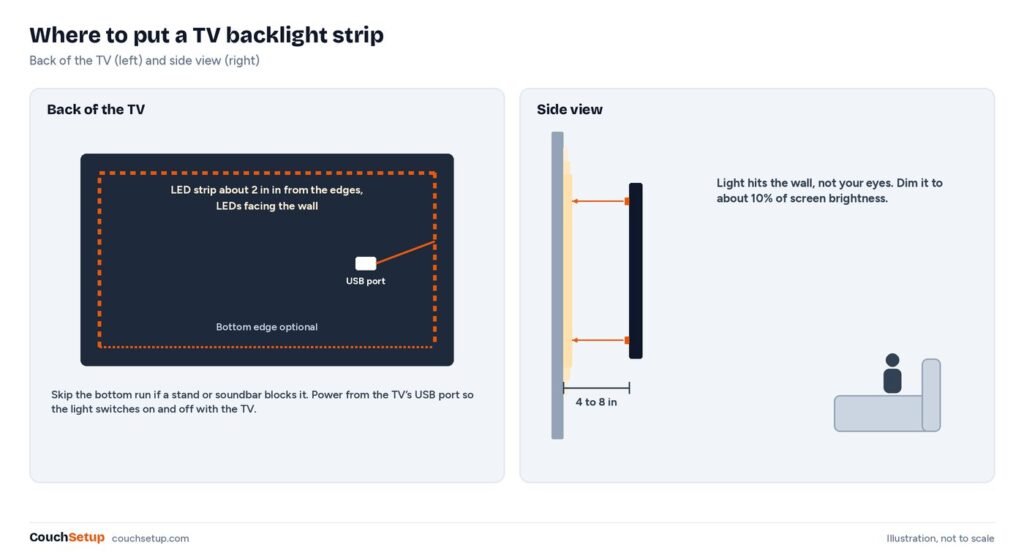
Stick the strip a couple of inches in from the edges of the TV back, LEDs facing the wall. Keep the TV 4 to 8 inches from the wall if you can so the glow spreads. Power it from the TV’s USB port so it turns on with the TV. MediaLight says its strips under 4 meters draw under 500 mA, which a standard USB 2.0 port supplies, and even its longest strips stay under 900 mA. If a long strip flickers, use a wall adapter.
Set the brightness by eye
- Put the TV in the picture mode you actually watch in (our TV picture settings guide covers this).
- Turn off the room lights and play a bright full-screen pattern or scene.
- Start the backlight at its lowest level and raise it slowly.
- Stop when the wall glow is clearly there but far dimmer than the screen, a soft halo rather than a second lamp.
- Play a dark scene. If you notice the wall more than the picture, go a step or two lower.
Camera and HDMI sync kits
Mount the Govee camera centered on top of the TV and run the app calibration; GameSpace describes placing eight small markers on the screen so the camera finds the edges. They found 5 to 12 inches between TV and wall worked best. For the Hue box, everything you want synced has to plug into it, so your streaming stick, console and cable box all move from the TV to the box. Check how audio gets to your soundbar; the box has an eARC port, and our HDMI ARC and eARC guide explains the connection.
Common mistakes
- Too bright. If the glow competes with the picture, it lowers perceived contrast.
- Wrong white. Cheap “white” strips are often far from 6500K. Look for 6500K or D65 and CRI 90+.
- LEDs facing forward. Any light toward the couch adds glare.
- Using sync color as bias light. Switch to a white mode for serious movies.
- Messy cables. A lit wall shows every wire; see hiding TV wires.
How we picked
We gathered the measurements and expert reviews for every pick, put them side by side, and worked out the room-fit numbers the individual reviews leave out. We added the bias lighting guidance from ISF, SMPTE and MediaLight, and the strip-length table is our own calculation from standard screen sizes. Every source is listed at the end.
FAQ
How long a strip for a 55-inch TV?
About 11 feet (3.4 m) for all four sides, or 7.5 feet (2.3 m) for the top and sides, set 2 inches in from the edges. Round up to the next kit size.
How long a strip for a 65-inch TV?
About 13 feet (4.1 m) for four sides or 9 feet (2.8 m) for three.
Is a backlight worth it on an OLED?
Yes, mainly for comfort. OLED blacks are already deep, so the gain is less eye fatigue in a dark room. Keep it dim.
Does bias lighting really reduce eye strain?
It helps many people. A soft light behind the screen narrows the gap between a bright screen and a dark room, so your eyes adjust less.
Do backlights work with Netflix and other apps?
Bias lights and camera kits do. HDMI sync boxes only work with devices plugged into them.
Should it be on for HDR movies?
Yes. SMPTE’s HDR guidance is roughly 4.5 nits behind the screen, a dim glow. Start where you have it for SDR and lower it if the wall distracts you.
Related guides
- Small living room home theater
- Home theater setup guide
- TV picture settings guide
- Best TVs for small rooms
Sources: MediaLight Mk2 specs · MediaLight: bias lighting fundamentals · MediaLight FAQ · MediaLight UK: brightness reference pattern · Wikipedia: bias lighting · Matter Alpha: Govee TV Backlight 3 Pro review · GameSpace: Govee TV Backlight 3 Pro review · Philips Hue Play HDMI Sync Box 8K · The Ambient: Hue Sync Box 8K review