

CouchSetup is reader-supported. When you buy through links on our site, we may earn an affiliate commission at no extra cost to you. Learn more
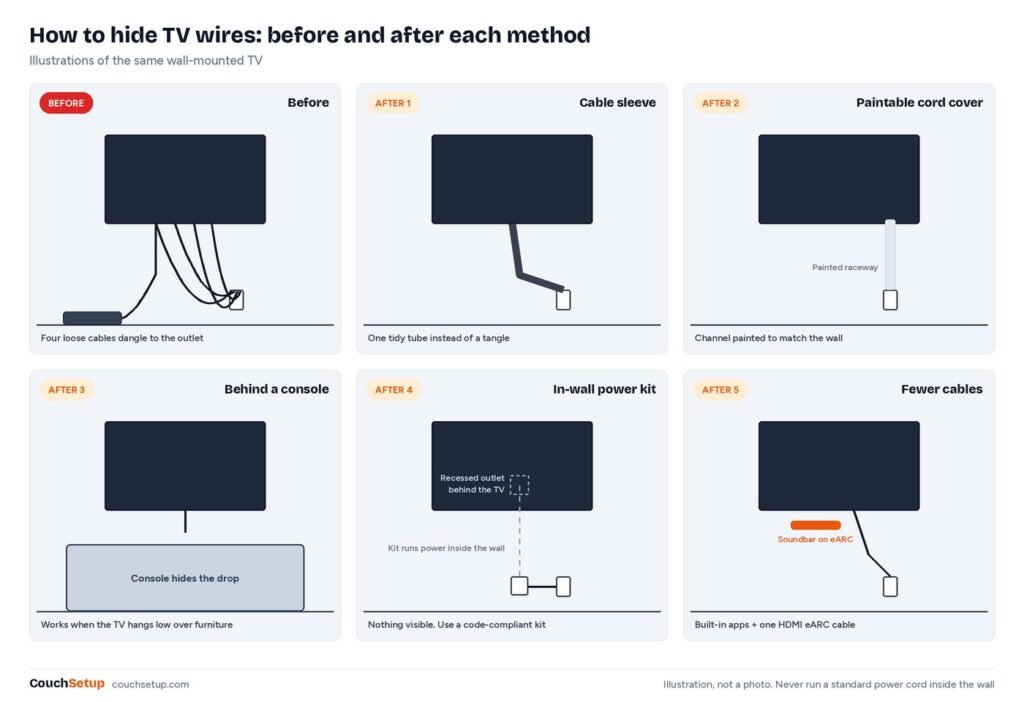
A wall-mounted TV looks great until three black cables dangle down to the outlet. Hiding them is one of the cheapest, quickest upgrades you can make, and you can hide TV wires in an afternoon. The method depends on two questions: can you cut into the wall, and where are the outlet and your devices?
Our verdict
Short answer: renting, or want it done fast? A paintable cord cover on removable strips gives the cleanest result without damage. Own the place and want it invisible? Use a code-compliant in-wall power kit like the Wiremold CMK70. Never push the TV’s own power cord inside the wall.
The five methods compared
| Method | Cost | Time | Renter-friendly | Look |
|---|---|---|---|---|
| 1. Cable sleeve | Low | 10 min | Yes | Tidy, still visible |
| 2. Cord cover (raceway) | Low | 30 min | Yes, with removable strips | Clean, paintable |
| 3. Behind furniture | Free | 15 min | Yes | Depends on layout |
| 4. In-wall power kit | Medium | 1 to 2 hours | No | Invisible |
| 5. Fewer cables | Varies | 30 min | Yes | Less to hide |
What most cable guides don’t tell you
Count your cables before you buy a cover
Most people buy a cord cover first and find it’s too narrow. List every cable that has to reach the TV, because the type decides what can go in the wall:
| Cable | Type | Inside the wall? |
|---|---|---|
| TV power cord | Line voltage (120V) | No, needs an in-wall power kit or a new outlet |
| HDMI from a box or console | Low voltage | Yes, with in-wall rated (CL2 or CL3) cable |
| HDMI eARC to a soundbar | Low voltage | Yes |
| Ethernet | Low voltage | Yes; worth adding while the wall is open |
| Soundbar or sub power | Line voltage | No; plug in below the TV |
A channel sized for one power cord and two HDMI cables won’t fit a power cord, three HDMI and Ethernet. Buy the next size up, or cut the count first (method 5).
Moving the console away can break 4K 120Hz
Putting boxes in a cabinet across the room is a great way to cut visible wires, but Anker says passive HDMI 2.1 cables only go around 10 feet before signal quality suffers at high bandwidth. Standard passive cables reach about 25 feet for lower bandwidth, active cables about 100 feet and active optical about 300. So a 12-foot run to a PS5 needs an active or optical cable, not a longer passive one.
Paying a pro adds up fast
| Option | Typical cost (Angi) |
|---|---|
| Cord cover | $10 to $150 depending on length |
| Cable sleeve | From about $20 |
| Pro concealed wiring, power and HDMI in wall | $75 to $300 |
| Pro TV mounting | About $150 to $350 |
| Electrician for a new outlet | $65 to $150 per hour |
Done separately, pro mounting plus in-wall wiring can run from about $225 to $650. Angi also lists concealed wiring as a $150 to $300 add-on to a mounting job, so ask for one combined quote.
Method 1: a cable sleeve
A split fabric or neoprene sleeve wraps every cable into one tube. It’s the fastest fix for a TV on a stand and works down the pole of a floor stand. One tidy line looks far better than a tangle. Renters, see our no-drill TV setup.
Method 2: a paintable cord cover
A slim plastic channel that sticks to the wall. Lay the cables in, snap the lid shut, paint it to match and it nearly vanishes.
Legrand Wiremold CordMate II Kit
Best for Renters and quick, clean results
- Paintable channel with fittings for corners
- Holds power and HDMI cables
- Adhesive backing, no tools needed
- Cut to length
Prices change often, so check today’s price on Amazon.
- Plan a straight line from the TV down to the outlet, or down then along the baseboard.
- Clean the wall with rubbing alcohol.
- Cut the channel with a fine-tooth saw or strong scissors.
- Stick it on, lay in the cables, snap it shut.
- Paint it with wall paint.
Renters: the factory adhesive can pull paint off, so use removable mounting strips instead.
Method 3: hide them behind furniture
If the TV sits low, a console directly underneath can hide the whole drop, and some have cable holes. A tall plant or slim bookshelf beside the TV hides a vertical run too.
Method 4: an in-wall power kit
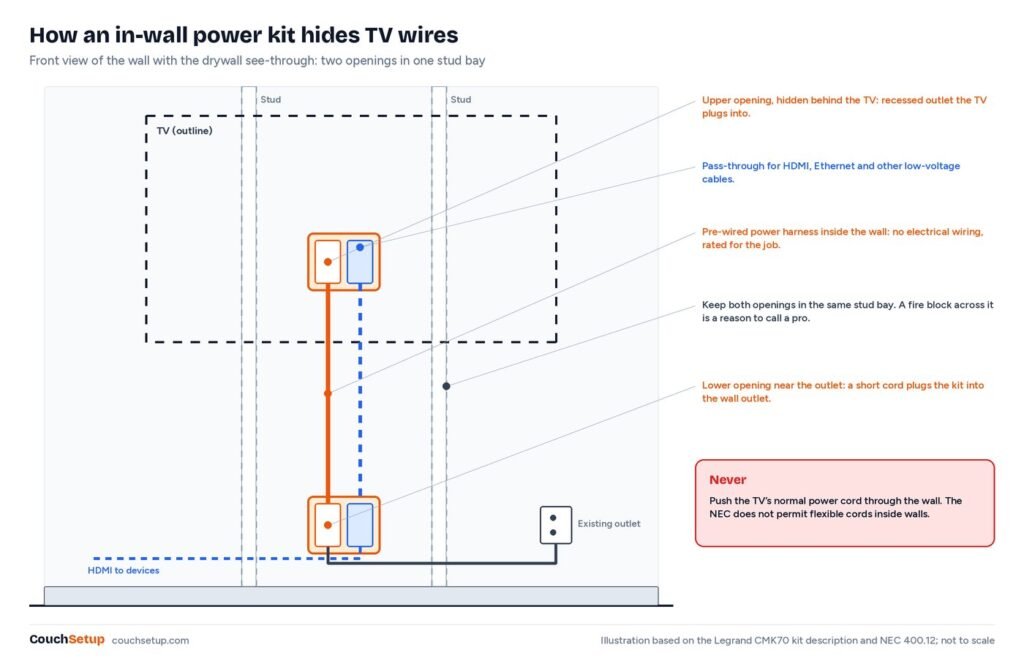
The National Electrical Code (section 400.12) says flexible cords may not be run through holes in walls or concealed by walls. A TV’s power cord is a flexible cord, so tucking it into the wall breaks both rules. An in-wall kit gets around that with a pre-wired connection inside the wall and a recessed outlet behind the TV. Low-voltage cables like HDMI and Ethernet aren’t covered by that section.
Legrand Wiremold CMK70 In-Wall TV Power Kit
Best for Homeowners who want a completely clean wall
- Recessed outlet behind the TV
- Plug-and-play power harness, no electrical wiring
- Pass-through for HDMI and low-voltage cables
- Installation tools included, per Legrand
Prices change often, so check today’s price on Amazon.
Legrand describes the CMK70 as plug and play, with no electrical termination required, and says the tools you need are included. You cut one hole behind the TV and one near the floor, feed the harness and cables between them, plug the bottom into your normal outlet and the TV into the recessed one up top.
Plan it so it works first time
- Mark the screen center and mount plate first, so the top opening hides behind the TV.
- Keep both openings in the same stud bay; crossing a stud is a different project.
- If your fish tape stops at the same height every time, it’s probably a fire block. Good moment to call a pro.
- Avoid exterior walls if you can; insulation makes fishing much harder.
- Pull a spare HDMI or Ethernet cable, or leave a pull string, for future upgrades.
- Leave slack at both ends so the mount can tilt.
Brick, concrete and plaster walls can’t be fished. Use a painted surface raceway, mechanically fastened if adhesive won’t hold on rough brick. Not sure which bracket? See types of TV wall mounts.
Method 5: fewer cables
- Use the TV’s built-in apps instead of a separate box.
- Connect the soundbar with one HDMI eARC cable; see HDMI ARC vs eARC.
- Move consoles to a cabinet with one longer HDMI cable (active if over about 10 feet for 4K 120Hz).
- Hide a power strip behind furniture so only one cord reaches the outlet.
For that power strip: buy a UL-listed one with a breaker and surge protection, never plug one strip into another, stop using any that feels hot, and leave airflow around it.
Tricky spots
- Over a fireplace: chimneys, fire blocks and heat make in-wall work risky. A painted raceway down beside the fireplace is easier.
- Corner TV: run cables straight down the corner itself, where they’re least visible.
- On a stand: sleeve them, use the console’s cable holes, and put a power strip behind it.
- Floor stand: use the column’s built-in channel or clips.
Before you close it up
Test picture, sound and 4K 120Hz before you snap covers shut or close a wall. No sound usually means the cable isn’t in the eARC port or the TV’s output isn’t set to the soundbar. Flicker at 4K 120Hz usually means a long or uncertified cable; HDMI.org says genuine Ultra High Speed cables carry a scannable QR label. Lost remote control of the soundbar? Turn HDMI-CEC back on. Building a gaming corner? See our couch gaming setup.
How we picked
We gathered the specs, code text and cost data for every method, put them side by side, and worked out the numbers the individual guides leave out. The code wording is from NEC 400.12, product details from Legrand, cable lengths from Anker and costs from Angi’s 2026 data; the combined cost range is our own sum. Every source is listed at the end.
FAQ
Can I run a TV power cord inside the wall?
No. NEC 400.12 doesn’t allow flexible cords through or inside walls. Use an in-wall power kit, or have an electrician add an outlet.
Is it safe to run HDMI in the wall?
Yes. For a permanent install, use in-wall rated (CL2 or CL3) cable.
How do I hide TV wires without cutting the wall?
A paintable cord cover, a cable sleeve, or furniture in front of the cable drop.
How long can a hidden HDMI cable be?
Passive HDMI 2.1 cables work best up to about 10 feet for 4K 120Hz, per Anker. Use active or optical for longer runs.
Do I need an electrician?
Not for cord covers, sleeves or a plug-in kit like the CMK70. Yes for a new hard-wired outlet behind the TV.
Related guides
- Renter-friendly TV setup
- Types of TV wall mounts
- Small living room home theater
- Home theater setup guide
Sources: Legrand CMK70 product page · NEC 400.12 uses not permitted · Angi: cost to mount a TV · Angi: how to hide wires · Anker: longest HDMI cable · HDMI.org: Ultra High Speed HDMI cable · Wellesley College: power strip safety