
CouchSetup is reader-supported. When you buy through links on our site, we may earn an affiliate commission at no extra cost to you. Learn more
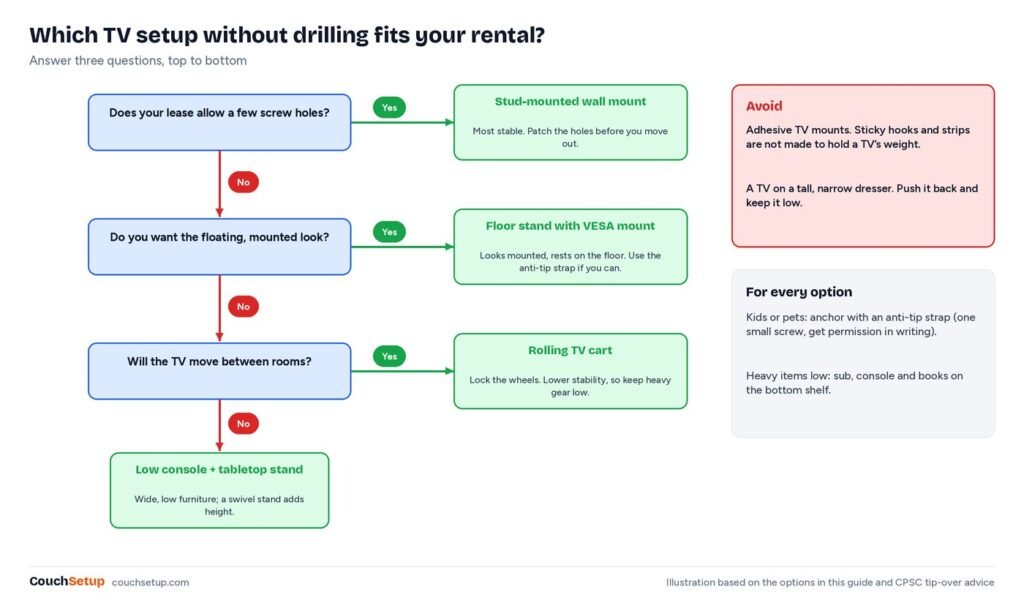
Renting doesn’t mean a TV perched on a wobbly dresser and a nest of cables on the floor. You can get the clean, mounted look without a single hole, and take the whole apartment TV setup with you when you move. First, check your lease: some landlords allow small screw holes if you patch them, others forbid any drilling. Everything below works with zero holes, or one tiny one for safety.
Our verdict
Short answer: a floor stand with a VESA mount, a cable sleeve and a compact soundbar with night mode give you the mounted look and good sound with nothing to patch. Add an anti-tip strap if your landlord allows one small screw, and RF TV headphones if you watch late.
Top picks at a glance
Best floor stand
Perlegear Floor TV Stand with Power Strip (PGFS06)
Renters, corners and rooms where you cannot drill
$ BudgetBest TV headphones
Sennheiser RS 275
Late-night movies without disturbing anyone
$$$ PremiumBest budget TV headphones
Avantree Ensemble
Budget buyers who want dock-and-go simplicity
$ BudgetWhat product listings don’t tell you
Floor stand listings lead with “fits up to 75 inches.” We checked the spec table of the stand we recommend against standard TV sizes, and it’s worth reading the small print.
The listing and the spec table don’t always agree
Perlegear’s own PGFS06 page says “fits 32 to 75-inch TVs” in the title but 32 to 70 inches in the spec table, and gives the TV plate height as both 41.4 to 46.5 inches and 35.2 to 46.7 inches. When a page disagrees with itself, go by the smaller size limit and the 110 lb weight limit, and measure the plate height yourself once it’s built.
The base is much narrower than the TV
| TV | Screen width | PGFS06 base | TV overhang each side |
|---|---|---|---|
| 55-inch | about 48 in | 21.65 × 15.7 in | about 13 in |
| 65-inch | about 57 in | 21.65 × 15.7 in | about 17.5 in |
| 70-inch | about 61 in | 21.65 × 15.7 in | about 20 in |
That’s normal for floor stands, and fine within the limits. But it’s why a bump from the side or a climbing child is the real risk, and why the anti-tip strap below matters more than the brochure suggests.
Tip-overs are mostly a TV problem
The CPSC’s 2022 report counted 581 tip-over deaths involving furniture, TVs or appliances since 2000; 472 were children, and a TV was involved in 71% of the child deaths. It estimated about 22,500 emergency-room visits a year (2018 to 2020). Its chair said most anti-tip kits cost under $20 and install in under 20 minutes.
1. A floor stand with a built-in mount
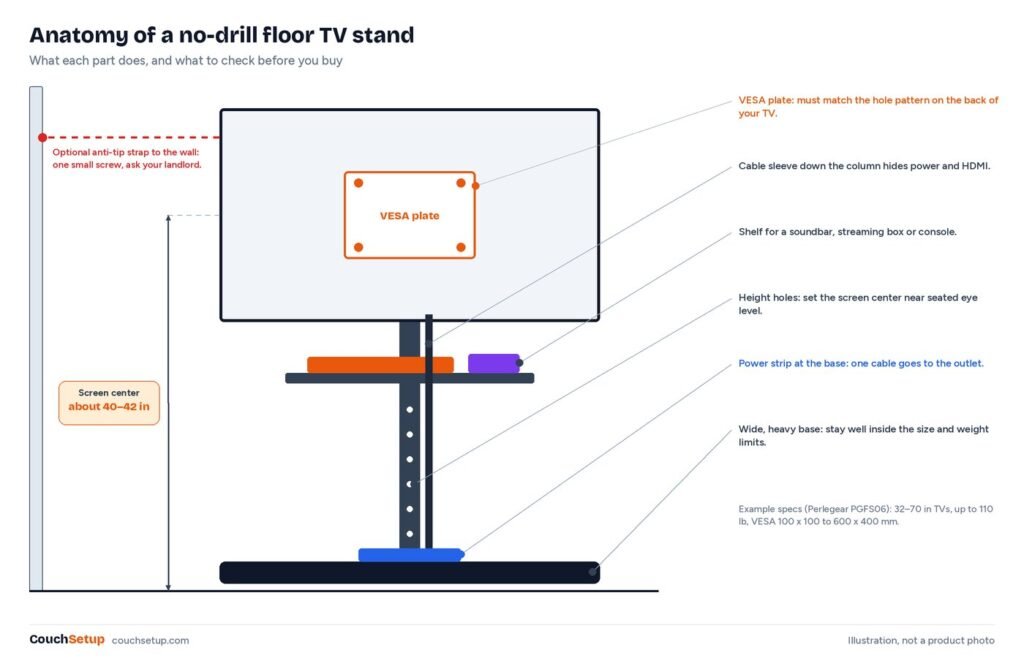
A floor stand holds the TV on a real VESA mount, the same standard wall mounts use, so it looks mounted but rests on the floor. Good ones adjust in height and have a shelf for a soundbar or streaming box.
Perlegear Floor TV Stand with Power Strip (PGFS06)
Best for Renters, corners and rooms where you cannot drill
- Rated for 32 to 70-inch TVs up to 110 lb
- VESA 100 x 100 to 600 x 400 mm
- 12 height positions, tilt and swivel
- 3 AC outlets and 2 USB ports
Prices change often, so check today’s price on Amazon.
Perlegear lists 12 height positions, +8°/-5° of tilt, ±35° of swivel, and three AC outlets plus two USB ports built in, which cuts down on loose power strips.
- VESA pattern: the hole spacing on your TV’s back must be within the stand’s range.
- Weight and size: stay well inside both, especially with kids or pets.
- Height: aim for the screen center around 40 to 42 inches from the floor for couch viewing.
Assembly in eight steps
- Check your TV’s VESA pattern and weight against the stand’s limits.
- Build the base and column on a rug or the box lid so you don’t scratch the floor.
- Lay the TV face down on a blanket and screw on the bracket. Don’t force screws that are too long.
- Set the height before hanging the TV.
- Hang it with two people, then tighten the safety screws.
- Put the heaviest items, like a subwoofer or console, on the lowest level.
- Run cables down the column in a sleeve, with a little slack for tilt and swivel.
- Give the top a gentle push. If it rocks, recheck the base bolts and use the strap.
Skip adhesive TV mounts
Sticky hooks and removable strips are made for picture frames, not a heavy, constant load on a patch of paint. If the adhesive or the paint lets go, the TV falls. A floor stand, a low console or a single anti-tip screw is far safer.
Other no-drill options
| Option | Looks like | Stability | Best for |
|---|---|---|---|
| Floor stand with VESA mount | A wall-mounted TV | Good; better with a strap | Living rooms |
| TV on its feet on a low console | A classic TV stand | Good if wide and low | Any size the console holds |
| Tabletop swivel stand on a console | Floating above furniture | Good | Bedrooms, angled seating |
| Rolling TV cart | A movable stand | Lower; lock the wheels | Studios, shared rooms |
In a corner, angle the stand so the screen faces the main seat. In a studio, a swivel stand turns the TV from sofa to bed. Match the screen to your seat first with our TV size calculator, and see small living room layouts for where the couch and walkway go.
2. Hide the cables without damage
- A fabric or plastic cable sleeve down the stand’s column: cheap and fully removable.
- Paintable cord covers stuck with removable mounting strips, not the permanent tape they ship with.
- Run cables behind a console, plant or bookshelf.
- Use fewer cables: the TV’s built-in apps, and one HDMI eARC cable to the soundbar.
More ideas in our guide to hiding TV wires.
3. Sound that won’t bother the neighbors
A compact soundbar with night mode keeps dialogue clear at low volume; see our best soundbars for small rooms. Bass travels through floors and walls far more than voices, so lower the sub level before the main volume, avoid shared walls if you can, and put a rug under the setup. If voices are still hard to follow, try our dialogue fixes.
For late nights, RF TV headphones with their own transmitter have much less delay than typical Bluetooth. More picks in our best wireless headphones for TV.
Sennheiser RS 275
Best for Late-night movies without disturbing anyone
- BTA1 transmitter with HDMI ARC, optical and 3.5mm inputs
- Up to 50 hours per charge, up to 50 m range
- Hearing profiles, balance and EQ in the app
- Auracast lets extra compatible headphones join
Prices change often, so check today’s price on Amazon.
Avantree Ensemble
Best for Budget buyers who want dock-and-go simplicity
- Charging dock doubles as the transmitter
- Optical and 3.5mm inputs, up to 2 headsets
- Up to 35 hours of playback
- aptX Adaptive, auto-pairing out of the box
Prices change often, so check today’s price on Amazon.
4. Tip-over safety in a rental
- Anchor it. An anti-tip strap uses one small screw. Ask your landlord in writing; many say yes for child safety.
- Low, wide base. Push the TV as far back as it goes on a console.
- Load low. Heavy gear on the bottom shelf.
- Don’t tempt climbers. Keep remotes and toys off the stand.
The CPSC still recommends adult supervision around young children even with an anchored setup.
If your lease allows a few holes
According to iPropertyManagement’s summary of landlord rules, small nail or thumbtack holes are generally normal wear and tear, while large drilled holes or many holes in one spot count as damage, often charged at about $5 to $25 per hole or the repair cost. A TV wall mount uses large bolts, so assume it counts as damage unless your lease says otherwise. State laws differ, so get permission in writing.
To patch small holes, DAP recommends pressing in spackling in layers about 1/4 inch thick, leaving the last one slightly mounded, then sanding, priming and touching up with matching paint. Lightweight spackling for tiny nail holes usually needs no sanding.
Moving day
Keep the TV upright; Dan’s Van Lines warns that laying a flat-screen flat puts uneven stress on the panel. Use the original box if you kept it. Bag and label the VESA screws, tape them to the stand, and photograph the cable setup before unplugging. Before you hand back the keys, pull adhesive strips slowly straight down and photograph the walls for your deposit.
How we picked
We gathered the specs and expert guidance for every recommendation, put them side by side, and worked out the numbers the listings leave out. Stand specs come from Perlegear’s own page, the overhang table is our own sums, and the safety, lease and repair advice comes from the CPSC, iPropertyManagement and DAP. Every source is listed at the end.
FAQ
How can I mount a TV without drilling?
Use a floor stand with a VESA mount. It looks like a wall mount but stands on the floor. Adhesive TV mounts aren’t safe.
Are floor TV stands stable?
Good ones are, within their limits. Choose a wide, heavy base, load it low and use an anti-tip strap if you can.
Can a floor stand hold a 65-inch TV?
Many can. The Perlegear PGFS06 is rated to 70 inches and 110 lb in its spec table. Check both against your TV’s manual.
Can I anchor a TV without losing my deposit?
Usually. An anti-tip strap needs one small screw, which is easy to patch. Get your landlord’s OK in writing.
Is it OK to lay a flat-screen TV down when moving?
No. Move it upright, ideally in its original box.
Related guides
- How to hide TV wires
- Best soundbars for small rooms
- Small living room home theater
- Types of TV wall mounts
Sources: Perlegear PGFS06 floor TV stand · Anchor It (CPSC): tip-over report · iPropertyManagement: landlord charges for nail holes · DAP: Spackling 101 · Dan’s Van Lines: how to move a TV · Crutchfield: wireless TV headphones