
CouchSetup is reader-supported. When you buy through links on our site, we may earn an affiliate commission at no extra cost to you. Learn more
There are five main types of TV wall mounts: fixed, tilting, full-motion, ceiling and pull-down. They differ in how far the TV sits off the wall, how much you can aim it, what they cost and how hard they are to put up. Picking the type is the easy half. The harder half is matching it to your wall, which is where most mounting problems start.
Our verdict
Quick answer: if the TV sits at eye level in front of one couch, a fixed mount is cheapest and slimmest. If it sits a little high or catches window glare, go tilting. Corners, open-plan rooms and several seats need full-motion. Over a fireplace, only a pull-down mount brings the screen back to eye level. Use a ceiling mount only when no wall works.

Top picks at a glance
Best fixed mount
Mounting Dream MD2163-K
TVs at eye level facing one main seat
$ BudgetBest tilting mount
Mounting Dream MD2268-LK
Bedrooms and TVs slightly above eye level
$ BudgetBest full-motion
ECHOGEAR EGLF2
Corners, open-plan rooms and TVs from 42 to 90 inches
$$ Mid-rangeAll the types compared
| Type | How it moves | Wall gap (our pick) | Best for | Cost | Install |
|---|---|---|---|---|---|
| Fixed | Doesn’t move | Closest of all | TV at eye level facing one sofa | Budget | Easy |
| Tilting | Angles down a few degrees | About 1.5 in | Bedrooms, TVs a bit high, glare | Budget | Easy |
| Full-motion | Pulls out, swivels, tilts | 2.4 in folded, 22 in out | Corners, open-plan rooms | Mid-range | Moderate to hard |
| Ceiling | Hangs on a pole; tilts, swivels | 22 to 36 in below the ceiling | Glass walls, kitchens, sloped ceilings | Mid-range | Hard |
| Pull-down | Drops down and out | 5.7 in retracted, drops 27 in | Over a fireplace | Premium | Hard |
| Motorized | Moves on a motor | Varies | Ceilings, cabinets, high walls | Premium | Pro install |

What the spec sheets don’t tell you
Mount listings lead with screen size and a weight rating. Those numbers are about the mount. Whether your TV stays on the wall depends on the wall, and on how far the arm sticks out. Putting the published figures side by side makes that clearer.
A full-motion arm can multiply the pull on the wall about nine times
The top bolts of a wall plate carry a turning force roughly equal to the TV’s weight times how far it sits from the wall. Take a 60 lb TV on the ECHOGEAR EGLF2. Folded at 2.4 inches, that’s about 144 inch-pounds. Pulled out to its full 22 inches, it’s about 1,320, roughly nine times as much, from the same TV on the same bolts. That’s why Audioholics and the mount makers keep saying full-motion arms need solid studs.
| Same 60 lb TV | Distance from wall | Rough turning force on the bolts |
|---|---|---|
| Tilting mount (MD2268-LK) | about 1.5 in | about 90 in-lb |
| Full-motion, folded (EGLF2) | 2.4 in | about 144 in-lb |
| Full-motion, extended (EGLF2) | 22 in | about 1,320 in-lb |
Makers don’t agree on the safety margin
SANUS says it tests its UL-certified mounts at four times the rated load. MantelMount wants total anchor capacity of at least four times the TV’s weight. Mounting Dream’s manual asks for a wall that holds five times the TV and mount together. Use the strictest number your mount’s manual gives, and add more for a full-motion arm.
A stud finder can lie on steel studs
Many apartments, condos and basements are framed with steel, not wood. MantelMount notes the steel is often thin 25-gauge, so ordinary lag bolts strip out. A stud finder still beeps, which is what makes it risky. If a magnet sticks along the whole stud line, use toggle bolts made for metal studs, and keep heavy full-motion arms off it unless the maker approves.
Fixed mount
A flat wall plate plus two brackets that bolt to the TV. The TV hooks on and stays put, so it’s the slimmest, simplest and cheapest type. It suits a screen at seated eye level facing one main sofa with no glare.
The downside is access. Plugging in a new HDMI cable usually means lifting the set off, and Audioholics notes rear-facing ports may need 90-degree adapters.
Tilting mount
A tilting mount adds a hinge so the screen angles down a few degrees, usually somewhere between 5 and 15. Our pick tilts 8 and sits about 1.5 inches off the wall. It’s a good fit for bedrooms, TVs above a console, and rooms where ceiling lights reflect in the screen.
Audioholics recommends tilting for most installs because it costs little more than fixed and adds glare control. Just don’t expect a few degrees to rescue a TV hung far too high. Our guide on how high to mount a TV shows where the screen center should land.
Full-motion mount
The TV sits on a folding arm, or two arms for bigger screens, so you can pull it out, swing it and tilt it. Audioholics says single-arm designs typically reach about 10 inches and dual-arm models 30 or more. It’s the type for corners, open-plan rooms where you watch from the kitchen too, and rooms with several seats.
Leave enough cable slack for the full swing. Audioholics suggests HDMI runs of at least 8 feet, with 12 being better. For a corner, they recommend an arm of 20 inches or more so a big screen clears both walls.
Tilting vs full-motion
| Feature | Tilting | Full-motion |
|---|---|---|
| Price | Budget | Mid-range and up |
| Distance from wall | About 1.5 in | Several inches folded |
| Glare control | Up and down only | Up, down and side to side |
| Corners | No | Yes, with a long arm |
| Load on the wall | Low | Much higher when extended |
| Reaching the ports | Fair | Easy, pull it out |
Ceiling mount
A pole bolted to a ceiling joist, with a head that tilts and swivels. It’s the answer when no wall works: glass walls, kitchens, bars, vaulted ceilings. You must hit a joist dead center, and concrete, I-beam and sloped ceilings need separate adapters. Unless you know what’s above the drywall, hire a pro.
Pull-down (mantel) mount
A gas-spring arm that keeps the TV high when you’re not watching and pulls it down and out in front of the mantel when you are. Samsung advises against putting a TV over a fireplace at all, citing heat, ash and neck strain, and this type exists to fix those problems.
Before buying, measure how far the mantel sticks out and check both the fireplace and TV manuals for heat limits. Samsung says its TVs should never go above 104°F.
Motorized and no-drill options
Motorized mounts drop from the ceiling, flip out of a cabinet or lower from above a fireplace by remote. They need power at the mount, cost the most and are best installed by a pro.
If you can’t drill, a floor stand or rolling cart holds the TV on a weighted base. Mount-It’s MI-876 cart, for example, takes 37 to 70-inch TVs, adjusts about 6 inches in height and has locking casters. Under-cabinet flip-down mounts are for small kitchen screens only: the MI-4200 manual lists screens up to 23 inches and 17.6 lb.
Renters should start with our guide to TV setup without drilling, and for big TVs on furniture see the best TV stands for a 65-inch TV.
Which type for your room
| Your room | Type | Why |
|---|---|---|
| Living room, TV at eye level, one sofa | Fixed | Slimmest and cheapest |
| TV a bit high above a console | Tilting | Angles the screen down toward you |
| Bedroom, TV above a dresser | Tilting | Aims at the bed and cuts lamp glare |
| Open-plan, or watching from the kitchen | Full-motion | Swivels toward wherever you are |
| Corner | Full-motion, long arm | The only type that angles across a corner |
| Over a fireplace | Pull-down | Brings the screen to eye level |
| Glass wall or sloped ceiling | Ceiling | Uses the joists instead |
| Renting, no drilling | Stand or cart | Nothing touches the wall |
Bedrooms have their own sightline math; our bedroom TV setup guide covers it.
One pick per type
Mounting Dream MD2163-K: best fixed mount
Mounting Dream MD2163-K
Best for TVs at eye level facing one main seat
- Fits 42 to 84 inch TVs, up to 132 lb
- VESA 200 x 100 to 600 x 400
- Low-profile design keeps the TV close to the wall
- For 16, 18 or 24 in wood studs or solid concrete
Prices change often, so check today’s price on Amazon.
A slim, no-fuss mount with a wide size range and a one-piece plate that handles 16, 18 or 24-inch studs or concrete. The catch: no movement, so reaching the ports means lifting the TV off.
Mounting Dream MD2268-LK: best tilting mount
Mounting Dream MD2268-LK
Best for Bedrooms and TVs slightly above eye level
- Fits 37 to 70 inch TVs, up to 132 lb
- VESA 200 x 100 to 600 x 400
- Tilts 0 to 8 degrees down
- About 1.5 in from the wall
- Fits studs up to 24 in apart
Prices change often, so check today’s price on Amazon.
Tom’s Guide calls it an inexpensive, very popular tilt mount and likes its quick-release straps. TechRadar’s review of the closely related MD2268-LK-02 praised the simple install and flush fit. The catch: Tom’s Guide notes there’s no level adjustment once it’s up, so get the plate dead level before the final bolts. And 8 degrees won’t fix a TV hung far too high.
ECHOGEAR EGLF2: best full-motion mount
ECHOGEAR EGLF2
Best for Corners, open-plan rooms and TVs from 42 to 90 inches
- Fits 42 to 90 inch TVs, up to 125 lb
- VESA 200 x 100 to 600 x 400
- Extends 22 in; folds to about 2.4 in
- Tilts 15 degrees down, 5 up; 130 degree swivel
- For studs 16 to 24 in apart
Prices change often, so check today’s price on Amazon.
Tom’s Guide’s top pick and a Bob Vila pick too. They praise the 22-inch reach and the leveling you can do after the TV is hung. The catch: it’s heavy, needs two solid wood studs, and a wide TV may not clear both walls in a tight corner.
Mount-It MI-509B: best ceiling mount
Mount-It MI-509B
Best for Kitchens, bars, glass walls and vaulted ceilings
- Fits 32 to 70 inch TVs, up to 110 lb
- VESA 200 x 200 to 600 x 400
- Tilts up to 25 degrees; swivels 360 degrees
- 13.8 in of height adjustment, about 22 to 36 in total drop
- Ceiling plate pivots for sloped ceilings
Prices change often, so check today’s price on Amazon.
The pivoting ceiling plate is what lets it work on sloped ceilings, and a long-pole version exists for tall rooms. The catch: it must hit a joist, and cables hang in view unless you sleeve them along the pole.
MantelMount MM540: best pull-down mount
MantelMount MM540
Best for TVs above a fireplace or any wall that is too high
- Fits 44 to 80 inch TVs, 20 to 90 lb
- Drops up to 27 in
- Handles turn red at 110 degrees F to warn of heat
- Swivels 30 degrees each way
- Clears mantels up to 18 in deep; soundbar bracket built in
Prices change often, so check today’s price on Amazon.
It clears mantels up to 18 inches deep, and its handles turn red at 110°F as a heat warning. The catch: it’s the priciest option here and sits about 5.7 inches off the wall when retracted.
Matching the mount to your TV and wall
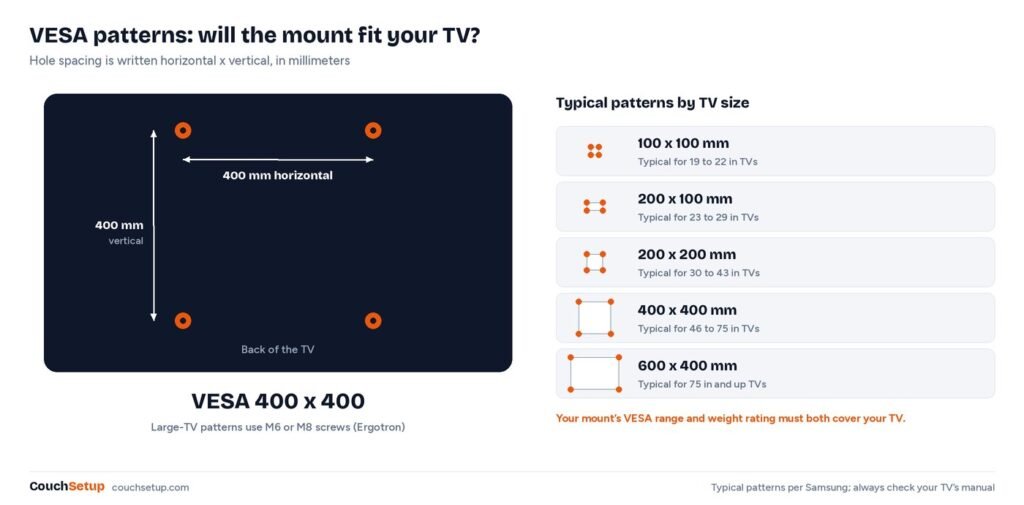
VESA is the hole pattern on the back of the TV, in millimeters, horizontal by vertical. The mount’s range must include your exact pattern. Samsung’s typical patterns are a useful guide, but always check your manual:
| TV size | Typical VESA (mm) |
|---|---|
| 19 to 22 in | 100 x 100 |
| 23 to 29 in | 200 x 100 |
| 30 to 43 in | 200 x 200 |
| 46 to 75 in | 400 x 400 |
| 75 in and up | 600 x 400 |
Use the TV’s weight without its stand. Then check the wall:
- Wood studs: the gold standard, usually 16 or 24 inches apart. Drill pilot holes and drive the lag bolts into the stud centers, not the edges.
- Drywall only: light TVs at most, with heavy toggle bolts. Mounting Dream says not to mount on drywall alone.
- Brick: MantelMount says drill into the brick, not the mortar, with a hammer drill and sleeve anchors.
- Concrete: hammer drill, masonry bit and the anchors the mount maker specifies.
- Plaster and lath: brittle. MantelMount suggests a plywood plate across the framing first for heavier TVs.
- Steel studs: see the warning above.
Install tips and cables
Fixed, tilting and full-motion mounts are a two-person job. You’ll need a stud finder, a drill and bits, a level, tape measure, painter’s tape and a socket wrench. Mark the screen center at seated eye level, scan for wires and pipes, level the plate allowing for its offset from the screen center, then hang the TV with a helper and engage the safety locks. Leave room below for a soundbar if you’ll add one, like our compact soundbar picks.
Plan the cable route before you drill. A paintable raceway is the easy fix and an in-wall kit looks cleanest. Never run a regular power cord inside the wall; that’s what in-wall power kits are for. Our guide to hiding TV wires compares the options.
Call a pro for ceiling, motorized and pull-down mounts, and for steel studs, plaster, brick or stone, very heavy TVs and in-wall power.
How we picked
We gathered the measurements and expert reviews for every pick, put them side by side, and worked out the room-fit numbers the individual reviews leave out. We added each maker’s spec sheet and installation guidance, and the turning-force table is our own simplified math from the published wall gaps. Every pick is sold new in the US, and every source is listed at the end.
FAQ
What are the different types of TV wall mounts?
Fixed, tilting, full-motion (articulating), ceiling and pull-down mantel mounts. Motorized mounts are a niche option, and corners use a long full-motion arm.
Which TV mount is best for a corner?
A full-motion mount with a long arm. Audioholics suggests 20 inches or more for large TVs so the screen clears both walls.
Is a tilting or full-motion mount better?
Tilting, when everyone watches from in front of the TV: cheaper, slimmer and easier. Full-motion for corners, open-plan rooms and several viewing spots.
What is the strongest type of TV mount?
Fixed and tilting put the least strain on the wall because the TV sits close to it. A full-motion arm acts as a lever and needs more margin.
Can you mount a TV on drywall without studs?
Only light TVs, with heavy-duty toggle bolts, and only if the wall can carry the weight. Many makers, including Mounting Dream, say not to.
What TV mounting options need no drilling?
Floor stands, rolling carts and ordinary TV stands. Ceiling and under-cabinet mounts still screw into a joist or cabinet.
Do tilting mounts reduce glare?
A little. Tilting down can move a ceiling light or high window reflection out of view. For a window beside the TV, a full-motion mount that swivels helps more.
Related guides
- How high to mount a TV
- How to hide TV wires
- TV setup without drilling
- Best TV stand for a 65-inch TV
Sources: Samsung: before wall mounting your TV · Ergotron: the VESA standard · Audioholics: how to choose a wall mount · MantelMount: metal studs, brick, concrete and plaster · Tom’s Guide: best TV mounts · SANUS: TV mount comparison guide · Mounting Dream MD2163-K · B&H: Mount-It MI-509B specs · B&H: Mount-It MI-876 cart · Mount-It MI-4200 manual (PDF)