This speaker placement calculator gives you the position of every speaker in a 5.1, 7.1 or Dolby Atmos system, measured from your own seat. Good surround sound is mostly about angles. Put each speaker at the right angle from your seat and effects move smoothly around the room; get it wrong and voices drift or the back speakers sound like they’re in another room. Pick your layout, enter your seat-to-TV distance, and get positions plus a top-view diagram.
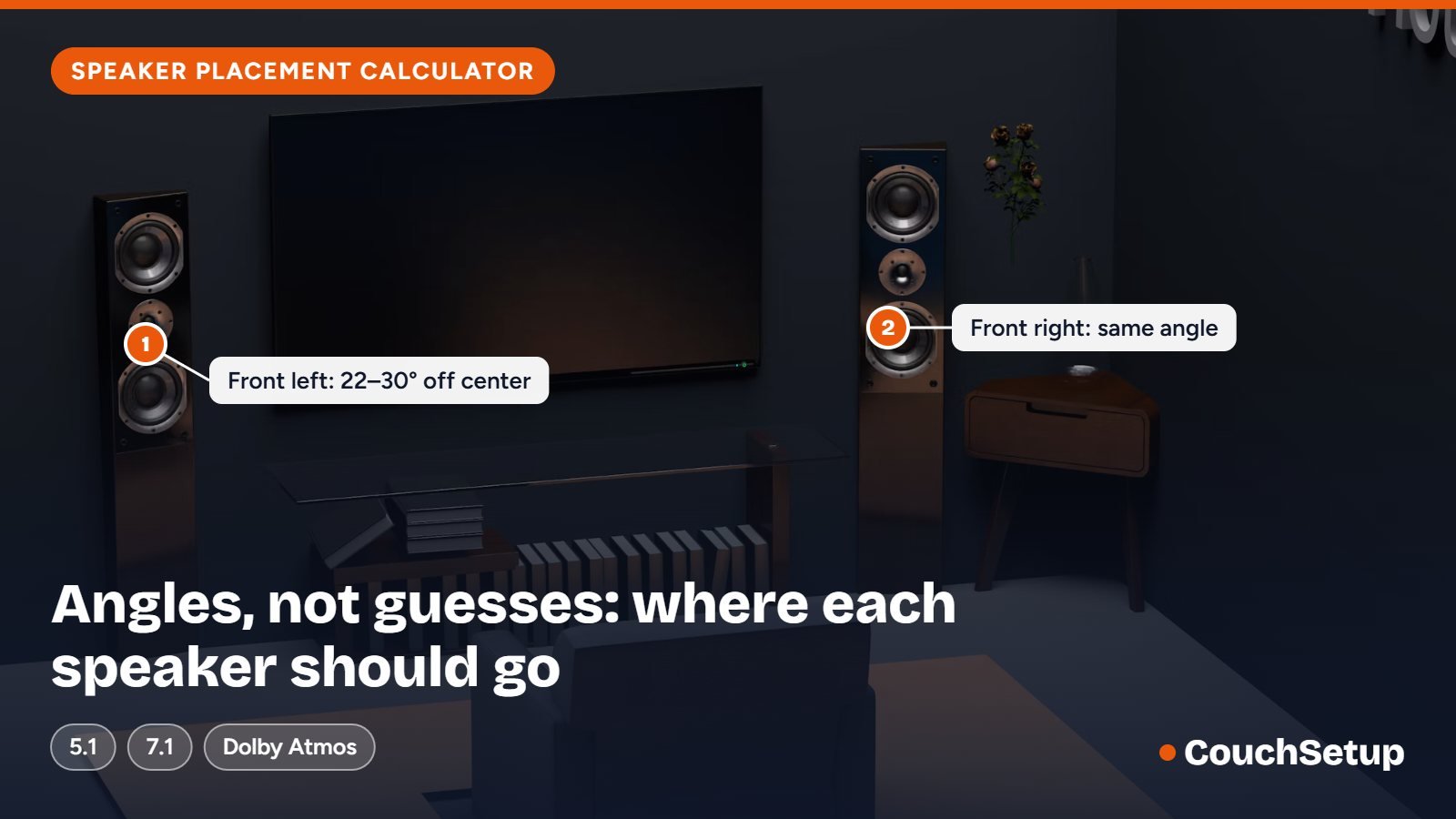
Positions assume every speaker sits the same distance from your seat as the TV. If a wall is in the way, keep the angle, move the speaker closer and set its distance in your AV receiver (or run its auto-calibration).
| Speaker | Angle from main seat | Used in | Placement tip |
|---|---|---|---|
| Center | 0° | All | Just above or below the screen, tilted toward your ears. |
| Front left / right | 22–30° | All | Tweeters at ear height, toed in toward the main seat. |
| Surround left / right | 110–120° | 5.1, 5.1.2, 5.1.4 | Slightly behind you, 1–2 ft (30–60 cm) above ear height. |
| Side surround left / right | 90–110° | 7.1, 7.1.4 | Beside or just behind you, 1–2 ft above ear height. |
| Rear surround left / right | 135–150° | 7.1, 7.1.4 | Behind you, about as wide apart as the front speakers. |
| Top middle (Atmos .2) | 65–100° up | 5.1.2 | On the ceiling just in front of or above the seat, in line with the front speakers. |
| Top front (Atmos .4) | 30–55° up | 5.1.4, 7.1.4 | On the ceiling in front of the seat, in line with the front speakers. |
| Top rear (Atmos .4) | 125–150° up | 5.1.4, 7.1.4 | On the ceiling behind the seat, in line with the front speakers. |
| Subwoofer | Any | All | Front of the room is a good start; use the "subwoofer crawl" to find the smoothest bass. |
Below the speaker placement calculator you will find what the layout numbers mean, the angle rules Dolby recommends, distance tables for real rooms, worked examples, height-speaker and subwoofer placement, the mistakes that make surround sound fall flat, and answers to common questions.
How the speaker placement calculator works
Everything starts from one point: the main listening seat. Picture a circle around your head with the center of the screen straight ahead at 0°. Every ear-level speaker gets an angle on that circle. The tool uses your distance to the screen as the radius, places each speaker at its recommended angle and turns the result into how far left, right, forward or behind your seat each one goes.
Angles matter more than exact distances because your brain locates sound by small differences in timing and loudness between your two ears. An AV receiver can fix distance and level electronically with delay and volume trims. It cannot move a speaker that points at you from the wrong direction.
What 5.1, 7.1 and 5.1.2 mean
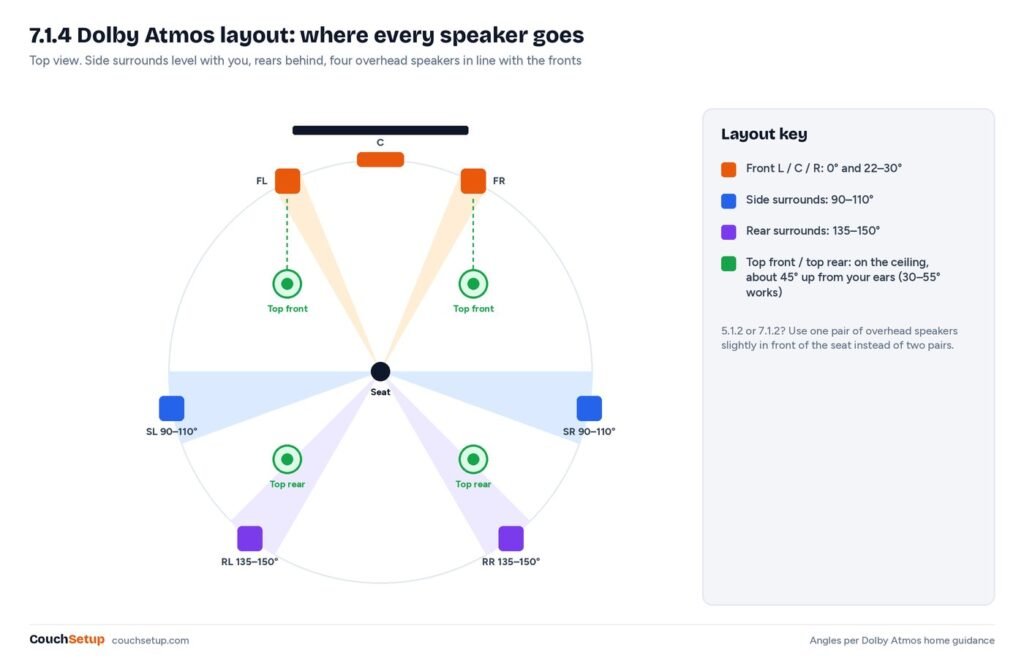
A surround layout is written as speakers.subwoofers.height speakers. A 5.1 system has five ear-level speakers and one subwoofer. A 5.1.2 system adds two ceiling (or up-firing) speakers for Dolby Atmos; 7.1.4 adds two more ear-level speakers behind you and four overhead.
- Front left and right go 22–30° to each side of the screen. The speaker placement calculator uses the middle of that range and shows you the full range too.
- Surrounds in a 5.1 system go slightly behind you (110–120°). In a 7.1 system the side surrounds move level with you (90–110°) and the rear surrounds go behind (135–150°).
- Height speakers for Atmos go on the ceiling, lined up with the front speakers. The calculator uses your ceiling height to work out how far in front of and behind your seat they go.
How to use the calculator, step by step
- Choose the main seat: the one you use most, or the middle of the sofa.
- Measure from your ears in that seat to the screen wall, and note your ceiling height if you plan to add Atmos.
- Pick a layout. If you are not sure, start with 5.1; it is easy to add height speakers later.
- Enter the numbers and mark each position with painter’s tape on the floor or wall before you mount anything.
- Sit in the main seat and check that each mark is roughly the same distance from your head and in a clear line of sight.
- Place the speakers, connect them, and run the receiver’s room calibration last.
The marks don’t have to be perfect. Being within 5° to 10° of the target angle and a foot or so of the ideal distance is close enough, because room correction tidies up the small differences.
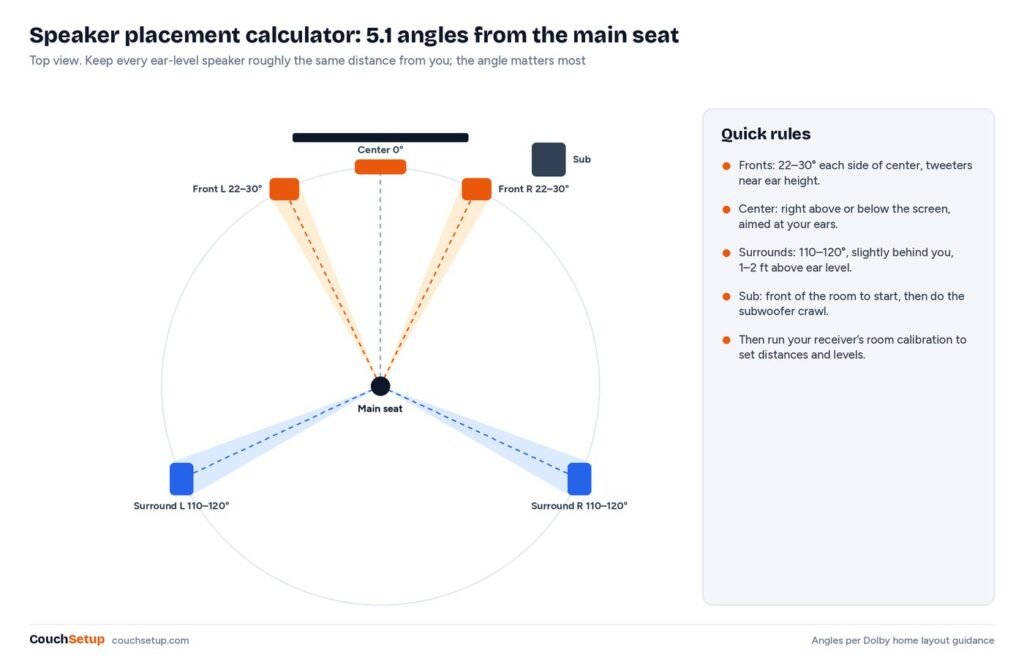
Speaker placement angles by layout
| Speaker | 5.1 | 7.1 | Height |
|---|---|---|---|
| Center | 0° | 0° | Just above or below the screen, aimed at seated ears |
| Front left / right | 22–30° | 22–30° | Tweeters near seated ear height |
| Side surrounds | 110–120° | 90–110° | 1–2 ft above ear height |
| Rear surrounds | Not used | 135–150° | 1–2 ft above ear height |
| Subwoofer | Front of room to start | Front of room to start | On the floor |
Dolby’s Dolby Atmos home theater installation guidelines describe the same layouts, with surrounds placed from roughly 90° to 150° depending on how many you have, and overhead speakers at about 45° elevation within a 30° to 55° range. The Dolby speaker setup guides show each layout as a simple drawing if you want a second reference.
Front speaker spacing by seat distance
Front left and right go 22° to 30° either side of the center line. Measured straight back from the front wall to your ears, that puts the two speakers about 0.8 to 1.15 times your seat distance apart. The calculator works this out for you; here are the results for common rooms.
| Seat to front wall | Spacing at 22° | Spacing at 30° | Fits beside |
|---|---|---|---|
| 7 ft | 5 ft 8 in | 8 ft 1 in | a 55- to 65-inch TV |
| 8 ft | 6 ft 6 in | 9 ft 3 in | a 65-inch TV |
| 9 ft | 7 ft 3 in | 10 ft 5 in | a 65- to 75-inch TV |
| 10 ft | 8 ft 1 in | 11 ft 7 in | a 75- to 85-inch TV |
| 12 ft | 9 ft 8 in | 13 ft 10 in | an 85-inch TV or a projector screen |
| 14 ft | 11 ft 4 in | 16 ft 2 in | a 120-inch or larger screen |
If the wall isn’t wide enough for 30°, stay at the narrower end. A slightly narrow front stage sounds fine, while speakers jammed into corners sound boomy. Where you can, leave a foot or two between each speaker and the side wall, and keep the tweeters near seated ear height, which in most sofas is around 3.5 to 4 feet off the floor.
Surround speaker placement in a real room
Most living rooms have a side wall or a sofa in the way, so the useful question is how far behind your ears to put a side-wall surround. If your ears are W feet from the side wall, a 110° speaker sits about 0.36 × W behind your ears and a 120° speaker about 0.58 × W behind.
| Ears to side wall | 110°: behind your ears | 120°: behind your ears |
|---|---|---|
| 3 ft | 1 ft 1 in | 1 ft 9 in |
| 4 ft | 1 ft 5 in | 2 ft 4 in |
| 5 ft | 1 ft 10 in | 2 ft 11 in |
| 6 ft | 2 ft 2 in | 3 ft 6 in |
| 7 ft | 2 ft 7 in | 4 ft 0 in |
In a 7.1 system the rear surrounds go on the back wall at 135–150°. If the back wall is B feet behind your ears, put each rear speaker about 0.58 to 1.0 × B to each side of the center line.
| Ears to back wall | 150°: each side of center | 135°: each side of center |
|---|---|---|
| 3 ft | 1 ft 9 in | 3 ft 0 in |
| 4 ft | 2 ft 4 in | 4 ft 0 in |
| 5 ft | 2 ft 11 in | 5 ft 0 in |
| 6 ft | 3 ft 6 in | 6 ft 0 in |
Surround height and aim
Mount surrounds 1 to 2 feet above seated ear height, which usually means about 4 ft 4 in to 5 ft 4 in off the floor, and angle them toward the main seat. Raising them slightly keeps other people’s heads from blocking the sound and makes effects feel less like they come from a single box.
Dolby Atmos height speakers
Height speakers add the last number in names like 5.1.2 or 7.1.4. Dolby puts overhead speakers about 45° above your ears, with anything from 30° to 55° working, and lined up front to back with the main left and right speakers. In a .2 system one pair goes slightly in front of the seat; in a .4 system one pair goes in front and one pair behind.
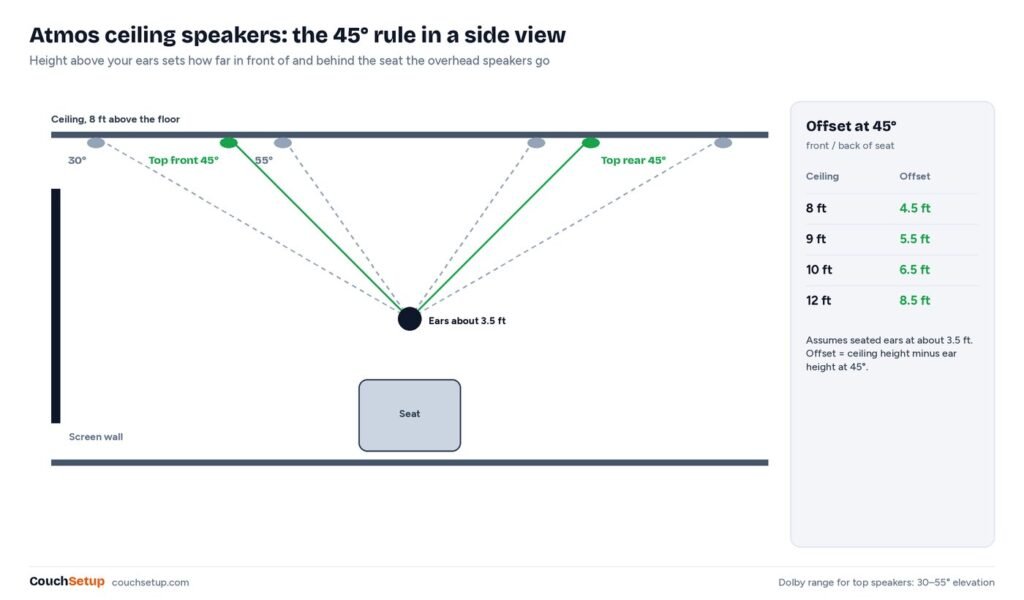
| Ceiling height | Ceiling above ears | Offset at 55° | Offset at 45° | Offset at 30° |
|---|---|---|---|---|
| 7.5 ft | 4.0 ft | 2.8 ft | 4.0 ft | 6.9 ft |
| 8 ft | 4.5 ft | 3.2 ft | 4.5 ft | 7.8 ft |
| 9 ft | 5.5 ft | 3.9 ft | 5.5 ft | 9.5 ft |
| 10 ft | 6.5 ft | 4.6 ft | 6.5 ft | 11.3 ft |
| 12 ft | 8.5 ft | 6.0 ft | 8.5 ft | 14.7 ft |
Low ceiling or no way to run wires? Dolby Atmos-enabled up-firing modules sit on top of the front and surround speakers and bounce sound off the ceiling. Dolby’s guidelines call for a flat, reflective ceiling, ideally between 7.5 and 12 feet, and suggest keeping these modules at least 3 feet from listeners.
Worked examples with the calculator
Apartment living room: 5.1 with the couch against the back wall
The seat is 9 feet from the TV wall and the couch backs onto the rear wall. Enter 9 feet in the calculator and the fronts come out about 7 ft 3 in to 10 ft 5 in apart, so with a 65-inch TV about 8 feet apart lands comfortably in range. There is no room behind the couch, so put the surrounds on the side walls slightly behind your ears, or on stands beside the couch arms, raised a foot or so above your head. Our small living room home theater guide shows this layout in a full room plan.
Basement theater: 7.1.4 with a 9-foot ceiling
Seats are 12 feet from the screen with 5 feet of space behind the row. The fronts sit 9 ft 8 in to 13 ft 10 in apart. Side surrounds go on the side walls level with or just behind the seats, and rear surrounds go on the back wall about 2 ft 11 in to 5 ft either side of center. With a 9-foot ceiling the overhead pairs go about 5.5 feet in front of and behind the main seat, in line with the front speakers. Enter 12 feet and a 9-foot ceiling in the calculator and you get the same positions.
Bedroom: soundbar or 3.1
In a small bedroom the bed is often against one wall with the TV opposite. Full surround rarely fits. Use the front-speaker numbers to place left, center and right speakers, or simply center a soundbar under the TV and add wireless rears if the model supports them. Our best soundbars for small rooms are picked for exactly these spaces.
Subwoofer placement
Low bass is hard to locate, so the calculator only suggests a starting spot for the subwoofer at the front of the room. The room itself, not the angle, decides how it sounds, because bass waves build up in some spots and cancel in others. Start with the sub at the front, a little off-center, then fine-tune with the subwoofer crawl:
- Put the subwoofer on or right in front of your main seat.
- Play a bass-heavy track or movie scene with a steady low line.
- Crawl along the front of the room and listen for where the bass sounds even and tight, not boomy or thin.
- Move the subwoofer to that spot and run your receiver’s room correction.
Two subwoofers smooth out bass across more seats than one, which helps if you have a full row rather than one main chair. Keep the sub a few inches off the wall at first; pushing it into a corner adds output but often makes the bass boomier.
Tips for awkward rooms
The calculator assumes an open room, but real rooms have walls, doors and sofas in the way. Keep the angle right and let the distance change: a surround speaker can sit closer to you on a side wall as long as it’s at roughly the right angle. Then run your AV receiver’s automatic room calibration (Audyssey, Dirac, YPAO and others), which corrects distance and level for each speaker.
- Open side of the room. Use a stand. It can sit anywhere along the angle line, closer or farther from you.
- Couch against the back wall. Use side-wall surrounds and skip rear surrounds; 5.1 or 5.1.2 suits this room better than 7.1.
- Off-center seat. Run the calculator from the seat you use most, then let room correction balance the rest.
- Doors and windows. Moving a speaker 10° within its range is fine; moving it to a completely different angle is not.
- Renting? Floor stands, shelf speakers and wireless surrounds avoid drilling. Up-firing Atmos modules avoid ceiling holes.
Common speaker placement mistakes
Most surround setups that sound disappointing were placed correctly on paper and then undone by small habits. These are the ones the calculator can’t catch for you:
- Surrounds too far behind you in 5.1. At 150° or more they act as rear speakers only and the sides of the sound field go hollow.
- Speakers hidden behind furniture. Even a sofa arm or an open cabinet door can muffle a speaker.
- Tweeters far from ear level. Front speakers on the floor or high on the wall pull voices away from the screen.
- Center speaker aimed at your chest. Tilt it up or down so it points at seated ear height.
- Skipping room correction. Run the receiver’s calibration after the speakers are in their final spots, with the microphone at ear height.
- Overheads straight above your head in a .2 setup. Move them slightly forward of the seat so overhead effects tie in with the screen.
Soundbar or separate speakers?
If this all looks like a lot of work, a good soundbar with wireless surrounds gets you most of the way with far less wiring. Compare both in soundbar vs surround sound, or see our best soundbars for small rooms. If you do go with separate speakers, our home theater under $1,000 guide shows how to split a budget between speakers, receiver and subwoofer.
Next steps
- Soundbar vs surround sound: which fits your room?
- Home theater seating and row spacing
- The complete home theater setup guide
- Size the screen with the TV size calculator
- Placing a projector? Use the projector throw calculator
FAQ
How far apart should front speakers be?
About 0.8 to 1.15 times your seat-to-screen distance, which keeps them 22° to 30° either side of center. From 9 feet away that is roughly 7 to 10 feet apart.
What if I can’t put surrounds at 110 degrees?
Anywhere from about 90° to 120° works for 5.1 surrounds. Level with your ears is better than far behind you, and a speaker on a stand beside the couch is better than one hidden behind it.
Does the calculator work for a soundbar with rear speakers?
Yes. Use the 5.1 surround angles for the wireless rears, and center the soundbar under the screen. The front-speaker spacing does not apply because the soundbar handles left, center and right.
How high should surround speakers be?
About 1 to 2 feet (30 to 60 cm) above your ear height when seated, which is usually 4 ft 4 in to 5 ft 4 in off the floor.
Should surround speakers face the listener?
Yes, aim them at the main seat. Dipole or bipole surrounds are the exception: they are made to point along the wall.
Where should Dolby Atmos ceiling speakers go?
For a .2 setup, on the ceiling slightly in front of your seat. For a .4 setup, one pair in front of the seat and one pair behind, all in line with the front left and right speakers.
Where should the subwoofer go?
Start at the front of the room. Then try the subwoofer crawl: put the sub on your seat, play bass-heavy music, crawl around the front of the room and put the sub where the bass sounds smoothest.
Can I use Atmos with a low ceiling?
Yes. Use Dolby Atmos-enabled (up-firing) speaker modules on top of your front speakers, or a soundbar with up-firing drivers. They work best with flat ceilings between about 7.5 and 12 feet.
Sources: Dolby: Dolby Atmos home theater installation guidelines (PDF) · Dolby: Speaker setup guides · Dolby: 7.1.4 overhead speaker setup · Dolby: Dolby Atmos speaker setup 101