

CouchSetup is reader-supported. When you buy through links on our site, we may earn an affiliate commission at no extra cost to you. Learn more
Is it still worth it in 2026? Short answer of this Sonos Beam Gen 2 review: yes. Years after launch, the Beam is still the compact soundbar we point most small and mid-size living rooms toward. It’s clear with voices, sounds bigger than its 26-inch body suggests, doubles as a genuinely good music speaker, and can grow into a full surround system. It isn’t perfect: the Atmos is virtual, there’s one HDMI port and no Bluetooth, and room tuning needs an iPhone or iPad.
Sonos Beam (Gen 2)
8.8/10 CouchSetup score
Best for Small to mid-size living rooms, music lovers and anyone who may add a sub or rears later
- About 25.6 inches wide and 2.7 inches tall
- Virtual Dolby Atmos plus Dolby TrueHD and DTS over HDMI eARC
- Speech Enhancement and Night Sound
- Wi-Fi, AirPlay 2 and Ethernet; no Bluetooth
- Add a Sonos sub and rear speakers later
Prices change often, so check today’s price on Amazon.
Our verdict
Score: 8.8/10. The safest premium soundbar for a small room: natural dialogue, wide lively sound for its size, excellent music streaming and a real upgrade path. Skip it if you want deep bass out of the box, true up-firing Atmos, or Bluetooth.
Key specs
| Spec | Sonos Beam (Gen 2) |
|---|---|
| Size (H × W × D) | 2.68 × 25.63 × 3.94 in |
| Weight | 6.35 lb |
| Drivers | 1 center tweeter, 4 elliptical midwoofers, 3 passive radiators |
| Amplifiers | 5 Class-D |
| Connections | HDMI eARC (cable included), 10/100 Ethernet, optical adapter included |
| Wi-Fi | 2.4 GHz 802.11b/g/n only; AirPlay 2 |
| Formats | Dolby Atmos, TrueHD, Digital Plus, multichannel PCM, DTS Digital Surround |
| Room tuning | Trueplay, needs a supported iPhone or iPad |
What the reviews don’t tell you
It only connects to 2.4 GHz Wi-Fi
Sonos’ spec page lists Wi-Fi as 2.4 GHz 802.11b/g/n only, and says owners with 5 GHz routers should enable 2.4 GHz or plug in Ethernet. Many newer mesh systems combine bands or default to 5 GHz, which is a common cause of music dropouts and setup trouble. If it happens, turn on the 2.4 GHz band or use the 10/100 Ethernet port.
Which TVs it looks right under
| TV | Screen width | Beam width | Space each side |
|---|---|---|---|
| 43-inch | about 37.5 in | 25.6 in | about 6 in |
| 55-inch | about 48 in | 25.6 in | about 11 in |
| 65-inch | about 57 in | 25.6 in | about 15.5 in |
| 75-inch | about 65 in | 25.6 in | about 20 in |
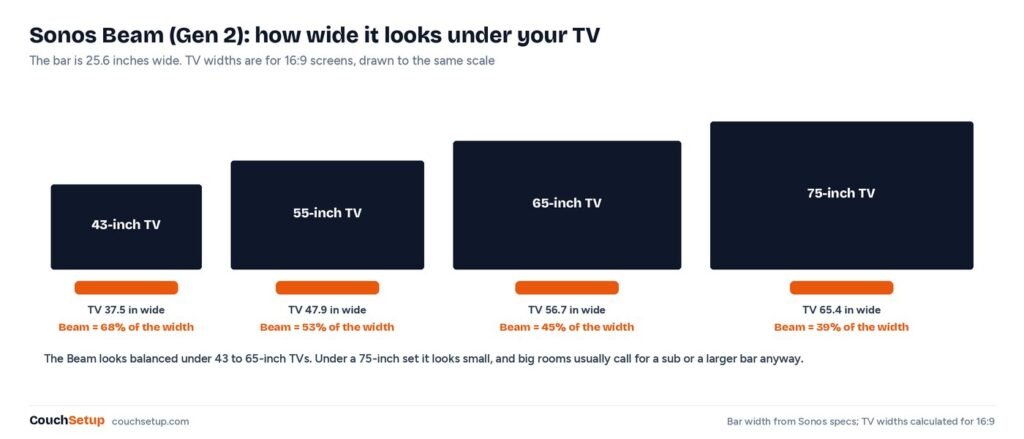
It looks balanced from 43 to 65 inches. Under a 75-inch it looks small, and in a room that size you’d want a sub or a bigger bar anyway. At 2.7 inches tall it rarely blocks the screen or IR sensor.
DTS yes, DTS:X no
Sonos lists DTS Digital Surround, and What Hi-Fi confirms DTS:X isn’t supported. If you play DTS:X Blu-rays, the Beam gets the core DTS track, not the height layer.
Sound
Dialogue is where the Beam earns its reputation: clean, centered and natural. Speech Enhancement lifts voices, and Night Sound narrows the gap between loud and quiet scenes for late viewing. Reviewers consistently describe a soundstage wider than the bar, the real win in a small room. What it can’t do is convincingly put sound over your head; in What Hi-Fi’s testing the Sonos Arc, with real up-firing drivers, was more enveloping. Bass is punchy for the size but won’t shake the room, and Sound & Vision found it trims bass as volume rises. If dialogue is your main problem, see our dialogue fixes.
For music it’s one of the best-sounding soundbars, streaming over Wi-Fi from the Sonos app and AirPlay 2, and joining other Sonos speakers. No Bluetooth means guests need the app or AirPlay to play.
The upgrade path
- Start with the Beam alone, a big step up from TV speakers.
- Add a Sonos Sub Mini (smaller rooms) or Sub for real low-end weight.
- Add two Sonos speakers as rears for true surround, with no wires across the room.
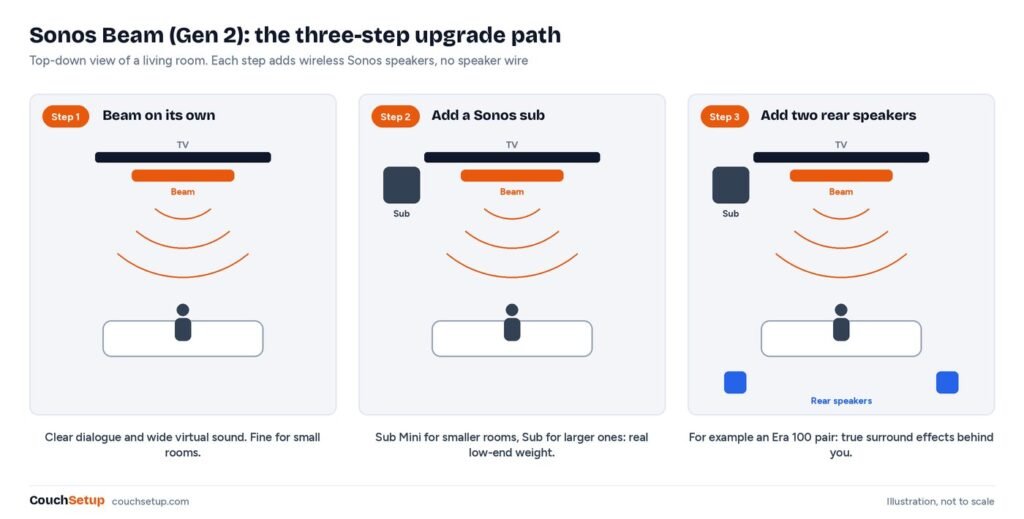
Sonos sells the Beam with a pair of Era 100s as a surround set, and What Hi-Fi notes an Immersive Set that adds a Sub Mini. Check rear positions with our speaker placement calculator.
Setup and settings
- Center it under the TV at the front edge of the stand.
- Connect the included HDMI cable to the TV’s eARC or ARC port; Sonos lists eARC as required for Atmos. See HDMI ARC vs eARC.
- Turn on HDMI-CEC so the TV remote controls volume.
- Set the TV’s digital output to Auto or Passthrough, not PCM.
- Add it in the Sonos app on 2.4 GHz Wi-Fi or Ethernet.
- Run Trueplay with an iPhone or iPad, then try Speech Enhancement and Night Sound.
Because the Beam sits on eARC rather than in the video path, consoles connect to the TV and keep 4K 120Hz and VRR. See best TVs for PS5 and Xbox.
Against the alternatives
| Soundbar | Key difference from the Beam |
|---|---|
| Sonos Ray | Cheaper, optical only, no Atmos |
| Sonos Arc Ultra | Flagship for big rooms, 14 drivers, far pricier |
| Sony HT-S2000 | What Hi-Fi says it runs the Beam close on sound but lacks its streaming features |
| Bose Smart Soundbar | Real up-firing drivers and Bluetooth, but a narrower, lighter sound |
Bose Smart Soundbar
Best for Bedrooms and anyone who wants Bluetooth and real height channels
- 3.0.2 channels with up-firing drivers
- AI Dialogue Mode
- Wi-Fi, Bluetooth, AirPlay 2 and Chromecast
- About 27.3 inches wide
Prices change often, so check today’s price on Amazon.
Full comparisons in our Bose Smart Soundbar review, Sonos Beam vs Bose and best soundbars for small rooms.
What we liked
- Clear, natural dialogue with Speech Enhancement and Night Sound
- Wide, spacious sound for a compact bar
- Excellent music performance with Wi-Fi and AirPlay 2
- Upgrade path to a full wireless surround system
- Compact size fits under TVs from about 43 inches
What we didn’t like
- Atmos is virtual, with no up-firing drivers
- Limited deep bass without a Sonos sub
- No Bluetooth and only one HDMI port
- Trueplay needs an iPhone or iPad
- 2.4 GHz Wi-Fi only
Owners’ most common complaint is the Sonos app, which drew heavy criticism after its 2024 overhaul and has improved since; it controls everything beyond volume.
How we picked
We gathered the specs and expert reviews (RTINGS, What Hi-Fi and Sound & Vision), plus confirmed answers on Sonos’ own community forum, put them side by side, and worked out what the individual reviews leave out, like the 2.4 GHz Wi-Fi limit and how it fits under each TV size. Specs were checked on Sonos’ product page. Every source is listed at the end.
FAQ
Is the Sonos Beam Gen 2 still worth it?
Yes, for small to mid-size rooms, and it’s discounted regularly.
Does it have real Dolby Atmos?
It decodes Atmos but creates height virtually, with no up-firing drivers.
Does it work with 5 GHz Wi-Fi?
No. Sonos lists 2.4 GHz only; enable 2.4 GHz on your router or use Ethernet.
Does it have Bluetooth?
No. It streams over Wi-Fi, the Sonos app and AirPlay 2.
Can I use it with a TV without HDMI ARC?
Yes, with the included optical adapter, but optical doesn’t carry Atmos.
Does it support DTS:X?
No. It decodes DTS Digital Surround, Dolby TrueHD and Atmos.
Related guides
- Best soundbars for small rooms
- Bose Smart Soundbar review
- HDMI ARC vs eARC explained
- Home theater under $1,000
Sources: Sonos Beam official specs · Sonos Community: Trueplay on Beam Gen 2 · RTINGS best small soundbars · What Hi-Fi best soundbars