

CouchSetup is reader-supported. When you buy through links on our site, we may earn an affiliate commission at no extra cost to you. Learn more
Both get every big app: Netflix, YouTube, Disney+, Max, Prime Video, Hulu and Peacock. So the Fire TV Stick vs Roku choice comes down to what you notice every day: the home screen, the remote, the ads, and which picture formats your TV uses. In 2026 there’s a new factor too, because Amazon’s newest sticks run a different operating system.
Our verdict
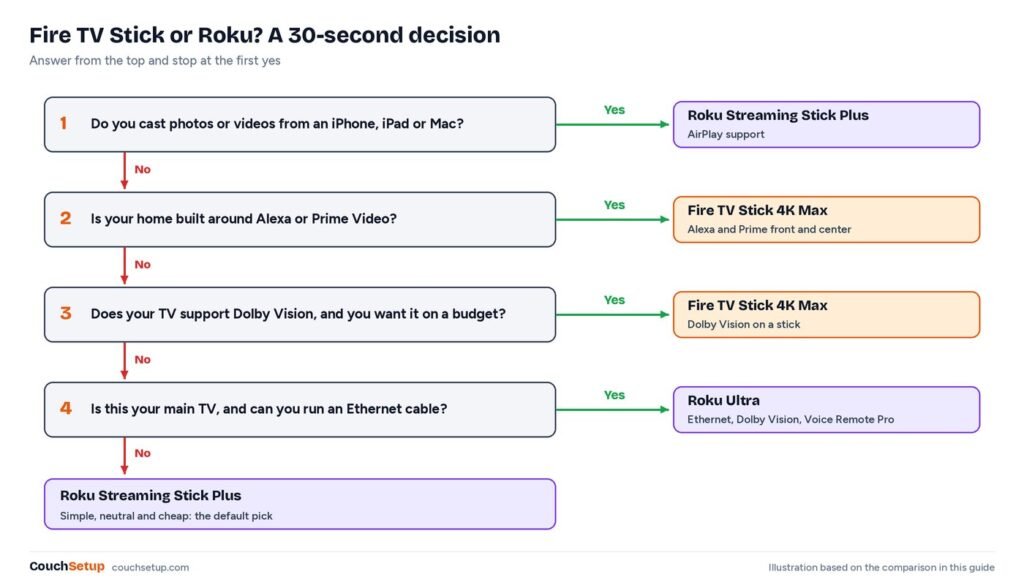
Short answer: choose Roku for the simplest, least cluttered home screen, Apple AirPlay for iPhone users, or a TV for parents and kids; the Roku Streaming Stick Plus is the easy pick. Choose the Fire TV Stick 4K Max if you use Alexa and Prime Video a lot or want Dolby Vision cheaply. For a main TV, the Roku Ultra.
Top picks at a glance
Best for most people
Roku Streaming Stick Plus
Simple, neutral streaming and iPhone users
$ BudgetBest for Alexa and Prime
Amazon Fire TV Stick 4K Max
Alexa homes, Prime Video fans and Dolby Vision TVs
$$ Mid-rangeBest premium
Roku Ultra
Main living room TV and the best Roku experience
$$$ PremiumAt a glance
| Feature | Roku | Fire TV |
|---|---|---|
| Home screen | Simple grid of your apps | Rows of recommendations, Amazon content and ads |
| Ads | One promoted tile and banners | More prominent, including auto-playing previews |
| Voice | Roku voice search | Alexa, which also runs your smart home |
| iPhone casting | AirPlay on most players | No AirPlay |
| Best 4K stick | Streaming Stick Plus (HDR10+) | Fire TV Stick 4K Max (Dolby Vision, HDR10+) |
| Top model | Roku Ultra | Fire TV Cube |

What the reviews don’t tell you
Reviews of each stick look at speed and menus. We lined up the manufacturers’ own developer spec sheets for every current model, and one thing jumps out.
The newest Fire TV Sticks are a step down on paper
| Model | OS | HDR formats | RAM | Storage | Price |
|---|---|---|---|---|---|
| Fire TV Stick 4K Max (2023) | Fire OS 8 | HDR10, HDR10+, HLG, Dolby Vision | 2 GB | 16 GB | $$Check price |
| Fire TV Stick 4K (2023) | Fire OS 8 | Includes Dolby Vision and HDR10+ | 2 GB | 8 GB | – |
| Fire TV Stick 4K Select (2025) | Vega OS | HDR10, HDR10+, HLG | 1 GB | 8 GB | – |
| Fire TV Stick 4K (2026) | Vega OS | HDR10, HDR10+, HLG | 1 GB | 8 GB | – |
| Roku Streaming Stick Plus (2025) | Roku OS | HDR10, HDR10+, HLG | 1 GB | n/a | $Check price |
| Roku Ultra (2024) | Roku OS | HDR10, HDR10+, HLG, Dolby Vision | 2 GB | n/a | $$$Check price |
Amazon’s own spec page lists no Dolby Vision on the 2026 Fire TV Stick 4K, and half the RAM of the 2023 model it replaces. So if your TV uses Dolby Vision (most LG, Sony, TCL, Hisense and Vizio sets do; Samsung doesn’t), the older 4K Max is still the Fire TV stick to get. Make sure the listing says “4K Max” and not just “4K.”
Vega OS changes which apps you can install
AFTVnews reports Amazon confirmed that, starting with the 4K Select, all future Fire TV Sticks run Vega OS instead of Android-based Fire OS. Vega only installs apps from Amazon’s Appstore, with no sideloading. For people who only use the big apps, that’s fine, and Amazon says the new sticks are faster. If you rely on a niche or sideloaded app, buy a Fire OS model or a Roku. Roku isn’t affected.
Home screen and ads
This is the biggest everyday difference. Roku’s home screen is a grid of the apps you’ve installed, with one promoted tile and a banner. It treats every service the same and anyone can use it. Fire TV puts rows of recommendations, Prime Video content and sponsored titles above your apps, and can auto-play previews. Great for discovery, but busier.
Picture: 4K, HDR and Dolby Vision
Every 4K stick from both brands does HDR10 and HDR10+. The difference is Dolby Vision, which Netflix, Disney+ and Apple TV use. The Fire TV Stick 4K Max and Roku Ultra have it; the Roku Streaming Stick Plus and the newest Vega Fire sticks don’t. With a Samsung TV, HDR10+ is what matters, and every 4K stick here has it.
Remotes, voice and headphones
Alexa on Fire TV can control smart-home devices and show your doorbell camera on the TV. Roku’s voice search is simpler but good at finding shows across apps, and its optional Voice Remote Pro adds a rechargeable battery, backlit buttons and a lost-remote finder.
For quiet late-night viewing, Roku’s mobile app has a private listening button that plays TV sound through your phone, and the Streaming Stick Plus also has a Bluetooth Headphone Mode. On Fire TV, pair Bluetooth headphones under Settings, Controllers and Bluetooth Devices. For long sessions, a dedicated set from our best wireless headphones for TV is more reliable.
Apps and extras
- Free TV: The Roku Channel has hundreds of free live channels; Fire TV has free ad-supported movies and channels built in.
- Cloud gaming: Fire OS sticks support Xbox Cloud Gaming and Luna. On Vega, check the Appstore listing first.
- iPhone and Mac: Roku says AirPlay works on a long list of its players when your Apple device is on the same Wi-Fi. Fire TV doesn’t support it.
Which household suits which
| If this sounds like you | Better choice |
|---|---|
| iPhone or Mac family | Roku |
| Alexa speakers and smart-home gear | Fire TV |
| Parents, grandparents or kids | Roku |
| Dolby Vision TV on a budget | Fire TV Stick 4K Max |
| Samsung TV | Either |
| Niche or sideloaded apps | Fire TV Stick 4K Max (Fire OS) |
| Main living room TV | Roku Ultra |
The picks
Roku Streaming Stick Plus
Best for Simple, neutral streaming and iPhone users
- 4K with HDR10+
- Powered by the TV’s USB port, no wall plug
- Simple home screen with fewer ads
- Free live TV on The Roku Channel
Prices change often, so check today’s price on Amazon.
Cheap, tiny, simple and neutral between services. It can run from the TV’s USB port. Its one real gap is Dolby Vision.
Amazon Fire TV Stick 4K Max
Best for Alexa homes, Prime Video fans and Dolby Vision TVs
- 4K with Dolby Vision, HDR10+ and Atmos
- Wi-Fi 6E for stable 4K streaming
- Alexa voice remote
- Ambient Experience art mode
Prices change often, so check today’s price on Amazon.
Dolby Vision, Wi-Fi 6E, 16 GB of storage and Android-based Fire OS, so the full Appstore and sideloading still work. Be ready for a busier home screen. Full details in our Fire TV Stick 4K Max review.
Roku Ultra
Best for Main living room TV and the best Roku experience
- Dolby Vision, HDR10+ and Dolby Atmos
- Wi-Fi 6 plus Ethernet port
- Voice Remote Pro with lost-remote finder
- Fastest Roku player
Prices change often, so check today’s price on Amazon.
Adds Dolby Vision, 2 GB of RAM, an Ethernet port for rock-solid 4K and Roku’s best remote.
Setup and day-one settings
- Use the HDMI extender in the box if the stick doesn’t fit or Wi-Fi is weak behind the TV.
- Turn on HDMI-CEC so the stick’s remote controls the TV and soundbar. Soundbar on the TV’s ARC/eARC port; see our HDMI ARC and eARC guide.
- Netflix recommends at least 15 Mbps per 4K stream, and 5 Mbps for 1080p. Test speed with a phone next to the TV.
- Fire TV: Settings, Preferences, Featured Content, then turn off video and audio autoplay. Tom’s Guide says the home screen feels snappier after.
- Roku: Settings, Privacy, Advertising, Limit Ad Tracking. On Roku TVs, also uncheck Use Info from TV Inputs under Smart TV Experience.
Buying 4K for a 1080p TV wastes money; an HD stick is enough. No HDMI port? See how to make an old TV smart.
How we picked
We gathered the measurements and expert reviews for every pick, put them side by side, and worked out what the individual reviews leave out. For streaming sticks that meant checking every model against Amazon’s and Roku’s own developer spec sheets, plus reporting on Vega OS. Every source is listed at the end.
FAQ
Is Roku or Fire Stick better?
Roku for simplicity, fewer ads and AirPlay. Fire TV for Alexa homes, Prime Video and cheap Dolby Vision with the 4K Max.
Does the 2026 Fire TV Stick 4K have Dolby Vision?
Amazon’s developer spec page lists HDR10, HDR10+ and HLG only. The 4K Max (2023) has Dolby Vision.
Does Roku have Dolby Vision?
The Roku Ultra does. The Streaming Stick Plus doesn’t.
Do they have monthly fees?
No. You buy the stick once and pay only for the services you subscribe to.
Can I sideload apps on a Fire TV Stick?
Only on Fire OS models like the 4K Max (2023). Vega OS sticks only install from Amazon’s Appstore.
Which is better for a Samsung TV?
Either. Samsung uses HDR10+, which both 4K sticks support, so pick on the interface.
Related guides
Sources: Amazon Fire TV device specifications · Roku hardware specifications · AFTVnews: future Fire TV Sticks on Vega OS · PCWorld: Fire TV Stick HD on Vega OS · TechRadar Roku Streaming Stick Plus review · Roku: AirPlay support · Netflix speed recommendations · Tom’s Guide: Fire TV lag setting · Tom’s Guide: Roku tracking