
CouchSetup is reader-supported. When you buy through links on our site, we may earn an affiliate commission at no extra cost to you. Learn more
Short version of this Fire TV Stick 4K Max review: it’s still the Fire stick to buy, and in late 2026 the reason is bigger than speed. Amazon’s newest sticks, including the 2026 Fire TV Stick 4K, now run Amazon’s own Vega OS, which can’t sideload apps and drops Dolby Vision on the new 4K. The 4K Max (2nd gen) stays on Android-based Fire OS, with Dolby Vision, HDR10+, Dolby Atmos, Wi-Fi 6E and 16 GB of storage. The trade-off is the home screen, which pushes Amazon content and ads hard.
Amazon Fire TV Stick 4K Max (2nd gen)
8.0/10 CouchSetup score
Best for Alexa homes, Prime Video fans and Dolby Vision TVs
- 4K with Dolby Vision, HDR10+, HDR10 and HLG
- Dolby Atmos audio
- Wi-Fi 6E and 16 GB storage
- Alexa Voice Remote Enhanced
- Runs Android-based Fire OS (not Vega OS)
Prices change often, so check today’s price on Amazon.
Our verdict
Score: 8.0/10. Fast, fully featured, and now the only current Fire stick with Dolby Vision and sideloading. Knock it down if home-screen ads bother you; a Roku is cleaner.
Key specs
| Spec | Fire TV Stick 4K Max (2nd gen) |
|---|---|
| Processor | Quad-core 2.0 GHz (MediaTek MT8696T) |
| Memory / storage | 2 GB RAM / 16 GB |
| Wi-Fi / Bluetooth | Wi-Fi 6E (2.4, 5 and 6 GHz) / 5.2 |
| Video | Up to 4K 60fps; Dolby Vision, HDR10+, HDR10, HLG; AV1 |
| Audio | Dolby Atmos |
| Operating system | Fire OS 8 (Android-based), sideloading allowed |
| Power | Micro-USB with included adapter |
| Ethernet | Optional adapter, sold separately |
What the reviews don’t tell you
Which Fire sticks still run Fire OS
Most 4K Max reviews were written before Amazon’s switch. In October 2025 Amazon said all future Fire TV Sticks, starting with the 4K Select, would run Vega OS, and AFTVnews reports Vega only installs apps from Amazon’s Appstore, with no sideloading. Here’s where the lineup stands, per AFTVnews’ list updated in October 2026:
| Device | Operating system | Sideloading |
|---|---|---|
| Fire TV Stick 4K Max (2nd gen) | Fire OS | Yes |
| Fire TV Stick 4K Plus | Fire OS | Yes |
| Fire TV Cube | Fire OS | Yes |
| Fire TV Stick 4K (3rd gen, 2026) | Vega OS | No |
| Fire TV Stick 4K Select | Vega OS | No |
| Fire TV Stick HD (2nd gen) | Vega OS | No |
If you rely on a niche app, a media-server client or anything outside Amazon’s Appstore, check that the box says 4K Max. The newer sticks look almost identical.
4K Max vs the new 2026 Fire TV Stick 4K
| Feature | 4K Max (2nd gen) | Fire TV Stick 4K (2026) |
|---|---|---|
| Operating system | Fire OS | Vega OS |
| Dolby Vision | Yes | No |
| HDR10+, HDR10, HLG | Yes | Yes |
| Wi-Fi | Wi-Fi 6E | Wi-Fi 6 |
| Storage | 16 GB | 8 GB |
| Processor | 2.0 GHz quad-core | 1.7 GHz quad-core |
The missing Dolby Vision matters most if you own an LG or TCL TV, which use it; Samsung TVs use HDR10+ instead, so either stick shows the best HDR there. The new 4K is cheaper and faster than older non-Max sticks, but for app freedom and Dolby Vision the Max is the safer pick. Compare platforms in Fire TV Stick vs Roku.
Wi-Fi 6E only helps with a 6E router
Wi-Fi 6E adds the less crowded 6 GHz band, but only if your router has it too. With an older router it runs fine on 5 GHz. If 4K buffers because the router is far away, Amazon’s Ethernet adapter is the more reliable fix.
Speed
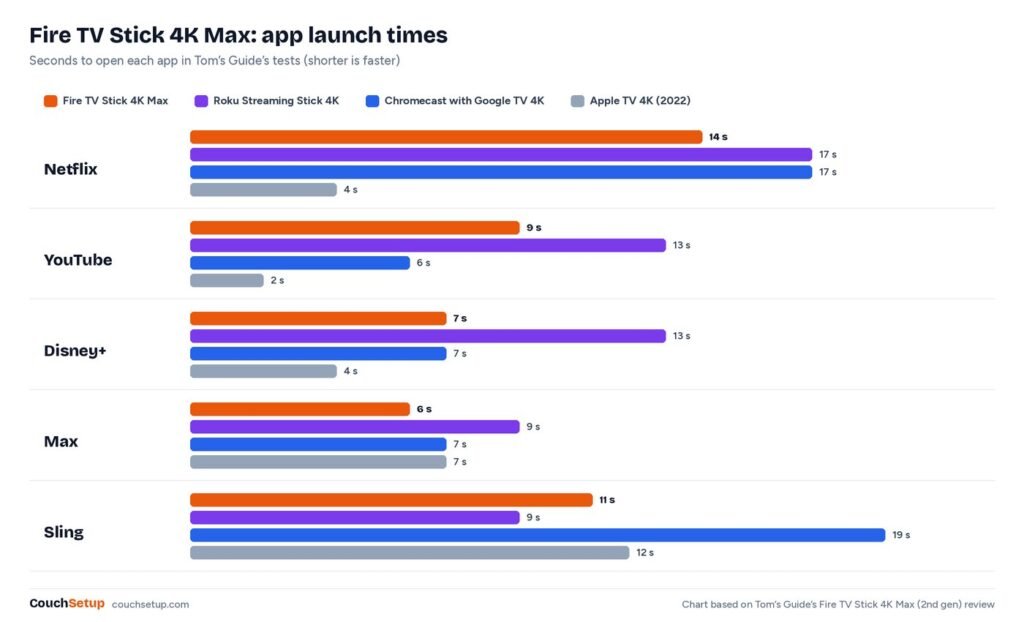
In Tom’s Guide’s tests the 4K Max opened Netflix in 14 seconds versus 17 on a Roku stick, YouTube in 9 versus 13 and Disney+ in 7 versus 13, though Sling was slower. The Apple TV 4K was faster still. Tom’s Guide called the gains not very significant day to day, and TechRadar describes it as very speedy.
Picture, sound and Alexa
What Hi-Fi scored the picture 5 out of 5, praised its sharp detail and clean film grain, and made it a 2026 Awards winner. It supports every major HDR format and sends the best one your TV can show. Dolby Atmos passes through to a soundbar like the Sonos Beam. Output tops out at 4K 60, which is all streaming services need. When idle, Ambient Experience can show art, photos and widgets, and Alexa handles search, playback and doorbell cameras. If your home already runs on Alexa, that’s the strongest reason to pick Fire TV over Roku.
Setup and best settings
- Plug the stick into an HDMI port, using the included extender if it blocks the next port.
- Power it from the included adapter, not the TV’s USB port.
- Join Wi-Fi, sign in and let the remote set up TV power and volume.
- Turn on HDMI CEC Device Control under Settings > Display & Sounds.
| Where | Change | Why |
|---|---|---|
| Preferences > Featured Content | Video and audio autoplay off | Fewer distracting previews and less lag |
| Display & Sounds > Display | Frame Rate Matching on | Less judder on films |
| Display | Dynamic Range: Adaptive | HDR only for HDR content |
| If menus lag | Hold Select + Play/Pause | Quick restart |
To see fewer ads, turn off autoplay, double-tap Home to skip the full-screen ad on wake, and use the remote’s app buttons to jump straight into apps. You can’t remove the ads completely.
What we liked
- Dolby Vision, HDR10+, HDR10 and HLG plus Dolby Atmos
- Fast app launches and 16 GB storage
- Wi-Fi 6E for crowded networks
- Android-based Fire OS with sideloading
- Deep Alexa integration
What we didn’t like
- Home screen crowded with ads and Amazon content
- Easy to confuse with the Vega OS sticks
- Wi-Fi 6E needs a 6E router to matter
- Micro-USB power and Ethernet adapter sold separately
Who should buy it
- Buy it if you use Alexa or Prime Video, have a Dolby Vision TV, or need sideloading and wide app support.
- Skip it for the simplest, least ad-heavy menu, or if your TV’s built-in platform already works well. For an old TV see streaming devices for old TVs.
Roku Streaming Stick Plus
Best for People who want a clean, simple home screen
- 4K with HDR10+
- Simple, neutral home screen
- AirPlay for iPhone users
- Voice remote
Prices change often, so check today’s price on Amazon.
How we picked
We gathered the specs, speed tests and expert reviews (Tom’s Guide, TechRadar and What Hi-Fi), plus AFTVnews’ tracking of the Vega OS rollout, put them side by side, and worked out what the individual reviews leave out, like which current sticks still run Fire OS and what the 2026 model drops. Every source is listed at the end.
FAQ
Will the Fire TV Stick 4K Max get Vega OS?
AFTVnews reports the 4K Max currently sold runs Fire OS and isn’t expected to switch; newer sticks ship with Vega.
4K Max or the 2026 Fire TV Stick 4K?
The Max for Dolby Vision, sideloading, Wi-Fi 6E and more storage; the 2026 4K only to save money.
Does the 4K Max need a 4K TV?
No. It works on 1080p TVs at the TV’s resolution.
Can it use Ethernet?
Yes, with Amazon’s adapter, sold separately.
Does it have USB-C?
No. Power runs through Micro-USB; use the included adapter.
Related guides
- Fire TV Stick vs Roku
- Streaming devices for old TVs
- Best TV picture settings
- Sonos Beam (Gen 2) review
Sources: CNX Software: Fire TV Stick 4K Max (2023) specs · AFTVnews: Fire TVs on Vega OS · AFTVnews: all future Fire TV Sticks will run Vega OS · Android Central: Fire TV Stick 4K (2026) launch · Tom’s Guide Fire TV Stick 4K Max review · TechRadar Fire TV Stick 4K Max review · What Hi-Fi Fire TV Stick 4K Max (2nd gen) review · Android Police: Fire TV Stick 4K vs 4K Max