

CouchSetup is reader-supported. When you buy through links on our site, we may earn an affiliate commission at no extra cost to you. Learn more
That perfectly good TV in the guest room doesn’t need replacing just because it has no apps. For the price of a takeout dinner, a streaming stick adds Netflix, YouTube, Prime Video, Disney+ and free live channels. You can make an old TV smart even without an HDMI port, using one small adapter.
Our verdict
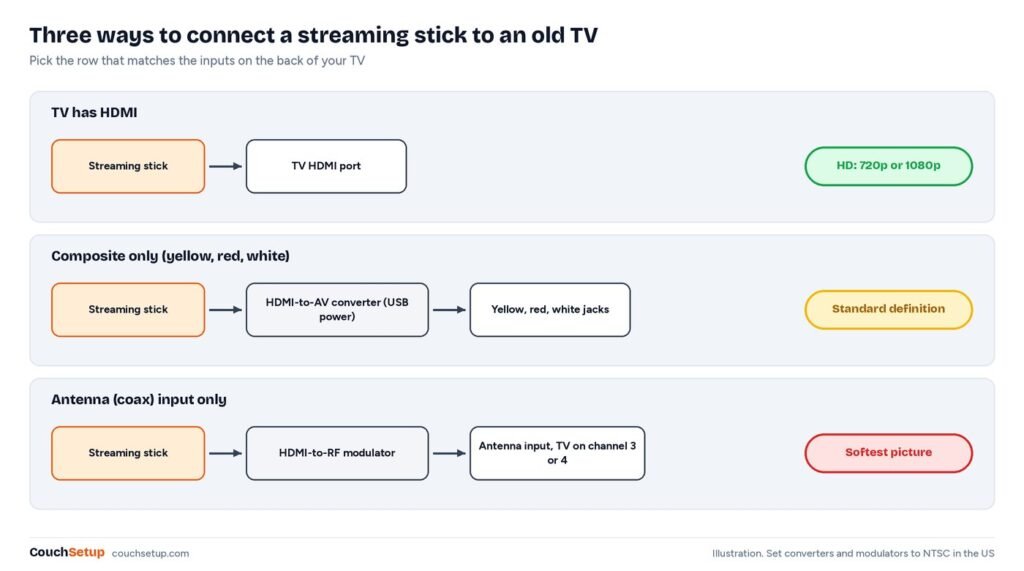
Short answer: has HDMI? Plug in a Roku Streaming Stick or Fire TV Stick HD and you’re done. Only red, white and yellow jacks? Add an HDMI-to-AV converter. Only an antenna input? You’d also need an RF modulator, and a cheap new TV may make more sense. Either way, buy a USB wall adapter too.
Step 1: Check your TV’s inputs
| Your TV has | What you need |
|---|---|
| An HDMI port | Just a streaming stick |
| No HDMI, but red, white and yellow jacks | Stick plus an HDMI-to-AV converter |
| Only a round antenna (coax) input | Stick, converter or modulator, or replace the TV |
What the box doesn’t tell you
Product pages for HD sticks assume a modern TV. We checked what’s actually in the box and what an older set can supply.
Neither HD stick includes a wall adapter
| Stick | Power needs | In the box | Price |
|---|---|---|---|
| Roku Streaming Stick | 5V 1A over USB-C | USB-C cable, no wall adapter, no HDMI extender | $Check price |
| Fire TV Stick HD (2026) | Built to run from the TV’s USB port | No power adapter, per PCWorld | $Check price |
Both are designed to draw power from the TV’s USB port. But many older TVs have no USB port at all, especially the composite-only sets this guide is for. And a standard USB 2.0 port only has to supply 500 mA, half of Roku’s 1A rating, which is why sticks on old TVs randomly restart. Add a phone-style USB wall adapter rated 1A or more to your order.
HD is all an old TV can show
| Connection | Best possible picture |
|---|---|
| HDMI | The TV’s native 720p or 1080p |
| Composite (yellow, red, white) | Standard definition, about 720 × 480 interlaced |
| Coax via RF modulator | Standard definition, with extra loss |
Through a converter, even a 4K stream is scaled down to roughly DVD quality. So a 4K stick is wasted money on an old set.
Step 2: Pick a stick
Roku Streaming Stick
Best for Older HD TVs and simple, neutral streaming
- Full HD streaming
- Simple home screen
- Free live TV on The Roku Channel
- Tiny, hides behind the TV
Prices change often, so check today’s price on Amazon.
Roku lists up to 1080p, dual-band Wi-Fi and Apple AirPlay and HomeKit support, plus a voice remote with TV power and volume buttons that work with most TVs.
Amazon Fire TV Stick HD
Best for Prime Video fans and Alexa homes
- Full HD streaming
- Alexa voice remote
- Free ad-supported content
- Controls TV power and volume on many TVs
Prices change often, so check today’s price on Amazon.
The 2026 model has Wi-Fi 6 and Bluetooth 5.3, and Amazon says it’s more than 30% faster than the last HD stick. It runs Vega OS, so it only installs apps from Amazon’s Appstore; the big services are there, but check any niche app first. More in Fire TV Stick vs Roku.
Step 3 (no HDMI): add an HDMI-to-AV converter
Also sold as “HDMI to RCA” or “HDMI to composite.” The stick plugs into its HDMI input and three RCA cables go to the TV’s yellow, red and white jacks. Check:
- Direction: HDMI in, AV out. The reverse type looks almost identical and won’t work.
- Power: USB, ideally from its own wall adapter, not the same TV port as the stick.
- NTSC/PAL switch: set it to NTSC in the US.
- RCA cables: included, or buy a set.
For coax-only sets, an HDMI-to-RF modulator turns the stick into an analog channel. North American devices traditionally used channel 3 or 4, like an old VCR. Expect the softest picture of all.
Step 4: Connect and set up
- Plug the stick into HDMI (or the converter) and into a wall adapter.
- Pick the right input on the TV remote: HDMI 1, AV, Video 1 and so on.
- Pair the remote, join Wi-Fi and sign in with a free Roku or Amazon account.
- Install your apps and sign in.
- Set the stick’s resolution to match the TV, 720p or 1080p. On Roku, Settings, Display type.
Netflix recommends at least 3 Mbps for 720p and 5 Mbps for 1080p. Old TVs often sit where Wi-Fi is weakest, so run a speed test on your phone next to the TV. If it buffers, move the stick out from behind the TV, add a mesh point, or drop to 720p.
Keep it or replace it?
| Keep it and add a stick if… | Consider replacing if… |
|---|---|
| It has HDMI and a picture you like | It only has coax and needs a modulator |
| The size suits the room | The picture is dim, flickers or has color problems |
| You mostly watch shows, news and YouTube | You want 4K, HDR or a bigger screen anyway |
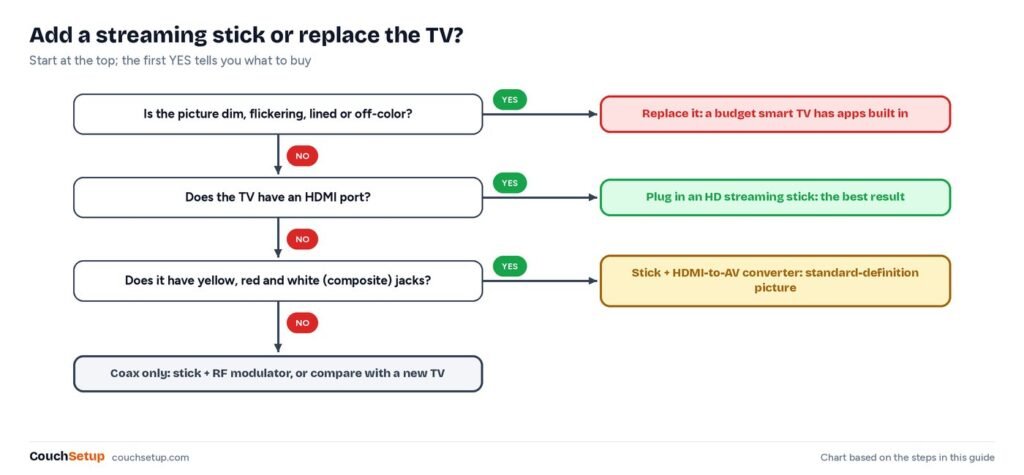
If you replace it, see our best TVs for small rooms. A console, Blu-ray player with apps or a laptop on HDMI can also stream in a pinch, but a stick is the simplest. For every option, see best streaming devices.
Troubleshooting
| Problem | Fix |
|---|---|
| “No signal” | Cycle the TV’s Input button through HDMI, AV and Video |
| Black screen through the converter | It’s the wrong direction; you need HDMI in, AV out |
| Black-and-white or rolling picture | Switch the converter to NTSC |
| Picture but no sound | Match the red and white plugs and push them in fully |
| Stick reboots on its own | Use a wall adapter rated 1A or more |
For grandparents, keep a few apps on the home screen, turn on captions and stick a note by the TV saying which input to use. For kids, set Roku or Amazon parental PINs first. Thin speakers? A compact bar from our best soundbars for small rooms helps, and hiding the cables keeps it tidy.
How we picked
We gathered the specs and expert coverage for every option, put them side by side, and worked out what the product pages leave out. Power needs and box contents come from Roku’s product page and PCWorld’s launch coverage, and the USB and video standards from their published specs. Every source is listed at the end.
FAQ
Is it worth making an old TV smart?
Usually, if the picture is still good. A stick costs far less than a new TV and adds every major app.
Can you make an old tube TV smart?
Yes, if it has yellow, red and white jacks, using an HDMI-to-AV converter. Coax-only sets also need an RF modulator.
Do I need a 4K stick for an old TV?
No. An HD stick is enough, and composite inputs only show standard definition anyway.
Why does my stick keep restarting?
Usually weak USB power from the TV. Use a wall adapter rated 1A or more.
Do streaming sticks have a monthly fee?
No. You buy it once and pay only for the services you subscribe to.
Related guides
Sources: Roku Streaming Stick product page · PCWorld: Fire TV Stick HD on Vega OS · Amazon Fire TV device specifications · Wikipedia: USB hardware (port power) · Wikipedia: composite video · Wikipedia: RF modulator · Netflix speed recommendations