




CouchSetup is reader-supported. When you buy through links on our site, we may earn an affiliate commission at no extra cost to you. As an Amazon Associate, we earn from qualifying purchases. Read our affiliate disclosure
This soundbar buying guide starts with your TV and your room, not the wattage on the box. Most people pick a soundbar by price or brand, then find it’s wider than the TV, blocks the IR sensor, booms through the floor at night or still makes voices hard to hear. Sort out those few things first and choosing gets easy.
Below are the eight things to check, in the order that matters most, plus a quick table for common rooms, 11 picks at every budget and a setup checklist. Every step links to our deeper guides if you want the full detail.
Our verdict
Quick answer: for most TVs, get a soundbar that’s a little narrower than the TV, connects over HDMI eARC (or ARC) and has a dialogue or speech mode. If voices are your main problem, pick a bar with a center channel (3.1 or more). For movie-style bass, add a subwoofer. For sound behind you, choose a 5.1 system with rear speakers. In a small room or bedroom, a compact bar with a night mode is plenty.
What’s in this soundbar buying guide
- What soundbar should I buy? The quick table
- Step 1: Match the size to your TV
- Step 2: How many channels do you need?
- Step 3: Do you need a subwoofer?
- Step 4: Is Dolby Atmos worth it?
- Step 5: HDMI eARC, ARC, optical or Bluetooth
- Step 6: Clear dialogue features
- Step 7: Placement, mounting and power
- Step 8: Matching your TV brand
- Soundbar price ranges: what you get
- Our top soundbar picks for 2026
What soundbar should I buy? The quick table
Find the line that sounds most like you. It gets you to the right shortlist fast, and the steps below explain why.
| Your situation | What to look for | Read next |
|---|---|---|
| Small room or desk, TV under 50 in | Compact 2.0 or 2.1 bar, 22 to 28 in wide | Best soundbars for small rooms |
| Can’t hear voices clearly | A center channel (3.1+) and a speech mode | Can’t hear dialogue on TV? |
| Bedroom or apartment with neighbors | Night mode, compact bar, no big sub | Bedroom TV setup |
| Tight budget | A 2.1 bar or budget 5.1 system | Best soundbars under $300 |
| Movies in a big living room | 5.1 or more with a sub and rear speakers | Soundbar vs surround sound |
| PS5 or Xbox gaming | HDMI eARC and, ideally, 4K 120Hz passthrough | Couch gaming setup |
| Lots of music | A Wi-Fi bar with AirPlay or Spotify Connect | Sonos Beam Gen 2 review |
Step 1: Match the soundbar size to your TV
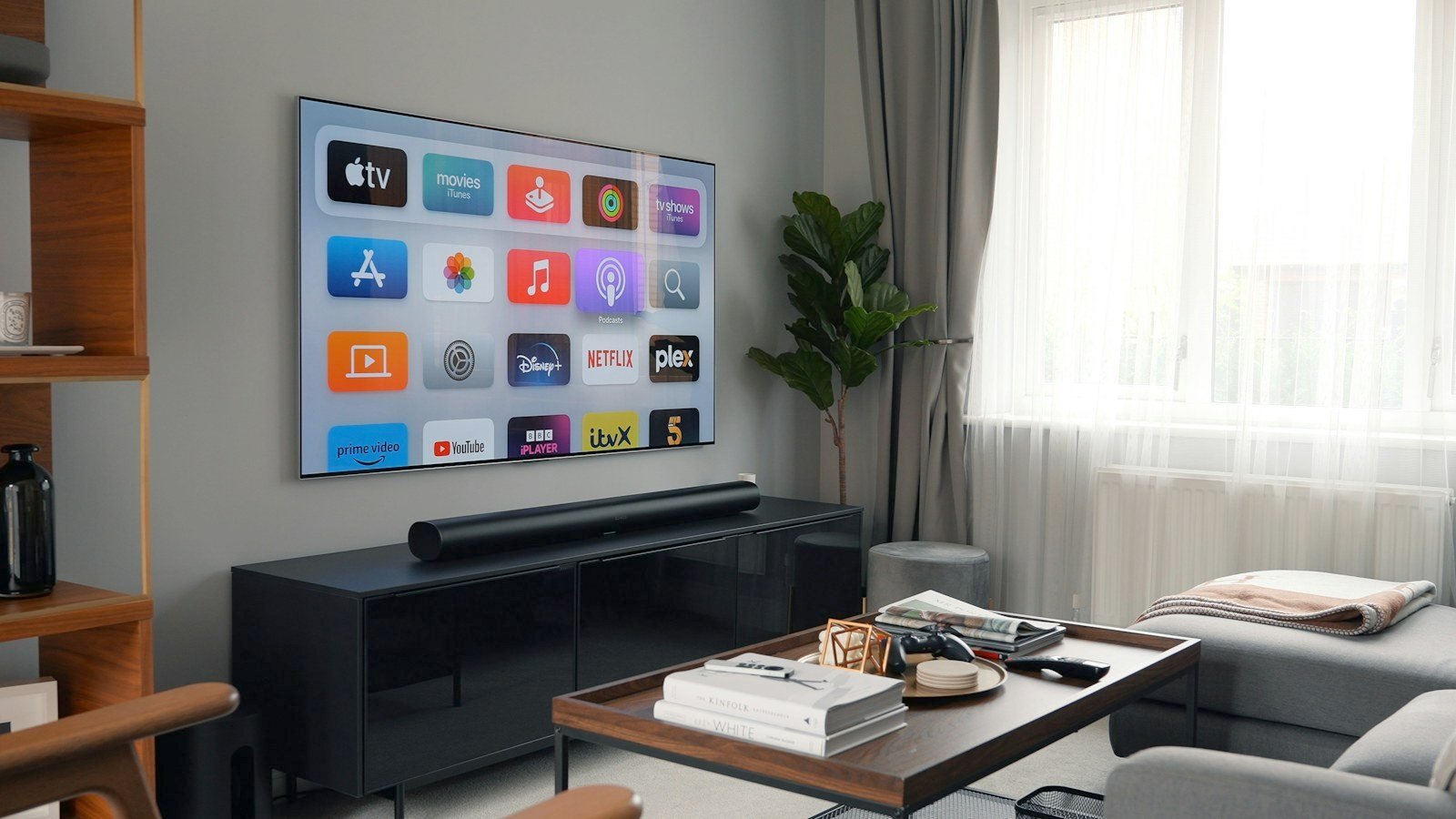
A soundbar should look like it belongs to the TV. The usual rule is a bar about the same width as the screen or a bit narrower. Too wide and it hangs off the stand and looks odd. Too small and it gets lost under a big TV, and usually sounds smaller too. A TV’s screen is about 0.87 times its size wide, so a 55-inch TV is about 48 inches across.
| TV size | Screen width (about) | Good soundbar width | Example bars |
|---|---|---|---|
| 43 in | 37 in | 22 to 32 in | Sonos Ray, Fire TV Soundbar, Sonos Beam |
| 50 to 55 in | 43 to 48 in | 25 to 40 in | Sonos Beam, Bose Smart Soundbar, Sony HT-S2000 |
| 65 in | 57 in | 30 to 50 in | Sony HT-S2000, Sonos Arc Ultra, Samsung Q-series |
| 75 in and up | 65 in or more | 40 in and up | Sonos Arc Ultra, Samsung HW-Q990H |
Two quick checks. First, height: measure the gap between the stand and the bottom of the screen. A tall bar placed in front of a low TV can cover the picture or block the TV’s remote sensor. Second, depth: make sure the bar sits fully on the stand and doesn’t hang over the edge.

Step 2: How many channels do you need?
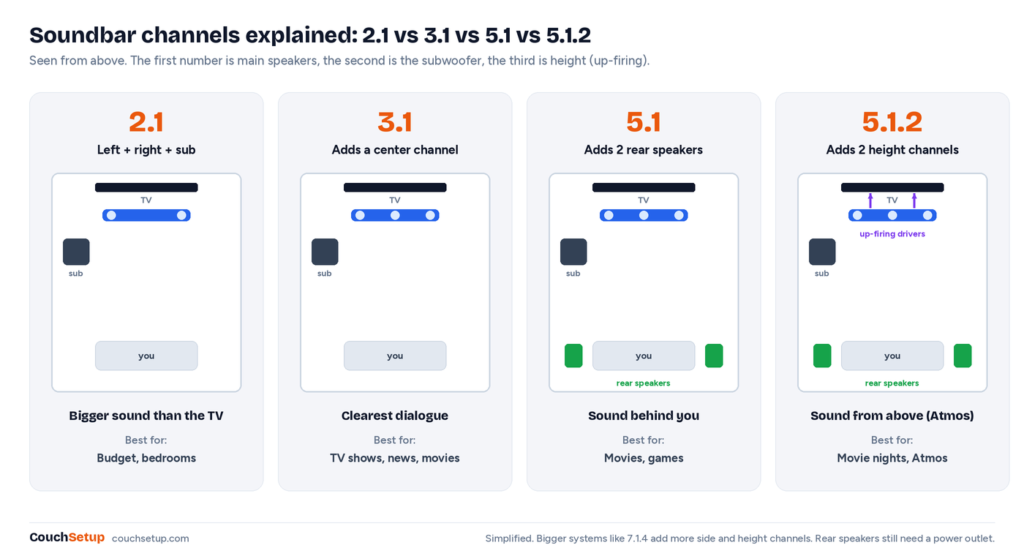
This is the biggest question in any soundbar buying guide. The numbers on the box tell you how many speaker channels you get. The first number is the main speakers, the second is the subwoofer and the third (if there is one) is height speakers for Dolby Atmos. So 5.1.2 means five main channels, one sub and two height channels.
| Setup | What you get | Best for | Typical price tier |
|---|---|---|---|
| 2.0 / 2.1 | Left and right speakers, plus a sub on 2.1 | Bedrooms, small rooms, budget upgrades | $ |
| 3.0 / 3.1 | Adds a center channel for voices | TV shows, news and anyone who struggles with dialogue | $ to $$ |
| 5.1 | Adds two rear speakers behind you | Movies and games in a living room | $ to $$ |
| 5.1.2 and up | Adds height (Atmos) channels | Movie nights and an immersive feel | $$ to $$$ |
| 7.1.4 / 9.1.4 / 11.1.4 | More side and height channels | Big rooms and home theater fans | $$$ |
Some bars use “virtual” surround or virtual Atmos. That’s processing that tricks your ears into hearing a wider sound from a single bar. It helps, but it won’t match real rear or up-firing speakers. If the box says something like 5.1 but it’s one bar with no rears, the extra channels are virtual.
Step 3: Do you need a subwoofer?
A subwoofer handles the deep bass: explosions, engines and the low hum in movie scores. Thin TVs and slim bars can’t move enough air for that, so a sub is the single biggest upgrade for movie fans.
- Get a sub if you watch a lot of action movies or sports, or the room is medium to large.
- Skip it or pick a bar with built-in bass if you live in an apartment with shared walls, have a small room or watch mostly news and TV shows.
- Wireless subs still need a power outlet, but no cable to the bar. Put it near the soundbar for the most natural sound.
Some systems let you add a sub later, which is handy if budget is tight. Our soundbar vs surround sound guide covers when a full speaker system makes more sense.
One catch most buyers miss: soundbar subwoofers are brand-locked. A Sonos bar only pairs with a Sonos sub, a Samsung bar with a Samsung sub, and so on, and very few bars have a sub output for any other brand. If you want to choose any subwoofer you like, that means an AV receiver and separate speakers; our best subwoofers for home theater guide covers that route.
Step 4: Is Dolby Atmos worth it?
Dolby Atmos adds height, so sounds like rain, helicopters or overhead flyovers seem to come from above. Real Atmos bars use up-firing drivers that bounce sound off the ceiling. For that to work you need a flat ceiling at a normal height and nothing on top of the bar.
It’s worth it if you stream a lot of movies (Netflix, Disney+ and Apple TV+ all have Atmos titles) and your room is set up for it. For news, sitcoms and casual TV, clear dialogue matters far more than Atmos. Note that to get Atmos from the TV’s apps, you usually need an HDMI eARC or ARC connection, not optical.
Step 5: HDMI eARC, ARC, optical or Bluetooth?
How you connect the soundbar decides which audio formats you get and whether your TV remote controls the volume.
| Connection | Formats | TV remote controls volume? | Use it when |
|---|---|---|---|
| HDMI eARC | Everything, including lossless Dolby TrueHD, DTS:X and Atmos | Yes | Your TV and bar both have eARC (best) |
| HDMI ARC | Dolby Digital Plus, including Atmos from streaming apps | Yes | Your TV has ARC but not eARC |
| Optical | Basic Dolby Digital and DTS 5.1, no Atmos | Usually not | Older TVs with no ARC |
| Bluetooth | Compressed audio, can lag behind the picture | No | Music from your phone, or as a last resort |
Use the HDMI port labeled ARC or eARC on your TV and turn on HDMI-CEC (each brand gives it a different name). Our HDMI ARC vs eARC guide explains the difference, and how to connect a soundbar to a TV walks through every connection step by step.
Step 6: Look for clear dialogue features
If you keep turning on subtitles, this step matters more than any other. Voices live mostly in the center channel, so a bar with a dedicated center speaker (3.1 and up) usually makes speech much clearer than a 2.0 or 2.1 bar.
- Speech or dialogue mode: lifts voices above music and effects. Quality varies by brand, so try it and keep it on if it helps.
- Night mode: squeezes the loud and quiet parts closer together, so you can hear whispers without explosions waking the house.
- Automatic room tuning: some bars use a microphone to adjust the sound to your room.
Still struggling? Our guide on what to do when you can’t hear dialogue on TV has fixes that work with any setup.
Step 7: Placement, mounting and power
Where the soundbar goes changes how it sounds, so plan this before you buy.
- On a TV stand: center it under the screen and keep the front edge flush with the stand. Leave space above it if it has up-firing Atmos drivers.
- Inside a cabinet: only forward-firing bars like the Sonos Ray work well in a shelf. Side- and up-firing drivers need open space.
- On the wall: check that a wall bracket comes in the box or can be bought, and mount the bar a few inches below the TV.
- Blocking the TV’s sensor: if the bar covers the IR sensor, the TV remote may stop working. Some bars have an IR repeater to fix this.
- Rear speakers and subs need power: “wireless” means no cable to the bar, not no cable at all. Check you have outlets near your seats.

Mounting the TV too? Our guide on how high to mount a TV leaves room for a bar underneath, and how to hide TV wires keeps the setup tidy. Placing rear speakers? Try our speaker placement calculator.
Step 8: Matching the soundbar to your TV brand
Any soundbar works with any TV over HDMI or optical. Same-brand pairs add some extras: Samsung’s Q-Symphony, LG’s WOW Orchestra and Sony’s Acoustic Center Sync let the TV speakers and soundbar play together, and some pairs also share settings or connect over Wi-Fi. It’s a nice bonus, but not a reason to pick a weaker soundbar.
Soundbar for your room and use
Small living room
A compact 2.0 to 3.1 bar is plenty. Look for a width of 22 to 32 inches and strong dialogue. See our best soundbars for small rooms.

Bedroom or apartment
Choose a slim bar with a night mode and skip the big subwoofer, which carries through walls and floors. Late at night, TV headphones are another option.
Big living room
Go for 5.1 or more with a subwoofer and real rear speakers. One bar on its own can sound small in a large open-plan room.
Gaming
Use HDMI eARC so you get surround sound from your console through the TV. If your TV has few HDMI 2.1 ports, a bar with 4K 120Hz passthrough, like the Samsung HW-Q990H, lets you plug the console into the soundbar instead. More tips in our couch gaming setup guide.

Music
A Wi-Fi soundbar with AirPlay, Chromecast or Spotify Connect plays music at better quality than Bluetooth and can join multi-room speakers.
Soundbar price ranges: what you get
We show price tiers instead of exact prices because soundbar prices change all the time. As a rough guide:
| Tier | What you usually get | Examples |
|---|---|---|
| $ (budget) | 2.0 or 2.1 bars and budget 5.1 kits, HDMI ARC, basic dialogue modes | Majority Naga 60, Fire TV Soundbar, Ultimea Poseidon D50, Hisense AX5125H |
| $$ (mid-range) | Better dialogue, Wi-Fi, virtual or real Atmos, optional sub and rears | Sonos Beam (Gen 2), Bose Smart Soundbar, Sony HT-S2000, Samsung HW-B750D |
| $$$ (premium) | Real height channels, big bass, room calibration, full surround kits | Sonos Arc Ultra, Samsung HW-Q990H |
Sales help a lot. Black Friday and Prime Day usually bring the biggest soundbar discounts, and last year’s model is often a bargain when the new one arrives.
Our top soundbar picks for 2026
These 11 picks come from our soundbar guides and reviews, built from manufacturer specs and independent expert reviews. They’re grouped by budget so you can jump to your price range.
Budget picks
Amazon Fire TV Soundbar
Best for Anyone upgrading from TV speakers on a small budget
- 24 inches wide
- DTS Virtual:X for wider sound
- HDMI ARC, optical and Bluetooth
- Very easy setup
Prices change often, so check today’s price on Amazon.
Majority Naga 60
Best for The cheapest real upgrade over TV speakers
- 2.1 bar with built-in bass drivers
- HDMI ARC (not eARC), optical and Bluetooth
- Surprisingly loud
- Budget price tier
Prices change often, so check today’s price on Amazon.
Ultimea Poseidon D50
Best for Tight budgets that still want sound behind you
- 5.1 system: bar, subwoofer and two rear speakers
- HDMI ARC
- Easy setup
- Surround and bass levels on the remote
Prices change often, so check today’s price on Amazon.
Hisense AX5125H
Best for Real surround sound on a budget
- 5.1.2 channels: bar, wireless sub and two rear speakers
- Dolby Atmos and DTS:X
- HDMI eARC plus an HDMI input
- Bluetooth for music
Prices change often, so check today’s price on Amazon.
More options in our best soundbars under $300.
Mid-range picks
Sonos Beam (Gen 2)
Best for Small to medium living rooms and anyone who may add speakers later
- About 26 inches wide
- Virtual Dolby Atmos over HDMI eARC
- Night Sound and Speech Enhancement
- Add a Sonos sub and rear speakers later
Prices change often, so check today’s price on Amazon.
Our favorite all-rounder. Read the full Sonos Beam Gen 2 review.
Sony HT-S2000
Best for Movie fans with a 50-inch or bigger TV who want clear voices
- True 3.1 channels with a center speaker
- Built-in dual subwoofers
- Dolby Atmos and DTS:X
- HDMI eARC, optical and Bluetooth
Prices change often, so check today’s price on Amazon.
Bose Smart Soundbar
Best for Bedrooms, apartments and hard-to-hear dialogue
- About 27 inches wide
- Up-firing drivers for Dolby Atmos
- AI Dialogue Mode for clear voices
- Wi-Fi, AirPlay, Chromecast and Bluetooth
Prices change often, so check today’s price on Amazon.
Torn between these two compact bars? See Sonos Beam vs Bose Smart Soundbar or our Bose Smart Soundbar review.
Sonos Ray
Best for Very small rooms, dorms and desks
- About 22 inches wide
- Forward-facing design fits inside TV cabinets
- Night Sound and Speech Enhancement
- Great music playback over Wi-Fi
Prices change often, so check today’s price on Amazon.
Samsung HW-B750D
Best for Everyday TV, sports and music with real bass
- 5.1-channel bar with wireless subwoofer
- DTS Virtual:X for wider sound
- Bass Boost and dialogue modes
- Bluetooth
Prices change often, so check today’s price on Amazon.
Premium picks
Sonos Arc Ultra
Best for Music lovers and anyone who wants to start with one bar and add a sub and rears later
- 9.1.4 spatial audio from the bar alone
- 14 drivers, 15 Class-D amps, up-firing height
- HDMI eARC, Wi-Fi 6, Bluetooth 5.3, AirPlay 2
- Trueplay on iOS and Android
- AI speech enhancement
Prices change often, so check today’s price on Amazon.
Samsung HW-Q990H
Best for Big living rooms that want true surround and Atmos without a receiver
- 11.1.4 channels with up-firing drivers in bar and rears
- Wireless sub with two 8-inch drivers
- 2 HDMI 2.1 inputs plus eARC, 4K 120Hz passthrough
- Dolby Atmos, DTS:X, Active Voice Amplifier Pro
- SpaceFit Sound Pro room calibration
Prices change often, so check today’s price on Amazon.


Common soundbar mistakes
- Buying by watts. Wattage claims aren’t comparable between brands. Channels, a center speaker and reviews tell you more.
- Using the wrong HDMI port. Only the TV’s ARC or eARC port sends sound back to the bar.
- Forgetting the outlets. Wireless subs and rears still plug into the wall.
- Leaving the TV speakers on. Set the TV’s audio output to the soundbar so you don’t get an echo.
- Skipping the setup. Update the firmware and run any room tuning before you judge the sound.
Soundbar buying checklist
- The bar is about the TV’s width or a little narrower, and fits on the stand.
- It won’t block the screen or the TV’s remote sensor.
- My TV has HDMI eARC or ARC, and I’ll use that port.
- If dialogue is a problem: it has a center channel or a good speech mode.
- If I want bass: it has a sub, or I can add one later.
- If I want surround: it has real rear speakers, and I have outlets for them.
- I’ve checked current prices and reviews of the exact model.
How we picked
We built this guide from our own soundbar buying guides and reviews, which combine manufacturer specs with expert reviews from sites such as What Hi-Fi, TechRadar and Tom’s Guide. We researched every pick, compared the specs that matter for real rooms (width, channels, connections and dialogue features) and grouped them by budget. Every source is listed at the end.
FAQ
How do I choose a soundbar?
Match the width to your TV, pick the channels you need (3.1 or more for clear dialogue, 5.1 for surround), make sure it connects over HDMI eARC or ARC, and decide if you want a subwoofer for bass.
What size soundbar do I need for my TV?
About the same width as the screen or a bit narrower. For a 55-inch TV that’s roughly 25 to 40 inches; for a 65-inch TV, about 30 to 50 inches.
Is a 2.1 or 3.1 soundbar better?
A 3.1 soundbar is better for dialogue because it has a dedicated center channel for voices. A 2.1 bar is fine for small rooms and tight budgets.
Do I need a subwoofer with a soundbar?
Not always. A sub adds deep bass for movies and sports. In a small room, a bedroom or an apartment with neighbors, a bar with built-in bass is often enough.
Is HDMI or optical better for a soundbar?
HDMI ARC or eARC is better. It carries more audio formats, including Dolby Atmos, and lets your TV remote control the volume. Use optical only if your TV has no ARC port.
Is Dolby Atmos worth it on a soundbar?
Yes, if you watch lots of movies and have a flat ceiling for up-firing drivers. For mostly TV shows and news, clear dialogue matters more.
Do wireless rear speakers need power?
Yes. Wireless means there’s no cable to the soundbar, but each rear speaker and subwoofer still plugs into a power outlet.
Does my soundbar have to match my TV brand?
No. Any soundbar works with any TV over HDMI or optical. Same-brand pairs add small extras, like playing the TV speakers together with the bar.
Related guides
- Most common soundbar complaints (data study)
- Best wireless headphones for TV
- Best AV receivers
- Best subwoofers for home theater
- Best soundbars for small rooms
- Best soundbars under $300
- Soundbar vs surround sound
- How to connect a soundbar to a TV
- TV buying guide
- Best soundbars for a clean, minimal TV setup
- Sony HT-S2000 review
- Best mini soundbars for small TVs
Sources: What Hi-Fi: how to choose and set up a soundbar · TechRadar: how to choose and buy a soundbar · Crutchfield: sound bar shopping guides · Dolby: Dolby Atmos · Wikipedia: HDMI (ARC and eARC)